
joebmmcibmhbakimolgmcfbjlmjfbkag

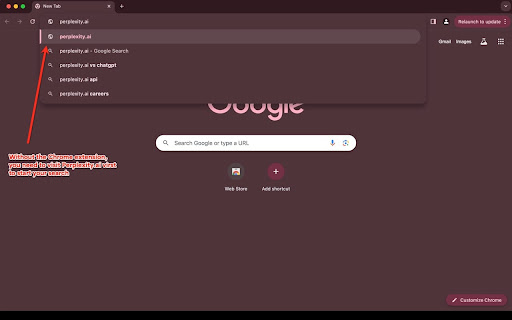
Just type 'perplexity.ai' in the URL bar, press Tab, and start your search. No more navigating to Perplexity manually to search. Just type 'perplexity.ai' in the Chrome URL bar, press Tab, and start your search. This extension lets you start your Perplexity AI searches right from the Chrome omnibox, instead of manually having to navigate to Perplexity to start your search.

Perplexity Omnibox
Type @perplexity in address bar to get results from Perplexity AI Open source code: https://github.com/KudoAI/perplexity-omnibox Support: https://github.com/KudoAI/perplexity-omnibox/issues Type @perplexity in address bar to get results from Perplexity AI

Complexity | Perplexity AI Supercharged
Power-user toolkit: Quick model switching, custom themes, enhanced code blocks, export tools, and 20+ productivity features. ✔️ Instant Model Switching: Seamlessly switch between Claude, GPT, Gemini models, and more, all within a streamlined interface ✔️ Claude's Artifacts: View and engage with AI-generated content directly in Perplexity ✔️ Navigate Without Leaving: Access Threads/Spaces and perform actions without leaving your current workflow ✔️ Enhanced Code Blocks: Improve readability with superior syntax highlighting, smart wrapping, and intuitive toolbars ✔️ Export Conversations: Save or copy chats as markdown with customizable citation formats ✔️ Personalize Everything: Tailor your experience with themes, fonts, dark mode, and custom CSS ✔️ And many more... (25+ plugins)

Perplexity Mini Tools
This extension aims to make Perplexity (https://www.perplexity.ai/) a little more convenient. - [Ctrl + Down] Switch to the next AI model. - [Ctrl + Up] Switch to the previous AI model. - [Ctrl + .] Select the AI model. - [Click Copy button] Copy to the clipboard with citation links (normal copy behavior). - [Shift + Click Copy button] Copy to the clipboard without citation links. - [Ctrl + K] Go to the library page. - [Ctrl + Shift + K] Go to the spaces page. - ["/library" Up/Down & Enter in the search box] Select a search result. - ["/spaces" Up/Down/Left/Right & Enter] Select a space. - [Ctrl + Shift + I] New thread in the same space as the current thread - [Esc] Change focus from the text box to the scroll area - [Down/Up/PageDown/PageUp when the text box is empty] Scroll the scroll area - Improved multi-line cursor operation when suggestions are displayed on the home page ("/") Automatically detects Mermaid diagrams within the response and adds a Mermaid diagram preview button. ✨ More convenient features: - Copy image to clipboard. - Download in PNG format. - Change the Mermaid theme. Displays a table of contents indicator on the right side of the search results page. You can scroll by clicking on the table of contents items. - [Shift + Down/Up when the text box is empty] Move up and down in the TOC The name of the currently selected model will be displayed next to the model selection button in the search box. [Translation] 🔧 Indicating generation status with a tab label While generating, the tab string is prefixed with "🏃" so you can tell the status at a glance, even when working in another tab. - This extension is based on the Perplexity specifications at the time of creation. It may stop working due to future changes in Perplexity's specifications. - Mermaid.js version used: 11.12.3

Hipsnap Productivity Companion for Perplexity.ai
Supercharge Your Perplexity.ai Workflow with intuitive keyboard shortcuts, magic commands, and prompt recipes *Unlock the Full Potential of Perplexity.ai with the Hipsnap Chrome Extension!* *Supercharge Your Workflow with Hipsnap* Hipsnap is the ultimate Chrome extension designed to transform your Perplexity.ai workflow into a streamlined, efficient experience. With intuitive keyboard shortcuts, exclusive magic commands, and customizable prompt recipes, Hipsnap saves you time and makes complex tasks easier—perfect for anyone serious about productivity. 🚀 *Boost Your Workflow with Powerful Keyboard Shortcuts* - Effortlessly navigate and manage threads, responses, and commands with single keystrokes. - From initiating a new thread to copying responses or code snippets, Hipsnap’s shortcuts put productivity at your fingertips. ✨ *Discover Exclusive Magic Commands* - Take your Perplexity experience further with advanced navigation and management tools. - Use shortcut keys to scroll through questions, toggle Zen Mode, collapse sidebars, and more! 📋 *Customizable Prompt Recipes for Every Task* - Hipsnap includes 30+ prompt recipes for various tasks, like SEO, research, and book summaries. - Just type // followed by your chosen recipe and personalize it by tabbing through fields, making complex tasks faster and tailored to your needs. ⚖️ *Lightweight, Free, and Private by Design* - Free to use with no hidden fees, Hipsnap stays focused on your productivity and privacy. - All data and prompts stay local to your device, ensuring full control and security. Try Hipsnap today and discover how a few keystrokes can supercharge your Perplexity.ai journey!
