
flhajamakbmbapipilldkbloldilfifo
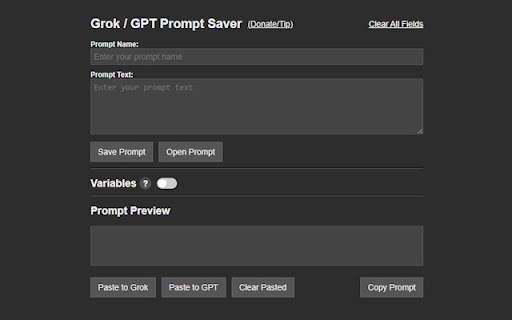


Save, organize, and deploy custom prompts with dynamic variables for Grok.com and ChatGPT.com. Whether you’re a power user, educator, or creative, this extension streamlines your workflow by letting you save and reuse prompts with ease. Say goodbye to repetitive typing and hello to efficiency! With Grok / GPT Prompt Saver, you can create prompts with dynamic variables—perfect for tailoring responses without rewriting from scratch. Add single-line or multi-line variables like [name] or [topic], and watch them seamlessly integrate into your prompts. The real-time preview shows exactly how your final text will look, with resolved variables highlighted for clarity. Save your prompts in a customizable folder system with drag-and-drop organization, making it simple to keep everything tidy. Need to deploy a prompt? One click pastes it directly into Grok or ChatGPT’s input field—or copy it to your clipboard for use anywhere. Clear pasted prompts effortlessly to reset your workspace. Worried about losing your work? Backup your prompts as a JSON file or import them later to merge or overwrite existing ones. Designed for simplicity and power, this extension requires minimal permissions: activeTab to paste prompts, downloads for backups, storage to save your data, and host permissions for grok.com and chatgpt.com integration. No remote code, no fuss—just a clean, local solution built for AI enthusiasts. Perfect for brainstorming, coding, teaching, or chatting, Grok / GPT Prompt Saver puts your prompts at your fingertips. Download now and take control of your AI conversations! 1.0.2 -fixed prompt preview to now show characters inputted in the prompt text field -fixed issue where characters were not pasting into the chatgpt.com prompt field -fixed issue where the variable switch turns off the first time when reopening the extension after loading a saved prompt with variables -added a 10 variable max limit due to performance issues -added character restrictions on prompt names to prevent corrupt saves (only letters, numbers, spaces, underscores, and hyphens are allowed)

XXL Prompt Manager for ChatGPT, Claude, Gemini, Perplexity, Grok and more!
Copy, edit, and save prompts in your personal prompt library as templates, and use them across AI / LLM websites. Your All‑in‑One Prompt Library to Create, Organize, and Reuse Prompt Templates across many popular AI-websites Create UNLIMITED (private) prompts to keep track and to organize your prompt template library. This is an essential tool for anyone who wants to save and access their prompts efficiently on ChatGPT, Claude, Gemini (Bard), Perplexity, Grok and more! 🔥Unlimited private prompts 👉 Saved prompts never leave your browser (localStorage) 🔍 Collapsible Search *NEW* 👉 Click the search icon (🔍) in the header to show/hide search 👉 Press 'Ctrl+F' or '⌘+F' to toggle search (when sidebar is open) ⌨️ Keyboard Shortcuts 👉 Press 'Alt+P' to quickly open/close the sidebar 👉 Press 'Escape' to close the sidebar 👉 Press 'Ctrl+F' / ⌘+F to focus the search (when sidebar is open) ❇️ Prompt Expansion 👉 'Expand All' button that open/closes the prompt expansion on all prompts at once ↕️ Draggable Icon *NEW* 👉 Drag the floating icon up or down to reposition it You no longer need to spend hours coming up with new prompts or rewriting prompts you used before, as you have quick access to your saved prompt templates and can make easily edits or modifications. Whether you're a professional writer, SEO Expert or a student looking for a way to save your prompt library the XXL Prompt Manager will make your AI writing process faster, easier, and more enjoyable. This free chrome extension will save you time and boost productivity! For issues, questions or suggestions: Please contact us at the support hub (link below). NEW Draggable Icon - Drag the floating icon up or down to reposition it - Position is saved and remembered across sessions NEW Collapsible Search - Click the search icon (🔍) in the header to show/hide search - Press 'Ctrl+F' or '⌘+F' to toggle search (when sidebar is open) Keyboard Shortcuts - Press 'Alt+P' (Changed from Ctrl+Alt+P) to quickly open/close the sidebar - Press 'Escape' to close the sidebar - Keyboard shortcuts now shown in Settings UX Improvements - Renamed header to "Prompt XXL" for a cleaner look - Simplified interface (tabs hidden for now) - macOS support with proper ⌘ and ⌥ key symbols Bug Fixes - Fixed icon disappearing on ChatGPT and other single-page apps - Fixed keyboard shortcut conflict with browser's print dialog - Updated all external links to HTTPS NEW Keyboard Shortcuts - Press 'Ctrl+Shift+P' to quickly open/close the sidebar - Press 'Escape' to close the sidebar - Press 'Ctrl+F' to focus the search (when sidebar is open) UX Improvements - 'Expand All' button that open/closes the prompt expansion on all prompts at once - Sort prompts by Newest, Oldest, A-Z, Z-A - Folder dropdown now appears above prompt content when editing for better visibility Bug Fixes - Fixed clipboard functionality for better browser compatibility - Fixed localization issues in multiple languages Performance & Stability - Improved error handling - Better input validation for prompts and folders - General code optimizations

Pin GPTs - Pins and Folders for ChatGPT, Claude, Gemini, DeepSeek and Grok
Pin your chats and organize them using folders on ChatGPT, Claude, Gemini, DeepSeek and Grok Tired of losing your important chats on ChatGPT, Claude, Gemini, DeepSeek or Grok ? Pin GPTs allows you to Pin your conversations and have them always available to you right in the sidebar or the extension popup! With Pin GPTs, You can pin chats in ChatGPT, Claude, Gemini, DeepSeek and Grok! Additionally, organize your pinned chats using folders! ✨ Features: ✔ Pin Unlimited Chats - Save important conversations from ChatGPT, Claude, Gemini, DeepSeek and Grok. ✔ Quick Access Sidebar - View your pinned chats on any website. ✔ Organize with Folders - Keep your chats neatly structured. ✔ Extension Popup - Manage your saved chats easily from the extension. ✔ Sync Across Devices - Your pins stay with you, thanks to Google Drive Sync. ✔ File Backup & Restore - Easily import/export your pinned chats and folders into a file. ✔ Cloud Backup - Automatic backup to your Google Drive account. Stay in control of your AI conversations - download now and never lose a chat again!

GPT Navigator – Bulk Delete, Archive & Timestamps
A Chrome extension to bulk delete ChatGPT conversations and Navigation GPT Navigator & Bulk Delete is a productivity-focused Chrome extension built to improve how you manage and navigate ChatGPT conversations. If you regularly engage in lengthy conversations or manage multiple conversations, this extension helps you save time, reduce clutter, and stay focused. Managing individual ChatGPT conversations can be slow and frustrating. This extension solves that problem by providing bulk actions and smart navigation tools directly inside the ChatGPT interface. Easily select and delete multiple conversations at once. Instead of manually removing chats one by one, you can clean up your conversation history in seconds. This is especially useful for users who frequently experiment with prompts, run tests, or maintain many chats. Jump to the previous message Jump to the next message Instantly scroll to the top of the conversation These tools make it easy to review older responses, compare messages, and navigate lengthy discussions without endless scrolling. The extension integrates cleanly with the ChatGPT interface and feels like a natural part of the experience. The UI is minimal, lightweight, and designed to avoid distractions. No heavy background scripts or unnecessary processes. The extension runs efficiently and activates only when you are using ChatGPT. Your privacy is a top priority. This extension does not collect any personal data All actions happen locally in your browser The extension only interacts with the ChatGPT page to provide navigation and conversation management features. 🧩 Who Is This Extension For? Developers working with long technical chats Students researching or studying with ChatGPT Anyone who wants faster navigation and cleaner chat history 3. Use the navigation controls to move between messages 4. Select multiple conversations and bulk delete them when needed This extension is an independent productivity tool and is not affiliated with, endorsed by, or sponsored by OpenAI. ChatGPT is a trademark of OpenAI.

ChatTrail - ChatGPT Organizer, Timeline, Prompts Manager & Bulk Delete
ChatGPT organizer, timeline and prompts manager to organize chats and manage prompts across ChatGPT, Gemini and DeepSeek. Finding old ChatGPT conversations shouldn’t feel like searching a haystack. ChatTrail is a powerful ChatGPT organizer, timeline, prompts and conversation manager that brings structure to your chat history with a visual conversation timeline, keyboard navigation, and bulk delete/archive tools designed for speed and clarity. It supports ChatGPT, Gemini and DeepSeek 🚀 Key Features 🗂️ Visual Timeline Navigation – Jump to specific chats using a dedicated sidepanel and structured ChatGPT timeline sidebar. 🧠 Prompts Manager & Prompt Library – Save, organize, edit, and reuse ChatGPT prompts with variables. Build your own prompt library across ChatGPT, Gemini and DeepSeek workflows and use it directly from ChatTrail sidebar. 📤 Chat Export – Export conversations to PDF, MD, JSON, or TXT. 📌 Pinned Chats and folders – Pin important conversations to easily find and revisit. 📊 Central Dashboard – Manage starred chats, prompt library and timeline settings from a unified control panel. ⭐ Starred Chats – View and access important chats across multiple platforms in one unified place with folders and subfolders support. 📉 Collapse Chat Groups – Collapse and expand chat sections to reduce clutter and focus faster. ⚙️ Timeline Settings – Customize timeline width or toggle timeline for a specific platform through dashboard. ⌨️ Keyboard Shortcuts – Ctrl + ↑ (previous chat), Ctrl + ↓ (next chat), Ctrl + \ (toggle timeline). 🔒 Privacy-Centric – All data stays in your browser and is never sent externally. 🤖 Multi-Platform Support – Fully supports ChatGPT, Gemini and DeepSeek with timeline, starred chats, and pinning. ChatGPT specific features: 🧹 Bulk Delete & Archive – Select multiple chats and clear or archive them in one action. ⚙️ How It Works 1️⃣ Install & Launch – ChatTrail integrates directly into your ChatGPT, Gemini and DeepSeek interface. 2️⃣ Open the Timeline or Dashboard – Use the sidepanel to browse chats or open the dashboard for starred chats, prompts, and settings. 3️⃣ Star and Pin Important Chats – Mark ChatGPT, Gemini or DeepSeek conversations as starred or pin them to folders for quick access. 4️⃣ Manage Prompts – Save reusable prompts, organize them into categories, and quickly insert them into chats. 5️⃣ Select & Act – Use bulk selection or keyboard shortcuts to manage multiple chats efficiently. 6️⃣ Export or Clean Up – Export chats or bulk delete/archive them instantly. 🎯 Who Is ChatTrail For? 🎓 Researchers & Students – Researchers & Students – Use ChatTrail as an AI research tool to track multiple projects and preserve important context across multiple AI platforms. 💻 Developers – Use ChatTrail as a ChatGPT timeline / organizer /manager to organize debugging sessions and technical discussions efficiently. ✍️ Content Creators – Organize ideas, export drafts, and clean up brainstorms. 🧘 Minimalists – Keep a clean, focused ChatGPT workspace. 📈 Power Users – Manage large chat histories efficiently with dashboards, collapsing, and starring. ChatTrail works as a ChatGPT organizer, ChatGPT prompts manager, ChatGPT timeline and AI conversation manager — making it one of the most powerful productivity extensions for managing ChatGPT chats and prompts efficiently. 🗓️ Changelog v1.6.0 1. Added DeepSeek support for timeline, starred chats and pinned chats(Folders) v1.5.0 1. Added Prompts Manager with support for saving, editing, and organizing reusable prompts 2. Added support for 7 languages (English, German, Spanish, French, Russian, Chinese, and Korean) v1.4.0 1. Added Gemini support for timeline, starred chats and pinned chats(Folders) v1.3.0 1. Added central dashboard with timeline settings 2. Added Starred Chats feature 3. Added ability to collapse and expand chat groups v1.2.0 1. Added chat export options (MD,JSON, TXT, PDF) in sidebar 2. Added keyboard shortcuts and feedback support v1.1.0 1. Added pinned chats and folders v1.0.0 1. Initial release with timeline sidebar and bulk delete/archive chats
