
jkkhkcljbnpghkhbgdoihnohfbbbmlib


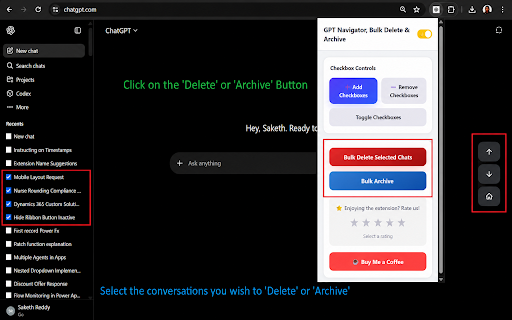


A Chrome extension to bulk delete ChatGPT conversations and Navigation GPT Navigator & Bulk Delete is a productivity-focused Chrome extension built to improve how you manage and navigate ChatGPT conversations. If you regularly engage in lengthy conversations or manage multiple conversations, this extension helps you save time, reduce clutter, and stay focused. Managing individual ChatGPT conversations can be slow and frustrating. This extension solves that problem by providing bulk actions and smart navigation tools directly inside the ChatGPT interface. Easily select and delete multiple conversations at once. Instead of manually removing chats one by one, you can clean up your conversation history in seconds. This is especially useful for users who frequently experiment with prompts, run tests, or maintain many chats. Jump to the previous message Jump to the next message Instantly scroll to the top of the conversation These tools make it easy to review older responses, compare messages, and navigate lengthy discussions without endless scrolling. The extension integrates cleanly with the ChatGPT interface and feels like a natural part of the experience. The UI is minimal, lightweight, and designed to avoid distractions. No heavy background scripts or unnecessary processes. The extension runs efficiently and activates only when you are using ChatGPT. Your privacy is a top priority. This extension does not collect any personal data All actions happen locally in your browser The extension only interacts with the ChatGPT page to provide navigation and conversation management features. 🧩 Who Is This Extension For? Developers working with long technical chats Students researching or studying with ChatGPT Anyone who wants faster navigation and cleaner chat history 3. Use the navigation controls to move between messages 4. Select multiple conversations and bulk delete them when needed This extension is an independent productivity tool and is not affiliated with, endorsed by, or sponsored by OpenAI. ChatGPT is a trademark of OpenAI.

Delete ChatGPT Messages Fast
Advantages: ⏱️ Time-Saving: Delete or archive with one click. 🗂️ Enhanced Organization: Keep important conversations easily accessible. 🖱️ User-Friendly: Simple design for easy use. 🔒 Privacy Control: Manage your data and remove unwanted chats. ⚡ Improved Performance: Reduce clutter for faster loading. 🎛️ Customizable Options: Tailor your preferences for a personalized experience. 🆓 Free Trial Limit: Enjoy a 5-message limit during the trial period. 🚀 How It Works: 🧩 Install the extension. 🔄 Reload your ChatGPT page or open a new ChatGPT page. 🖱️ Click on the extension icon in your browser. 🗑️ / 🗄️ Choose between Delete or Archive options. 📊 Track your progress in the bottom navbar popup. 🛑 Stop the process anytime by clicking the Stop button in the navbar.

ChatGPT Delete All Chats
ChatGPT Delete All Chats: bulk delete multiple chats, clear history and keep your ChatGPT clean. ChatGPT Delete All Chats makes it easy to clean your ChatGPT history. Features: 🗑️ Bulk delete chats: Remove all unnecessary conversations in GPT with one click. 📦 Bulk archiving: Move multiple dialogues to the ChatGPT archive with ease. ✅ Multi-select chats for bulk actions: Choose conversations and apply actions in seconds. Quick start: 1️⃣ Install extension ChatGPT Delete All Chats by clicking “Add to Chrome”. 2️⃣ Open ChatGPT with the plugin ready to use. 3️⃣ Turn on the Multi-select actions toggle. 4️⃣ Select the chats to delete or archive. 5️⃣ Delete them all with one click. 5 Reasons to Choose this extension: ▪️ Simple chatgpt history clean ▪️ Integrated directly into interface ▪️ Easy-to-use, intuitive design ▪️ Completely free and ad-free ▪️ Respects your privacy ⏳ Time-saving Bulk delete chats allow you to manage history at once. 🧹 Order and cleanliness Clear your chatgpt history and focus on important conversations. 🗜️ Flexibility Keep conversations archived for easy access whenever needed. Who is it for? 🌐 Active GPT Users: Keep your dialogues history tidy without the hassle of manual management. 🎓 Students and Researchers: Simplify your research by keeping only relevant conversations, archiving or removing old dialogues. 👨💼 Professionals: Manage hundreds of chat gpt sessions with ease, archiving or deleting unnecessary conversations with a single click. 📌 How to delete all chats? 💡 Open your ChatGPT, enable the Multi-select actions toggle, press the Select All button, and remove them with a single click. 📌 How to clear ChatGPT history? 💡 Simply open gpt in your chrome, enable toggle, select all dialogues, and delete or archive them with a single click. 📌 Can I archive all conversations? 💡 Yes, you can easily archive multiple conversations using the bulk action feature. 📌 Is my privacy secure with ChatGPT Delete All Chats? 💡 The extension collects only a generated identifier using the FingerprintJS library and your email. This data is not shared with anyone and is only stored on the server for identification. 🚀 Keep your ChatGPT history clean with Delete All Chats today!

ChatGPT Batch Delete History Manager
The 'ChatGPT Batch Delete History' Chrome Extension revolutionizes your ChatGPT usage by providing a straightforward solution for bulk-deleting your chat history. It enhances ChatGPT interaction management, ensuring user privacy and simplifying the cleanup of conversation records. Key Features: Effortless Batch Deletion: Easily remove multiple entries from your ChatGPT conversation history with just a few clicks. This feature simplifies the deletion process, saving time and effort for users. Batch Archiving Feature: This feature enables users to bulk archive their ChatGPT conversation history for future reference. Users can selectively save important conversations without having to manually archive each one, thereby enhancing efficiency and convenience. Batch Unarchiving Feature: This functionality allows users to simultaneously restore multiple archived conversations to their active chat list. It's especially convenient for users who need to revisit previous interactions or topics, eliminating the need to unarchive them one by one. The extension provides links to other extensions of WindChat in both popup and options pages, including:

GPT Navigator
A Chrome extension to expand and collapse ChatGPT message panes for better navigation. GPT Navigator: Streamline Your ChatGPT Conversations Transform how you interact with ChatGPT! GPT Navigator adds essential conversation management tools that make navigating long chat sessions effortless and efficient. 🚀 KEY FEATURES: - Message Control: Easily expand and collapse individual messages with a single click - Global Management: Collapse all messages at once with our convenient global toggle - Quick Navigation: Jump instantly to the top of any message - Clean Interface: Seamlessly integrates with ChatGPT's design - Zero Configuration: Works immediately after installation 💡 PERFECT FOR: - Developers reviewing coding discussions - Researchers managing long research conversations - Students organizing study sessions - Professionals handling multiple topics in one chat - Anyone who wants a cleaner, more organized ChatGPT experience ⚡ WHY YOU'LL LOVE IT: - No learning curve - intuitive controls - Speeds up navigation in long conversations - Keeps your workspace clean and organized - Completely free to use - Regular updates and improvements Made with ❤️ by Gray Technologies Support & Feedback: Visit graytechnologies.com/gpt-navigator for updates, support, and to share your feedback. Try GPT Navigator today and take control of your ChatGPT conversations!
