
flfminafiamnggnldfpilnfnmbgmiegn

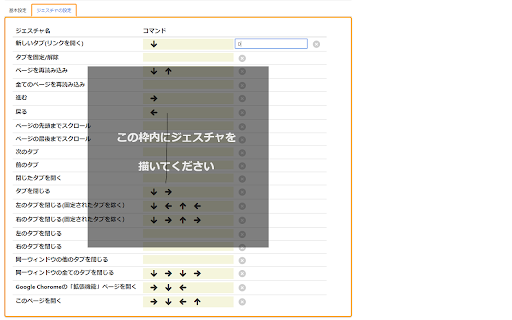
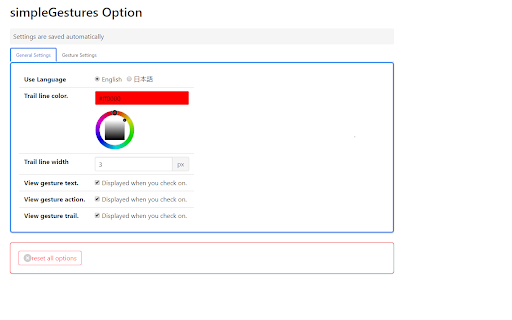
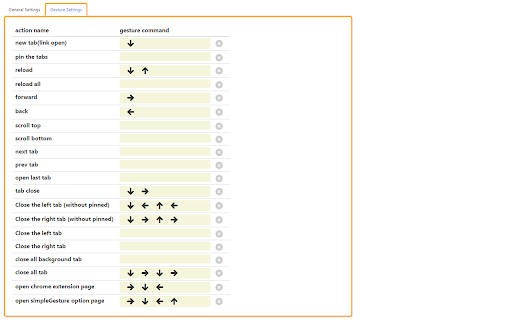
設定画面・使い勝手のシンプルさにこだわったマウスジェスチャの拡張機能です。 シンプルなマウスジェスチャです。 Ctrlを押している間、ジェスチャ機能は無効になります。 注:Google のセキュリティ制限のため、Chrome の内蔵ページでは機能しません。 【アップデート内容】 https://github.com/RyutaKojima/simpleGestures/releases 【サポートOS】 - Windows - Mac OS - Linux ※ Windows以外のOSでは右クリックメニューを開く操作はダブルクリックに変わります 【インストール時に表示される権限について】 権限は次に明記した目的のみに使用します。 ・アクセスしたウェブサイト上にある自分の全データの読み取りと変更 →「閉じたタブを開く」ジェスチャ実行の為 【ユーザーデータの扱いとプライバシー】 このアプリはユーザーの個人情報や機密データを参照しません。 設定や状態はユーザーのローカルな環境に保存され、外部に送信はされません。 また、ジェスチャ機能の提供のためだけに使用します。 【ソースコード】 GitHubにて公開しています。 https://github.com/RyutaKojima/simpleGestures

Douga Getter
You can easily download videos from popular video sites. Just click the extension icon, then select the video you want to download. The Douga Getter provides a feature that allows you to download videos from websites. On a page opened in your browser, it detects all the videos that have been loaded and notifies you on the action button. When you click the action button, a list of downloadable videos will appear, and you can click the one you want to download. By default, video files smaller than 2MB are not shown, so change the settings if necessary. Please note that Douga Getter takes no responsibility for the content you download. Therefore, before downloading, it is recommended that you check the copyright and permissions of the video. In Japan, it is prohibited by law to download videos that you know have been uploaded without the copyright holder’s permission. Please be mindful of this. We bear no responsibility for any incidents arising from the use of this extension. No guarantees are made regarding the operation of this extension. Use it at your own risk. Distribution of this extension may be discontinued without notice. There is no obligation to provide version upgrades, bug fixes, or other support. 1. Extension This extension does not collect, store, or transmit any personally identifiable information or usage data. All functionality runs entirely within the user’s local browser environment. 2. Service Website ( https://www.douga-getter.com/ ) Our official service website, which works in conjunction with the extension, may collect limited technical information and may use analytics tools (e.g. Google Analytics). • Collection The service website may collect anonymous technical data such as browser type, screen size, language settings, visit duration, and whether the content on the page is displayed correctly. Personally identifiable information is not collected. Please note: We do not collect or store any information about your personal activities, such as which pages you visit or what files you download. Your browsing and download history remain entirely private and are never transmitted to us. • Purpose Collected information is used only to understand general usage patterns, improve service functionality, and enhance user experience. • Sharing We do not sell, share, or disclose collected data to third parties. If analytics tools such as Google Analytics are used, data may be processed by those providers in accordance with their privacy policies. • Choices Users may opt out of Google Analytics data collection by using tools such as the Google Analytics Opt-out Browser Add-on, or by discontinuing use of the service website. • Updates This privacy policy may be updated from time to time. Any changes will be posted on the service website and/or the extension’s store listing page.

uAutoPagerize
A browser Extension for auto loading paginated web pages!!! *What's this This is an extension that provides infinite scrolling on various sites. It is a derivative of AutoPagerize. It is an extension that automatically loads and appends the "next page" in search engine, blogs, etc. * How to use When you scroll to the bottom of the page, the page will be added without your permission. When you cannot use the comment box due to the addition, click the green icon in the page to pause it. This may not work well on sites that change pages dynamically using JavaScript. In that case, right-click on the toolbar icon and select "Disable on this page".

Mouse Gestures - Power Mouse X
Enhance mouse capabilities using gestures, combos, Quick search, Drag options and Next page predictions. #Customizable Mouse gestures, with over 40 actions to choose from including: Go to predefine site Go to the top or bottom of the page Go to the previous page Paste a predefined text Go super back (X7) Refresh page Go to the next page Mute \ Unmute tab Open new tab Minimize window Close tab Duplicate tab And many more... We use the more efficient, single motion, gesture mechanism. To use mouse gestures just hold the mouse right button and drag the mouse to one of the eight directions. #Combo buttons allow you to quickly: Open new tab - left mouse click while holding the right button Close tab - double click the right or middle mouse button Go to the top / bottom of the page - press and scroll the mouse wheel Zoom in / out - press and scroll the mouse wheel (require setting change) Scroll the tabs - scroll the mouse wheel while holding the right mouse button #Quick tab and web search: Press space bar while holding the right mouse button to open the search bar. Type the site name or search query just as you would on the URL bar. Press enter when the suggestion matches your search. Get an even quicker search by typing while holding the right mouse button (without pressing the space bar before), now when you have a match just release the right button and it will go to the site \ search the query - No need to press enter. Type + before the search in order to open the site in a new tab or Shift + Tab to search and navigate to a tab. #Drag options: Drag a link, selected text or an image to open the "drag options" menu. You can use this menu to open links and images in a new tab, search the web for the selected text and more. #Predictions Are you one of the people that have a "next page" button on their mouse? Power Mouse X will try to predict your next page even if you haven't visited it. use your special button to go to the next video on your YouTube playlist or the next search result page. #Configure side buttons Give your side buttons new functionalities. Q: Why doesn't the extension work on the starting page? A: Browsers do not allow extensions to work on non-URL pages such as startup page, setting page, PDF viewer etc., same goes to the Chrome Web Store. Q: Do you collect user data? A: NO! Q: Can I adjust the length of the mouse gestures? A: You can and you probably should! go to settings to do that. Q: Where can I learn how to use the extension? A: Visit "https://PowerMouseX.com/en/how to" for a complete user guide.

twitter画像原寸ボタン
This extension adds "Original" button on the image-embedded tweet in Twitter. Click the "Original" button to open image(s) in original size. [注 / Note] この拡張機能は、譲渡・売却の予定はありません。そのような連絡はお断りします。 I WILL NOT transfer/sell this extension under any condition. I REFUSE such requests.
