
fkpngmoodfpnnnnbabhnnbemglnphncc
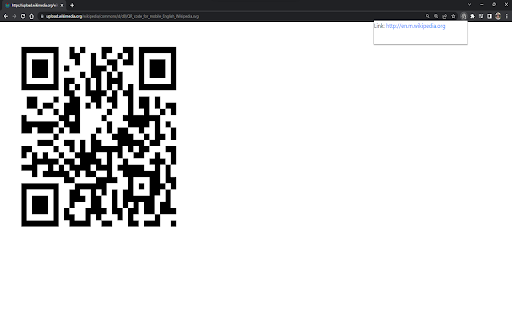
Scans QR codes on any web page or PDF Google Chrome extension that scans your currently active tab for a QR code and returns the link if one is found.

QR Code Reader
This simple QR Code Reader app lets you scan QR codes from a web page or uploaded image, or via your camera or screen sharing Looking for a simple and effective way to scan qr code directly in your browser? The image qr code reader Chrome extension makes it easy. No need to juggle multiple devices. This extension works entirely in your browser. You don’t have to download app on your computer anymore. With this Chrome extension, everything happens on your desktop. 💪 Where can this app scan QR codes from? 1. Uploaded images 2. The current browser tab 3. Your PC’s camera 4. Other apps via screen sharing ▸ Key reasons users love this tool: 1) Works directly in Chrome - no switching apps 2) Supports live scanning from web pages 3) Your privacy is protected - no data shared 4) Clean interface with no learning curve 5) Fast, accurate, and ad-free 6) Ideal for business, education, and daily browsing 7) Maintains browser speed and performance Need to access links, documents, or contact details? This qr code reader application decodes them instantly. It’s a smart solution for busy users who don’t want to reach for their phone every time. 1️⃣ Here’s how it works: 1. Visit any web page with a visible QR code 2. Click the extension icon in your Chrome toolbar 3. Instantly decode and view the content 4. Or, upload a file to use decode from image feature 5. Copy, open, or save the decoded result as needed Not all data matrixes are printed or physical - many are in digital form. That’s why the qr code reader from image feature is so helpful. Drag and drop any image into the extension popup to decode instantly. ➤ Top use cases include: - Accessing event check-ins directly from invitation emails - Read qr code from image , invoices, brochures, or ads - Scanning from product pages to get bonus content - Testing encoded data during web development and marketing - Viewing Wi-Fi or business card info from screenshots For anyone who regularly interacts with quick response content, having a dedicated qr code reader pc tool can save time. There's no need to grab your smartphone. Just scan and go from your browser—whether you're at home, at work, or managing an online team. 📋 Frequently Asked Questions: * Does this extension store my scans? No. All scans are processed locally in your browser. * Can it read blurry or small QR codes? Yes, the scanner is optimized for common formats. * Is it compatible with all types of images? It works with standard data formats like links, text, and contact info or any other encoded text • Main benefits at a glance: • Scan fast from any webpage • Upload and read images quickly • No external software or mobile device needed • Safe and easy to use right inside Chrome • Perfect for students, professionals, and developers Unlike many tools that require cloud access or background tracking, this qr code reader online extension runs privately within your browser. There's no login required, and your data never leaves your device. It's a simple, secure solution for quick decoding. If you’re tired of interrupting your workflow, this extension is for you. Our quick response code reader app is built for seamless desktop use. No popups, no lag—just immediate results from the web or any uploaded file. 🌟 Why it’s better than using your phone: 1️⃣ No camera aiming or shaky hands 2️⃣ Saves time when browsing or researching 4️⃣ Use QR Code Reader for pc to read images that aren’t scannable via smartphone 5️⃣ Streamlines tasks directly in your browser tab Whether you need a qr reader for occasional scans or daily use, this Chrome extension is always ready. It's the ideal quick response code scanner for desktop users who value speed and simplicity. Don’t overlook the convenience of a browser-based code reader qr tool. It’s especially handy for team environments, online classrooms, or remote workspaces where link sharing happens often. • Additional features to love: * Lightweight and doesn’t slow down Chrome * Recognizes most images instantly * Drag-and-drop interface makes uploads simple * Easy access from the browser toolbar * Updated regularly for performance and compatibility This quick response code scanner helps you stay focused and organized. You no longer have to stop what you're doing to grab your phone or search for a mobile app. Everything works in-browser—right when you need it.

QR Code Generator
Create your own QR code with this free software today. You can generate QR codes quickly by entering in the text/URL you want your QR code to represent. The QR code generation is done offline and takes less then a minute. Try this free QR Code generator today when you install this free software. Please note we do NOT capture any data/save any of the QR codes you create as a user. All the QR codes which you create can be saved in your own computer and the QR code you generate is NOT uploaded to our servers.

QR Code Reader
a multiple QR- and bar-code scanner that supports scanning from webcam and local images A powerful QR-code (Quick Response code) and barcode scanner supports scanning from the camera or local image files and keeps the history of the last 100 scans. It supports almost all known formats, including text, link, ISBN, coupon, and contact. Privacy: This extension does not rely on any external services to perform detection. There is no server-side interaction whatsoever. Features: 1. Read multiple QR-codes on a single image 2. Supports multiple protocols 3. Saves the history of scanned items 4. Drop local image files to the user interface 5. Uses both native method and ZBar library to maximize the detection power. This extension uses ZBar c-library, to extract multiple QR-codes and barcodes in a single image frame. What is a QR code? It is a type of matrix barcode that is a machine-readable optical label. A QR code contains information about the item to which it is attached. A QR code uses four standardized encoding modes (numeric, alphanumeric, byte/binary, and kanji) to store data efficiently. What is a barcode? It is a method of representing data in a visual, machine-readable form. Initially, barcodes represented data by varying the widths and spacings of parallel lines.

QR Code Generator
Have you ever felt the need to quickly open an URL on your smartphone while browsing the page on your desktop or laptop? Entering it manually in your mobile browser address bar, copying and sending it via email or messenger are some of the tedious ways to achieve it. QR Generator extension to scan and generate new QR code. This extension offers a set of very unique features. Which enable users scanning and creating new QR within just a click. A powerful Barcode Scanner supports scanning from the camera or local image files and keeps the history of the last 100 scans. It supports almost all known formats, including text, link, ISBN, coupon, and contact. What is a Barcode? It is a method of representing data in a visual, machine-readable form. Initially, barcodes represented data by varying the widths and spacings of parallel lines. Thank you for use it, if you like our app, please give it 5 stars for the QR scanner extension!
