
fkodheimkfkbomekjjpbblgmikniblmb

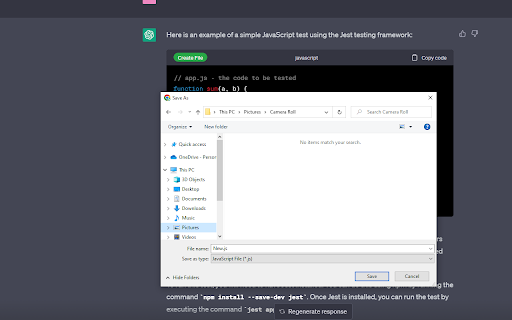
Adds a 'Create File' button to code containers on web pages, allowing you to download the code as a file. ChatGPT Code Downloader is a handy tool for web developers who frequently copy and paste code snippets from the web into their text editors or IDEs. With this plugin, you can easily create a new file from any code snippet on a webpage, and download it in the appropriate file format for your language of choice. Once you install the plugin, it will automatically add a "Create File" button to every code container on the webpage, making it easy to create and download new files without having to manually copy and paste code snippets. The plugin currently supports a wide range of programming languages, including JavaScript, HTML, CSS, Python, Java, C#, C++, Ruby, Go, Swift, SQL, and more. This plugin is designed to be lightweight and non-intrusive, and it works seamlessly with most popular text editors and IDEs. Whether you're a seasoned developer or just starting out, ChatGPT Code Downloader can help you save time and streamline your workflow, so you can focus on what really matters - writing great code!

Auto-Continue & Download Codes for ChatGPT
Automatically continues generating and adds download buttons to code blocks in ChatGPT *** IF YOU WANT TO HAVE THE AUTO-NAMING FUNCTIONALITY, PLEASE INCLUDE THIS LINE OF TEXT IN YOUR CHATGPT CUSTOM INSTRUCTIONS OR PREPEND IT TO YOUR MESSAGE IN CHAT FOR O1-PREVIEW/O1-MINI --->>> >> *** Auto-Continue & Download Codes for ChatGPT: Your Coding Productivity Booster Supercharge your ChatGPT coding experience with this essential Chrome extension for developers and programmers. Say goodbye to manual code copying and tedious file management! Key Features: 🚀 Auto-Continue Generation: Never interrupt your flow again! Our extension automatically clicks the "Continue generating" button, ensuring seamless, uninterrupted code output. 💾 One-Click Code Downloads: Instantly save any code snippet with a single click. No more copy-pasting or manual file creation! 📁 Smart File Naming: We automatically generate appropriate filenames based on the code content, saving you precious time and mental effort. 📦 Bulk Code Export: Download all code snippets from your entire ChatGPT conversation with just one click. Perfect for complex projects or long coding sessions. ⏱️ Time-Saving Workflow: Streamline your coding process and focus on what matters - solving problems and writing great code. 🔧 Customizable Settings: Tailor the extension to your workflow with easy-to-use toggle options. Whether you're a seasoned developer or a coding novice, Auto-Continue & Download Codes for ChatGPT is your perfect companion for productive coding sessions with ChatGPT. Reclaim your time, reduce stress, and boost your coding efficiency today! Download now and experience the future of AI-assisted coding productivity!

Power Prompt For ChatGPT & OpenAi
Power Prompt is a Chrome Extension for ChatGPT/OpenAi Power Users is a cutting-edge Chrome extension that takes your Ai interaction to the next level. With this extension, you can maximize the potential of the state-of-the-art language model and experience a seamless and efficient conversation. The Power Prompt v1 beta allows you to choose from different models, load and save prompt templates, set temperature and prompt length and tokens. Source code and instructions available at https://github.com/ruvnet/powerprompt

ChatGPT Code Runner
Run and save the code in ChatGPT. Supports upto 70+ languages. Run and save the code in ChatGPT directly in your browser, Supports upto 70+ languages. Installation Guide. 1.Head over to Jdoodle Compiler API (https://www.jdoodle.com/compiler-api/) and create account 2.Go to Credentials and copy them. 3.Go to Plugin settings and add your Credentials and hit save. 4.Now Ask ChatGPT to Write a program and hit "Run Code" or "Save Code". 💾 Download Chat-GPT Code Runner today and start coding like a pro! Github Source : https://github.com/haseeb-heaven/ChatGPT-CodeRunner-Extension

ChatGPT Custom Instructions Storage
Elevate your creativity with ChatGPT Custom Instructions Storage, the ultimate tool for managing Custom Instruction prompts! Whether you're a writer, artist, or just looking to spark your imagination, this Chrome extension is here to help. 🚀 Creative Prompts: Get inspired with a collection of creative prompts that will ignite your imagination. 📝 Store Your Custom Prompt: Save your own prompts for future use. 📚 Prompt Library: Store and organize your prompts in a convenient library for quick access. 🚫 Delete and Edit: Manage your prompts by editing or deleting them as needed. ✨ Enhance Your Creativity: Unleash your creative potential with the power of Custom Instructions Storage. Whether you're a writer seeking inspiration, an artist looking for new ideas, or just want to boost your creative thinking, ChatGPT Custom Instructions Storage has you covered. Start creating, start imagining, and start innovating today! Get ChatGPT Custom Instructions Storage now and supercharge your creativity! If you would like to support my work, you can donate to https://buymeacoffee.com/automatemyl
