
dfhaeonjlcgpgoienfbafnnpdommhblh
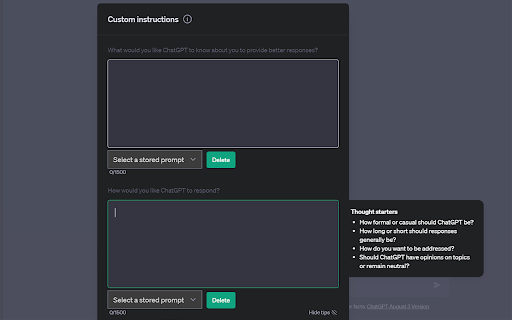
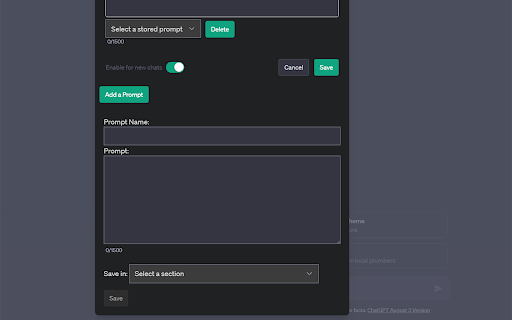
Elevate your creativity with ChatGPT Custom Instructions Storage, the ultimate tool for managing Custom Instruction prompts! Whether you're a writer, artist, or just looking to spark your imagination, this Chrome extension is here to help. 🚀 Creative Prompts: Get inspired with a collection of creative prompts that will ignite your imagination. 📝 Store Your Custom Prompt: Save your own prompts for future use. 📚 Prompt Library: Store and organize your prompts in a convenient library for quick access. 🚫 Delete and Edit: Manage your prompts by editing or deleting them as needed. ✨ Enhance Your Creativity: Unleash your creative potential with the power of Custom Instructions Storage. Whether you're a writer seeking inspiration, an artist looking for new ideas, or just want to boost your creative thinking, ChatGPT Custom Instructions Storage has you covered. Start creating, start imagining, and start innovating today! Get ChatGPT Custom Instructions Storage now and supercharge your creativity! If you would like to support my work, you can donate to https://buymeacoffee.com/automatemyl

XXL Prompt Manager for ChatGPT, Claude, Gemini, Perplexity, Grok and more!
Copy, edit, and save prompts in your personal prompt library as templates, and use them across AI / LLM websites. Your All‑in‑One Prompt Library to Create, Organize, and Reuse Prompt Templates across many popular AI-websites Create UNLIMITED (private) prompts to keep track and to organize your prompt template library. This is an essential tool for anyone who wants to save and access their prompts efficiently on ChatGPT, Claude, Gemini (Bard), Perplexity, Grok and more! 🔥Unlimited private prompts 👉 Saved prompts never leave your browser (localStorage) 🔍 Collapsible Search *NEW* 👉 Click the search icon (🔍) in the header to show/hide search 👉 Press 'Ctrl+F' or '⌘+F' to toggle search (when sidebar is open) ⌨️ Keyboard Shortcuts 👉 Press 'Alt+P' to quickly open/close the sidebar 👉 Press 'Escape' to close the sidebar 👉 Press 'Ctrl+F' / ⌘+F to focus the search (when sidebar is open) ❇️ Prompt Expansion 👉 'Expand All' button that open/closes the prompt expansion on all prompts at once ↕️ Draggable Icon *NEW* 👉 Drag the floating icon up or down to reposition it You no longer need to spend hours coming up with new prompts or rewriting prompts you used before, as you have quick access to your saved prompt templates and can make easily edits or modifications. Whether you're a professional writer, SEO Expert or a student looking for a way to save your prompt library the XXL Prompt Manager will make your AI writing process faster, easier, and more enjoyable. This free chrome extension will save you time and boost productivity! For issues, questions or suggestions: Please contact us at the support hub (link below). NEW Draggable Icon - Drag the floating icon up or down to reposition it - Position is saved and remembered across sessions NEW Collapsible Search - Click the search icon (🔍) in the header to show/hide search - Press 'Ctrl+F' or '⌘+F' to toggle search (when sidebar is open) Keyboard Shortcuts - Press 'Alt+P' (Changed from Ctrl+Alt+P) to quickly open/close the sidebar - Press 'Escape' to close the sidebar - Keyboard shortcuts now shown in Settings UX Improvements - Renamed header to "Prompt XXL" for a cleaner look - Simplified interface (tabs hidden for now) - macOS support with proper ⌘ and ⌥ key symbols Bug Fixes - Fixed icon disappearing on ChatGPT and other single-page apps - Fixed keyboard shortcut conflict with browser's print dialog - Updated all external links to HTTPS NEW Keyboard Shortcuts - Press 'Ctrl+Shift+P' to quickly open/close the sidebar - Press 'Escape' to close the sidebar - Press 'Ctrl+F' to focus the search (when sidebar is open) UX Improvements - 'Expand All' button that open/closes the prompt expansion on all prompts at once - Sort prompts by Newest, Oldest, A-Z, Z-A - Folder dropdown now appears above prompt content when editing for better visibility Bug Fixes - Fixed clipboard functionality for better browser compatibility - Fixed localization issues in multiple languages Performance & Stability - Improved error handling - Better input validation for prompts and folders - General code optimizations

GPTEnhancer
Provides you the feature to upload files to ChatGPT and make it more user specific UPDATE: 1. New UI 2. Now users can provide 100 word long custom prompt which can be written in the text box before submitting a file. ----------------------- Boost your interaction with ChatGPT using GPT-Enhancer, the ultimate companion extension designed to enhance your AI conversation journey. With GPT-Enhancer, you can seamlessly integrate any file type into your ChatGPT context/history, empowering the AI model to provide more accurate and contextually aware responses. Perfect for developers, our extension has the ability to read programming files, providing assistance in debugging, test writing, and more. But GPT-Enhancer isn't just for coders - it's for anyone looking to elevate their ChatGPT experience. The best part? We're just getting started. GPT-Enhancer is committed to continuous improvement, with an exciting roadmap of features set to roll out. On the horizon, you can look forward to Smart Highlighting for key information, Conversation Summaries for quick recaps, and Chat Bookmarking for easy referencing. Your input matters to us. We welcome feature requests and feedback to help shape the future development of GPT-Enhancer. Experience the future of AI conversations with GPT-Enhancer. Download today. --------------------- Please follow the steps below to upload a file: 1. Click the "Submit" button to initiate the file upload process. 2. Specify the desired delay between chunks in seconds. By default, the delay is set to 8 seconds. #Optional: Now you can provide a 100 word long custom prompt before submitting the file. Directly type your prompt in the text box at the bottom of the page. 3. Select the file you wish to upload and click the "Submit" button. 4. Once the file is being uploaded, the button will turn 'Yellow' and the text will be automatically divided into manageable chunks with appropriate formatting and numbering. 5. It is important to press the "Stop Generating" button as soon as the GPT starts providing answers for the given prompt. This step allows the extension to work efficiently and input the chunks accurately. Failure to perform this step may result in errors. 6. When the entire text has been successfully uploaded, the "Submit" button will turn 'Green' to indicate completion. -------Privacy-------- We prioritize your privacy and ensure that we do not collect any files or data from you, so you can enjoy our services without any concerns.

ChatGPT Prompt List
A Chrome extension that allows you to create a list of prompts to feed to ChatGPT. Time saving extension where you can leave you computer and the prompts will still be asked. Go to the https://chatgpt.com/?model=gpt-4. Click on the icon C to open up the extension popup. Insert the prompt in the input field and click enter or add prompt button. Insert as many prompts as you need. Make the hhttps://chatgpt.com/?model=gpt-4 as the active window and click start in the extension popup. Wait for it to finish all the prompts. When it finishes the prompts click the button clear all prompts to start with new ones. (OPTIONAL) Switch between light and dark mode.

ChatGPT Prompt Plus
ChatGPT with Prompt curated template. Quickly save and reuse prompt instant anytime. ChatGPT Prompt Plus is an extension that allows you to save and manage your prompt library, making it easy to call. You can create your prompt template with great flexibility, such as adding parameters to the template. Additionally, you can set each parameter's details, including default value and input type, enabling you to create high-quality and adaptable prompts. 🔥 Key Features: 💾 Manage prompt library and reuse it easy 🎹 Set your own hotkeys to your prompts 🗃️ Prebuilt Prompt template from awesome prompt 📂 Organize your prompts with categories and custom icons 🔍 Easy find prompt with Popup search 🧰 Bind Parameters with Prompt 🎨 Many Variant parameter type 💻 Simple and easy-to-use interface 1. Go to the prompt setting page by clicking on the hamburger icon near chat input of ChatGPT to access the main menu. Click on 'Prompt' to begin creating a new prompt template. 2. Add your prompt in prompt setting and fill your prompt detail. 3. Type a forward slash (/) in the chat input to open the prompts list menu. Select the prompt you want from the list. Click on the chosen prompt to proceed. 4. If the selected prompt is linked to a parameter, fill in the required parameter data. Enter the data into the parameter fields. Click on the 'Send icon' button to proceed and finish the process.
