
fkkgemhpdacjgjafkangcoakdbpmhope
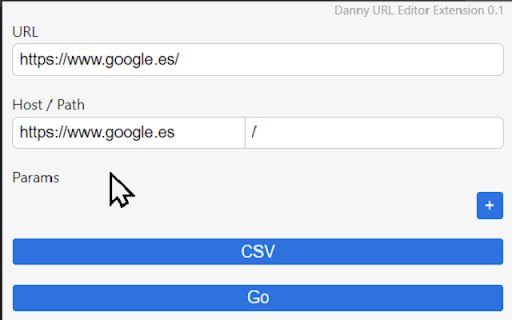
An extension to easily modify URL parameters Provide tools to modify and update complex URLs. URL is sliced, taken the main parts and shown in a easier way that allows for easy manipulation and visualization.

TweakSync
TweakSync lets you style web elements in real-time from Chrome and sync changes with VS Code for a smooth development experience. TweakSync is a powerful tool designed for front-end developers and web designers who want to streamline their styling workflow. This Chrome extension enables real-time styling of web elements directly within Chrome, allowing you to see changes instantly as you tweak styles. Real-Time Styling: Easily select any element on a webpage and adjust its styles on the fly. With live previews, you can see the impact of your changes immediately, making the styling process more efficient and intuitive. Seamless Integration with VS Code: TweakSync syncs your style changes directly with your VS Code environment. This integration allows you to apply and save your CSS changes effortlessly, ensuring that your development process remains smooth and uninterrupted. Efficient Workflow: By bridging the gap between your browser and your code editor, TweakSync eliminates the need to switch back and forth between tools. This results in a more streamlined workflow, saving you time and effort. Boost Your Efficiency: Save time with instant style updates and seamless integration with VS Code. TweakSync helps you make changes faster and more accurately. Improve Your Design Process: Experience a smoother design workflow with live previews and direct synchronization between Chrome and VS Code. Streamline Your Development: Minimize context-switching and keep your development process focused with TweakSync is real-time styling and VS Code integration.

Stopwatch for Excel
This extension adds a stopwatch to Excel. When the stopwatch isn't running you can start the stopwatch by clicking on the time. When the stopwatch is running you can click on the time again to pause the stopwatch. The stopwatch can be reset anytime by clicking on the X button next to the time. When the stopwatch is paused or reset the time is copied to the clipboard.

Character Input
Press Insert key, then: aXXX for an Alt Code, XXXX for Unicode, c for (c), or HTML entity reference. Designed for Ex Libris Alma. Allows entering of symbols and diacritics into the Alma Metadata Editor (MDE) using Unicode, Alt-key codes, or HTML entity codes. It is designed to make the input of diacritics and symbols easy without needing to use a separate application or copy and paste from a website. It supports 4-digit Unicode hex codes, almost all HTML entity references, as well as Alt-key codes; it also allows quick entry of the copyright symbol. - aXXX for an Alt Code (e.g. a130 for é) , - XXXX for a Unicode code (e.g. 00e9 for é) - Any valid HTML entity (e.g. eacute for é) except IJ - c for a copyright symbol ©. Note that a0169, 00a9, and copy also work. Note that HTML entity references do not need the & and ; to be entered. Where possible some fuller and alternative names for accents are permissable, e.g. ehacek and ecircumflex will work although the correct codes are ecaron and ecirc. Codes can be all lower case although capital letters need to be entered properly, e.g. Eacute for É. Designed for Ex Libris Alma. Entering uXXXX for Unicode is deprecated from version 4.

Bitbaguette
A browser extension extending Bitbucket's interface with useful features Bitbucket's user interface for Pull Requests lacks certain features that the Bitbaguette browser extension adds: * Restrict maximum display size of embedded screenshots, so that the layout of the PR description and comment threads do not get destroyed anymore * Allow to collapse (partial) comments * Provide overview of number of replies and number of linked tasks for each comment (sub-)thread * Provide a image comparison tool whenever raw image files are modified within the PR
