
palopabccigloiidhjpehnphbcblfhcn
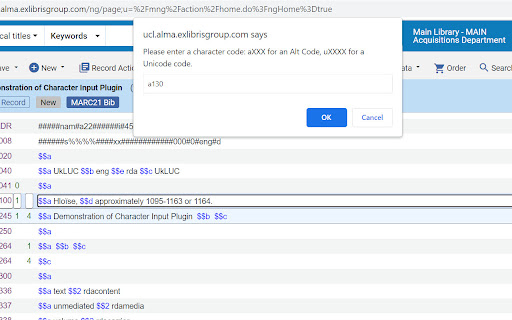
Press Insert key, then: aXXX for an Alt Code, XXXX for Unicode, c for (c), or HTML entity reference. Designed for Ex Libris Alma. Allows entering of symbols and diacritics into the Alma Metadata Editor (MDE) using Unicode, Alt-key codes, or HTML entity codes. It is designed to make the input of diacritics and symbols easy without needing to use a separate application or copy and paste from a website. It supports 4-digit Unicode hex codes, almost all HTML entity references, as well as Alt-key codes; it also allows quick entry of the copyright symbol. - aXXX for an Alt Code (e.g. a130 for é) , - XXXX for a Unicode code (e.g. 00e9 for é) - Any valid HTML entity (e.g. eacute for é) except IJ - c for a copyright symbol ©. Note that a0169, 00a9, and copy also work. Note that HTML entity references do not need the & and ; to be entered. Where possible some fuller and alternative names for accents are permissable, e.g. ehacek and ecircumflex will work although the correct codes are ecaron and ecirc. Codes can be all lower case although capital letters need to be entered properly, e.g. Eacute for É. Designed for Ex Libris Alma. Entering uXXXX for Unicode is deprecated from version 4.

Clear Portal Cache
Clearing the cache with a single click! Easily clear your Dynamics portal cache without going to /_services/about. Just click the icon in your extensions! Everyone who worked in Dynamics portals, knows it is a struggle to clear the server-side cache. You always have to go the page "/_services/about" and click on the button "Clear cache". This simple Chrome extensions loads this page and clicks on the button automatically in the background. This extension only works for Microsoft portals and Power Pages.

Redense Clip
A companion to RedenseAI that lets you save links from around the web to your RedenseAI account. Create engaging newsletters in minutes with AI. Simply enter the links you want to include in your newsletter and our AI will generate a headline, description, and build a newsletter for you. Redense AI is currently in an open beta. Chrome extension requires a Redense AI account. Create one here: app.redenseai.com

Debug Master: Debugging with ease
Simplify console errors with clear explanations for web dev. Debug Master is an innovative chrome extension that utilizes AI technology to provide detailed explanations for complex error messages. With just a simple copy and paste, users can easily understand what went wrong and how to fix it. Debug Master makes it easy for developers to quickly and efficiently solve programming issues, saving valuable time and frustration. Say goodbye to spending hours trying to decipher confusing error messages, and hello to faster debugging with Debug Master. The extension help developers save valuable time and increase their productivity, allowing them to focus on developing new features and improving their website. Additionally, the extension's ability to understand and explain various types of errors means that it can be used across different programming languages and frameworks, making it a versatile tool for any web developer. With Debug Master, web developers can more efficiently and effectively debug their code, leading to faster and more successful web development projects.

BBR Helper
This provides some advanced stats (game score, simple player rating and game box plus-minus) on multiple pages for NBA, WNBA, G-League, international leagues and college basketball. Including: - average stats by season on the player page - average stats by playoff series on the player page - average stats by player on the team_season page - average stats by player on the team_player page - average stats by player on the season_player page - single game/half/quarter stats by player on the game_boxscore page - single game and average stats on the gamelog and split pages - top 5 and top 20 average stats players on the season page - top 20 average stats players on the team_season page - top 20 average stats seasons rankings on the player page - top 50 career stats rankings on the player page - multiple stats rankings on the leader page - player awards column on team season page gBPM = (-0.55 * fga + 1.04 * fg3 + 1.39 * fg - 0.25 * fta + 0.79 *ft + 0.17 * orb + 0.27 * drb + 0.24 * (trb - orb - drb) + 1.34 * stl + 0.43 * ast + 0.64 * blk - 0.34 * pf - 0.95 * tov) / g """ , where orb is treated as 0.3 * trb and drb is treated as 0.7 * trb approximately when stats are not complete in early years.
