
fkioalmkhgkhojppkapnidbnaecnnkfo
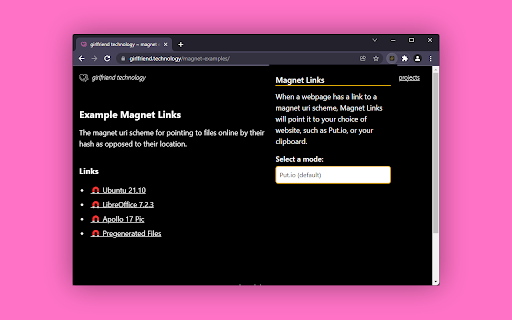
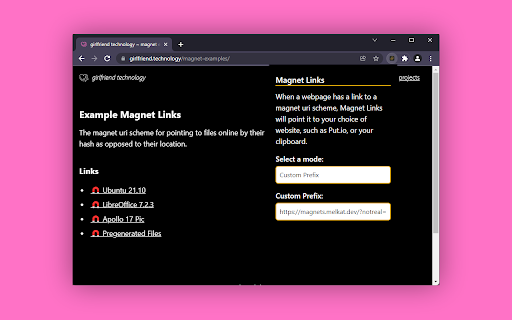
Tired of having issues when you try to open a magnet link? This extension helps by adjusting the links to go through Put.io, to your clipboard, or to any URL you want. You know how urls start with http:// or https://? Well, some start with `magnet:` and by default most devices do not know how to handle this. Magnet Links lets you choose how you want these urls handled. This app is not affiliated with Put.io Hello there, for a sample for what this extension does visit this page and try to click on the URLs before using the extension and after using the extension. https://girlfriend.technology/magnet-examples/ For example, by default a Mac doesn't know what to do with a magnet link, which looks like this: what my extension does is prefixes it with a Put.io url so that Put.io can download the file for you. So the final URL after my script runs should look like this: https://put.io/default/magnet?url=magnet:?xt=urn:btih:6H6NYFDC2NSTB5JGYHMUALXMSEALPOQY&dn=ubuntu-21.10-desktop-amd64.iso&xl=3116482560&tr=https%3A%2F%2Ftorrent.ubuntu.com%2Fannounce and when loaded Put.io will handle the download.

simple put.io
Add right click 'Send to Put.io' option as well as a simple interface to manage files and transfers.

Real Debrid Download Manager
A Chrome Extension to simplify downloading of torrents through Real Debrid Easily send your magnet links to Real Debrid from any website, without needing to go to the Real Debrid website. Just right click any magnet links and choose "Send Magnet Link to Real-Debrid”. The extension will automatically select all files in the torrent and start it. Once complete you can download the contained files using chrome, or you can copy the completed links from the popup window for use with external software. By default, the torrents are removed on completion but this can be changed via settings. If using chrome to download each torrent will have its own folder in your "downloads\rddm". I look forward to any feedback and hope people find this extension useful. Updates: 14/03/2025 - Fixed existing extension to work with manifest v3. This is temporary until I have completed my revised version with added features. Since this is my last change to this version I did brief tests as I want to devote more time to the next version. I tested auth, adding links via magnet, deleting links, auto download multi files, multi delete. If you run into auth issues you can try re-installing the extension. 07/03/2025 - Updated privacy page In progress: - Updating current extension to use Manifest V3 so that it won't stop working. - Working on a new version with added features and fixes to issues. 05/06/2020 - Removed unused permissions (for planned features which weren't implemented) to comply with Googles policies.

TorrentSafe
Anonymous bit downloads, just right click the magnet link Easily add torrent and magnet links to your TorrentSafe.com "My Downloads" torrent cloud storage area. Fast, anonymous, and secure downloads without storage or transfer rate limits. Free users limited to 5 downloads per month. 1. Visit your favorite torrent provider 2. Right click magnet link and select "Download with TorrentSafe" 3. Visit TorrentSafe.com and select "My Downloads" to view and download your torrent files.

Webtor.io - Watch torrents online
Any torrents are available online. Just open torrent-file and start watching absolutely free and without registration. Usage: Download torrent-file and new tab with it's content will appear immediately! Magnet links are also supported. What's new? 1. Torrent file handling improved ("Allow Access to file URLs" option must be enabled on extension settings page) Features: 1. Instant streaming - You don't have to wait while the whole file loads. Webtor will start streaming from the first byte. You don't have to think where to download torrents and spend your hard drive space anymore. 2. Download everything as ZIP-archive - yes, you had share ability earlier as well, but now we have separate button. On click it will show dropdown with all available social networks. 3. On-the-fly transcoding - Webtor automatically converts audio and video to the desired playback format suitable for your browser. Webtor supports video in AVI and MKV formats and lossless FLAC audio. 4. Cross-platform - you do not need additional extensions and plug-ins. Webtor streams torrent-files on any device where the Chrome browser starts, whether it's Windows, Mac or Linux. 5. Absolutely free -Webtor only supported by ads without any restrictions. 6. No registration - We do not track your activity and do not store any data about you. Your visit is absolutely anonymous. 7. On a big screen - Webtor can cast video to your TV screen. TV box with Google Cast support required.
