
fkehjmfmeabgpbhogomhagoagbniddii
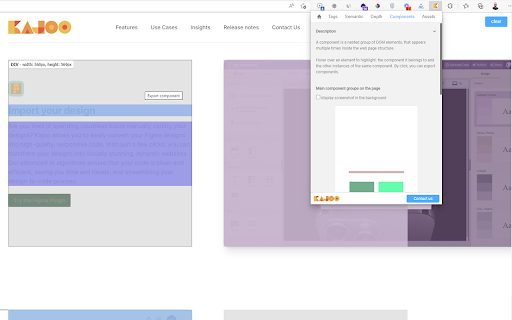
Explore visually the structure of a web page, gain valuable insights, and detect design patterns and components automatically. Explore visually the structure of a web page, and convert HTML markups and CSS into Kajoo.ai interactive canvas, so that you can integrate with your headless systems visually and generate JAMStack code (react, nextjs, vue, or angular)

CodeSensAI
Enhance your coding with AI-driven insights! CodeSensAI offers intuitive code reviews directly in your side panel. Introducing CodeSensAI, a revolutionary Google Chrome extension that leverages the power of OpenAI to enhance your code reviews and code comprehension. Whether you're a solo developer, part of a coding boot camp, or working in a large software development team, CodeSensAI is your reliable assistant for effective and efficient code reviews. AI-Powered Code Review: Harness the capabilities of OpenAI to review your code. Get insights into potential bugs, vulnerabilities, and improvement areas that you might have overlooked. Customizable Review Focus and Personality: Tailor the focus of the review and the AI's personality to your needs. Whether you want a detailed inspection for bugs, a high-level check for best practices, a friendly companion, or a strict reviewer, you are in control. Customizable Parameters Level: Choose your desired level of creativity with our exclusive feature. Higher creativity levels lead to more exploratory reviews, possibly offering unconventional insights, while lower levels stick to common patterns and best practices. Support for Multiple Languages: Whether you're coding in Python, JavaScript, Java, or any other popular language, CodeSensAI is here to help. It's like having a coding expert fluent in multiple languages at your side. Free SensAI Card: Sign up and get a free SensAI card which you can use to enhance your coding skills further. With CodeSensAI, ensure your code adheres to best practices, is free of bugs, and is as efficient as possible. Install CodeSensAI today and step into the future of code reviews!

Website Editor
Introducing our versatile Chrome extension, designed to effortlessly enhance your web browsing experience by allowing you to edit and customize the content of any webpage without delving into the Inspect Element tool. Whether you're preparing a presentation, creating mockups, or just want to see how different styles look, this extension has you covered. Here are its key features: ✏️ Edit Content: Easily modify text on any webpage with a simple click, making adjustments on the fly. 🔠 Font Size: Increase or decrease the font size to ensure readability and fit your design needs. 🎨 Font Color: Change the color of the text to match your desired aesthetic or highlight important information. 🔤 Font Family: Choose from a variety of font styles to personalize the appearance of the text. 🅱️ Bold: Emphasize important text by making it bold. Italic: Add a touch of elegance or emphasis by italicizing text. U Underline: Highlight text by underlining it, perfect for drawing attention. This extension is perfect for anyone looking to quickly and easily tweak webpage content without the hassle of complex tools.

AI Code Generator
Using AI technology, convert screenshots, design drafts, and prompts into front-end code(HTML/Tailwind/React/Vue/Bootstrap/Ionic). Using powerful AI technology, convert screenshots, design drafts, and prompts into front-end code(HTML/Tailwind/React/Vue/Bootstrap/Ionic). Screenshot to code, convert design to code, prompts to code. AI-powered UI builder: convert screenshots, mockups and Figma designs and prompts into clean, functional code using AI. Effortless UI Translation: Transform screenshotss, design drafts, and prompts into front-end code seamlessly, streamlining the development process. Intuitive Integration: User-friendly extension that seamlessly integrates with your workflow for instant code generation. Accelerate Development: Boost productivity by converting visual designs into front-end code in a fraction of the time. Visual Learning Aid: Learn and understand UI development through a visual translation of design elements to code. Support for mainstream front-end frameworks: We support generating code for these front-end frameworks: HTML + Tailwind, HTML + CSS, React + Tailwind, Vue + Tailwind, Bootstrap, Ionic + Tailwind, and many more!

ChatGPT UI Preview
Introducing ChatGPT UI Preview! Now, seamlessly view your HTML, CSS, or JS code results right in the ChatGPT sidebar The ChatGPT UI Preview (ChatGPT HTML CSS JS Preview) View extension is a revolutionary browser add-on designed to elevate your ChatGPT experience to new heights! 🚀 It seamlessly integrates with the chat interface, bringing your code snippets to life with live previews of HTML, CSS, and JavaScript. Say goodbye to the hassle of switching between tools and hello to a smoother web development workflow! 🎉 1. 🎥 Live Code Previews: Witness your code in action! Our extension dynamically renders HTML, CSS, and JavaScript code blocks in real-time, providing you with an instant visual representation of your work. 🎨 2. 🧩 Seamless Integration: Our extension blends seamlessly with the ChatGPT interface, ensuring a fluid and intuitive user experience. Code previews are displayed directly below the relevant code blocks, making it effortless to follow along with the conversation. 😊 3. 🔄 Automatic Updates: No more manual refreshes! Our extension automatically detects and updates code previews as new snippets are shared in the chat. Stay up-to-date with the latest view of the code without any effort. 🎯 4. 💅 Customizable Appearance: Enjoy a sleek and modern design that complements the ChatGPT interface perfectly. Code previews are presented in a visually appealing manner, and you can even tailor the styles to match your preferences. 🎨 The ChatGPT HTML Web View extension stands out from the crowd! 🏆 With its seamless integration, real-time updates, and CodePen integration, it offers an unparalleled coding experience within the ChatGPT environment. Say farewell to the complexity of managing multiple tools and embrace a streamlined workflow that empowers you like never before! 🦸♂️🦸♀️ Whether you're new to coding or a seasoned professional, our extension will transform the way you discuss and collaborate on web development projects. Boost your productivity by engaging in interactive coding discussions, where you can see results instantly and share your creations effortlessly. 🌠 Ready to embark on this coding adventure? Installing the ChatGPT HTML Web View extension is a breeze! 🍰 Simply visit the Chrome Web Store or Firefox Add-ons repository, click install, and you're all set! The extension will spring into action, automatically rendering code previews in your ChatGPT conversations. Customize the settings according to your preferences and get ready to experience ChatGPT in a whole new light! 🎉 Don't miss out on this groundbreaking extension! Install it now and unlock a world of interactive and efficient coding within ChatGPT. Happy coding! 💻✨
