
fkcglcjlhbfbechmbmcajldcfkcpklng
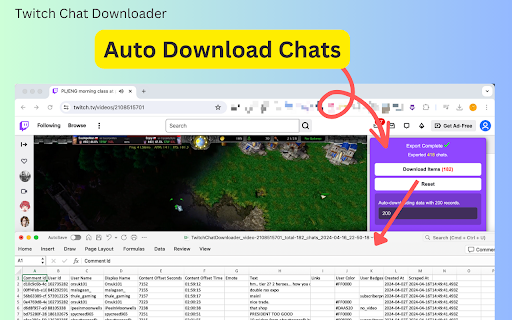
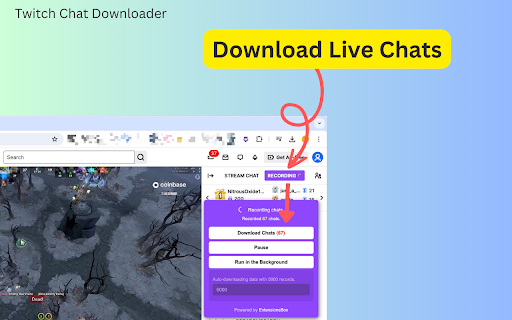

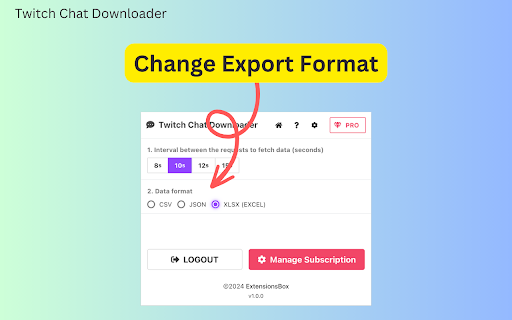
Capture and preserve Twitch chat history with Twitch Chat Downloader. Record viewer interactions and conversations for later review Twitch Chat Downloader, Your Comprehensive Live Chat, and Replay Chat Recorder Elevate your Twitch streaming experience with our cutting-edge browser extension, the Twitch Chat Downloader. This tool is designed not only to capture the flurry of comments, reactions, and conversations during live streams but also to record chat interactions from live replay videos and clips. It's perfect for streamers who want to analyze viewer engagement and for viewers who desire to revisit the lively discussions in chatrooms during intense streaming sessions. The Twitch Chat Recorder is an essential tool for anyone looking to enhance their interaction with streamers and the Twitch community. Whether you're a streamer aiming to monitor and analyze the engagement levels of your viewers or a spectator wanting to save memorable chat moments for later review, this extension has got you covered. Using the extension is straightforward and efficient. As a user, you can start the chat recording on any Twitch live room, live replay, or clip by clicking the "Record" button located at the top of the chat window on the right-hand side of your screen. Once activated, it begins to log all chat content. You can customize settings, such as specifying the number of chat messages to record before the extension automatically triggers a download, for example, setting it to download after every 5,000 messages. When the set threshold is reached, the Twitch Chat Downloader automatically saves the recorded chats. Additionally, you have the option to manually download the chat data whenever you choose. To ensure that your data is both accessible and manageable, the Twitch Chat Exporter saves the chat logs in various formats including CSV, JSON, or XLSX (Excel), facilitating easy analysis or viewing at your convenience. Data Privacy Your data stays on your device and is not stored or transmitted to our servers. We prioritize keeping your information secure and confidential. Disclaimer This extension is an independently developed product by ExtensionsBox and has no association with Twitch Inc.

FetchV - Video Downloader for m3u8 & hls
The video downloader for saving web videos and live streams. Features: 1. Supports HLS video (streaming video indexed by m3u8 file), integrating all media fragments into a single MP4 file. 2. Supports HLS live streaming. 3. Supports videos or live streams with a 'blob' prefix in the player's src address. For such media, when the actual media address cannot be detected, the "recording mode" can be used to convert the buffered data into an MP4 file. 4. Supports various static videos or audios that can be played on web pages, such as MP4, WEBM, etc. 5. Supports streaming MP4 (HLS v7, may add support for "MPEG-DASH" in the future). 6. Uses multi-thread downloading, which can significantly increase the download speed in good network conditions, very useful for downloading large files. 7. Supports switching resolutions, available when the HLS video's m3u8 file provides multiple resolutions. 8. Provides media preview, if multiple media are captured on a page, you can confirm your target through the preview. 9. Provides a feature-rich download interface, where you can know the download speed, progress, and perform operations like switching download threads, switching resolutions, and modifying file names. 10. All the work of this tool is done in your browser, without using any third-party servers to transmit or convert media data. Notes: 1. This tool is only applicable to videos that comply with technical standards, and it does not work for videos using non-standard playback technologies. It does not have special adaptations for specific websites. 2. It does not support encrypted videos, and we are not responsible for any media you download. It is recommended to check the copyright of the media before downloading. 3. Although this tool has been adapted to popular web videos, it cannot guarantee absolute success in the adapted scope. If it doesn't work for you, please try other tools as an alternative.

Searchsen - Twitch VOD Chat Search Tool
Browser extension to search and analyze the chat logs of Twitch VODs v4.0: New UI, more channel support for faster fetching, emote support.

Twitch Chat Nexus
Lets you view your Twitch chat history or collect chats of interest from the live chat window. An extension that provides features to enhance your Twitch chat experience. • View your chat history through the button at the bottom of the chat window • Adds an area to the chat window where you can collect chats of interest • Indicates in color in the chat text box whether your chat has been sent successfully [View chat history] - A "Chat History" button is added at the bottom of the chat window. (Button can be moved to chat settings menu) - You can also browse chat history by page. - Username hiding function (Used for screen capture) - Show date at the top when scrolling [Filtered chat view] - Adds an area to the chat window where you can collect chats of interest. (If the feature is enabled on the options page) - Automatic area resizing is possible. Areas automatically collapse when inactive for a period of time and expand again when active. - You can save the filtered chats as an image. - You can add and edit username / keyword / badge filters using the filter editor. [Show chat transfer status] - Status Type: Response waiting (gray) / Sending success (green) / Response timeout (orange) - Appearance and behavior can be customized

ChatReplay
Watch stream archive videos with chat replay. Watch stream archive videos with chat replay. Click the button below the supported video or extension icon to open ChatReplay. Chat replays are available on selected videos of participating channels. Full list available on the website: https://chatreplay.stream/ If you enjoy this extension, please consider donating to help cover the server costs: https://ko-fi.com/chatreplay
