
oopcjaklhenijofoanbpchndknfadldn
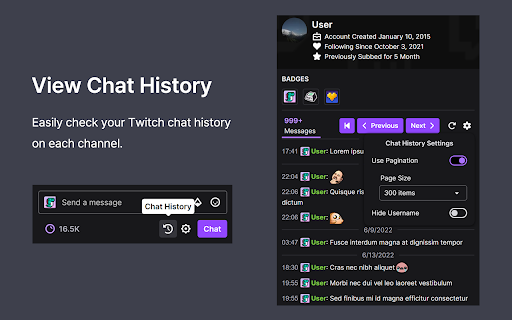


Lets you view your Twitch chat history or collect chats of interest from the live chat window. An extension that provides features to enhance your Twitch chat experience. • View your chat history through the button at the bottom of the chat window • Adds an area to the chat window where you can collect chats of interest • Indicates in color in the chat text box whether your chat has been sent successfully [View chat history] - A "Chat History" button is added at the bottom of the chat window. (Button can be moved to chat settings menu) - You can also browse chat history by page. - Username hiding function (Used for screen capture) - Show date at the top when scrolling [Filtered chat view] - Adds an area to the chat window where you can collect chats of interest. (If the feature is enabled on the options page) - Automatic area resizing is possible. Areas automatically collapse when inactive for a period of time and expand again when active. - You can save the filtered chats as an image. - You can add and edit username / keyword / badge filters using the filter editor. [Show chat transfer status] - Status Type: Response waiting (gray) / Sending success (green) / Response timeout (orange) - Appearance and behavior can be customized

Cheese Knife - CHZZK Toolkit
Adds useful features and tools to CHZZK. This extension adds various useful features and tools to CHZZK, NAVER's streaming platform. [Explore] - Live Preview: Preview live by hovering over the channel. - Refresh Sidebar: Refresh the sidebar every 30 seconds. - Popup Player: View multiple lives in one window. [Player] - Stats Menu: Select Stats from the right-click menu to view resolution, bitrate, FPS, latency, and codec. - Seek with Arrow Keys: Use the arrow keys to rewind a short amount of time. - Video Filters: Adjust video brightness, contrast, and gamma, and apply a sharpen filter. - Audio Compressor: Reduce loud sounds to adjust the dynamic range to make the sound more comfortable. [Chat] - Hide Donation Messages: Hide Cheese messages in the chat. - Adjust chat panel and font size It also adds many other useful features and allows to customize styles. ==== This extension is not affiliated with CHZZK, and related trademarks are the property of their respective owners. This extension is provided "as-is" without any warranties, and the developer assumes no responsibility for any issues, damages, or data loss resulting from its use.

K-Twitch-Bypass
Extension to bypass Twitch quality restrictions

SOOP Plus
SOOP 스트리밍 서비스 SOOP Plus SOOP 스트리밍 서비스의 확장 프로그램입니다. [ 현재 기능 ] - 선호채널 미리보기 (썸네일) 기능 -> SOOP 서비스에서 추가로 인해 확장프로그램에서 제거 - 채팅 콜렉터 기능 (닉네임, 아이디 채팅 필터링), (등급별 채팅 필터링) - 방송 화면 캡처 기능 (개선작업 진행중) [ 수정 사항 ] [1월 15일] 채팅 콜렉터 기능 기본 값이 기존 시청자 불편함을 해소하기 위해 OFF로 설정했습니다. [1월 17일] 닉네임뿐만 아니라 아이디로 채팅 필터링 가능하도록했습니다. [1월 18일] 버튼 클릭으로 방송 캡처가 가능하도록 했습니다. [1월 19일] 채팅 콜렉터 버튼 디자인 수정 [1월 19일] 방송 캡처 버튼 디자인 수정 및 위치 변경(방송화면 하단으로 이동) [1월 19일] 등급(BJ, 매니저, 열혈팬, 팬클럽, 구독팬, 일반유저)별 채팅 필터링 기능 추가 [1월 20일] 방송 캡처 버튼 디자인 다크모드 대응 [1월 21일] 콜렉터(부검) 채팅창 크기 조절(위, 아래) 및 잔버그 수정 [1월 21일] 콜렉터 기능을 사용자가 직접 선택할 수 있도록 스위치버튼 추가 [1월 22일] 콜렉터 필터링 wakfreeca 확장프로그램에서 아이콘 제거해도 사용할 수 있도록 수정 [1월 23일] 아프리카 매니저 도우미 채팅창 빈공간(패딩) 이슈 해결 [1월 25일] 아프리카 확장 앱 디자인 변경 / 필터링(부검) 채팅창과 라이브 채팅창 위치 변경 버튼 추가 [1월 26일] 아프리카 확장 앱에서 실시간 방송중인 즐겨찾기 방송리스트 볼 수 있는 기능 개발 [2월 2일] 콜렉터(필터링) 채팅창 크기조절 설정한 값으로 유지하도록 수정 (새로고침하면 이전 사용자가 세팅한 상태로 유지) [2월 3일] 채팅창 처음 입장시 스크롤 되지 않는 현상(버그 수정) [2월 5일] 아프리카TV 채팅 UI 변경에 따른 대응 [2월 5일] 채팅 시작점 고정 기능 추가(ON/OFF) 기능 [2월 6일] 구독, 열혈, 팬, 서포터 뱃지 제거 (ON/OFF)기능 [2월 6일] 스크롤 관련 버그 수정 [2월 6일] 2줄보기 기능 추가 [2월 6일] 채팅 시작 정렬 간격 수정 [2월 6일] 즐겨찾기 리스트 기능 비활성화(수요 조사중) [2월 6일] 채팅창 구분자( : ) 추가 기능 [2월 8일] 입장시 스크린 모드 유지 기능 추가 (버그로 잠시 비활성화) [2월 8일] 스크롤 멈춤 현상 수정완료 [3월 1일] 라이브 채팅창에서 콜렉터 등록한 유저 하이라이트 처리 [3월 5일] VOD 채팅창 필터링 기능 추가 [3월 14일] 한줄 채팅 정렬 닉네임 안보이는 이슈 대응 처리 [10월 15일] 아프리카TV 리브랜딩으로 인해 SOOP으로 대규모 업데이트로 인해 확장 프로그램 충돌 발생 미리보기(썸네일)보기 제거 라이브 채팅 콜렉터 충돌 대응 VOD 채팅 콜렉터 작업 진행중 [11월 1일] 스타일 수정 및 로고 수정 [11월 3일] VOD (다시보기) 채팅 콜렉터 완료 [11월 10일] 닉네임, ID 정보 설정 저장 및 불러오기 기능 UI, UX 개선 잔버그 개선 [11월 14일] 사용성 개선을 했습니다. [11월 16일] 라이브 스트리밍 화면 캡처 기능 추가 [2025년 3월 3일] 많은 채팅으로 인한 버퍼링 이슈 해결 필터링 채팅창 사용자 스크롤 가능하도록 수정 [2025년 3월 4일] 열혈팬, 구독팬 글자 바껴있는 현상 다시보기 버퍼링 이슈 해결 [2026년 3월 25일] soop 도메인 변경에 따른 조치 [2026년 3월 26일] 디자인 변경 및 버그 수정 버퍼링 및 렉 걸리는 현상 개선 [2026년 3월 28일] 유저 채팅 밴 기능 추가 팝업 UI 및 사용법 설명 [2026년 3월 29일] VOD(다시 보기) 배치 수정 [ 다음 기능 ] 리뷰에 남겨주시면 바로바로 추가 해보도록 하겠습니다. [ 안내 ] 이 확장 프로그램은 SOOP 고객으로 있으면 좋은 점을 추가해본 서비스이므로 SOOP과 관련이 없습니다.

Cheese-PIP
치지직에 녹화, 스크린샷 등 다양한 기능을 추가합니다. 네이버 게임 스트리밍 서비스 치지직에 녹화, 스크린샷, 다운로드 등 다양한 기능을 추가해주는 확장 프로그램입니다. 🚀 주요 기능 ⭐️ 스트림 녹화 / 스크린샷 버튼 추가 ⭐️ 방향키를 이용한 이전 스트림 내용 탐색 ⭐️ 자동 최대 품질 해상도 적용 ⭐️ 확장된 기능을 제공하는 PIP+ ⭐️ 팔로우 즐겨찾기 (베타) ⚠️ 주의 브라우저의 여러 제약으로 긴 영상의 녹화에 오류가 발생할 수 있습니다. 🧑💻 기여하기 Cheese-PIP는 오픈소스 프로젝트로, 누구나 개발에 참여할 수 있습니다. 아래 링크에서 Cheese-PIP의 소스를 확인하고, 여러분의 아이디어나 개선점을 기여해보세요. https://github.com/khk4912/Cheese-PIP Cheese-PIP는 네이버 치지직(chzzk)과 관련이 없는 개인 프로젝트입니다.
