
fkalhmbalmfkehoaeggpofnhajmidmeb
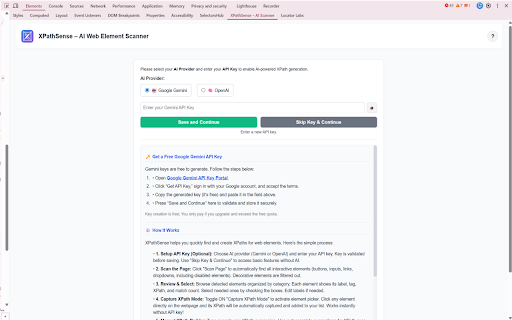


Smartly scan web pages and extract AI-enhanced XPaths for automation. Product Overview XPathSense is an AI-powered web element scanner and XPath generator designed to streamline web automation testing. It helps QA engineers, automation testers, and developers quickly extract, validate, and improve XPath expressions from any webpage, then export production-ready test code for popular automation frameworks. Key Features Intelligent Page Scanning 1.Automatically scans web pages to detect all interactive elements (buttons, inputs, links, dropdowns) 2.Includes disabled elements and framework-specific components (Angular, React, Material UI, etc.) 3.Filters out decorative and non-functional elements 4.Organizes detected elements by category with labels, tags, and match counts Capture XPath Mode 1.Toggle ON to activate element picker mode 2.Click any element directly on the webpage to instantly capture its XPath 3.Works without requiring an API key 4.Perfect for quick, targeted XPath extraction Manual XPath Builder 1.Type or paste custom XPath expressions 2.Real-time validation with match counting 3.Navigate through multiple matches with previous/next controls 4.Autocomplete suggestions for XPath axes and functions 5.Visual feedback for valid/invalid XPaths AI-Powered XPath Enhancement 1.Improve XPaths using Google Gemini or OpenAI 2.Generates more stable, readable, and maintainable XPath expressions 3.Provides confidence scores and improvement suggestions 4.Accept, reject, or revert AI suggestions with ease 5.Custom prompt support for specific requirements Multi-Framework Code Export 1.Export to Java + Selenium (Page Object Model) 2.Export to Playwright + TypeScript 3.Export to Cypress + JavaScript 4.Export to Python + Selenium 5.Export to Robot Framework 6.Generates production-ready Page Object files with: 7.Proper class structure 8.Locator definitions 9.Interaction methods 10.Best practices implementation User-Friendly Interface 1.Interactive tour guide for first-time users 2.Toast notifications for all status messages 3.Collapsible element lists for better organization 4.Select all/bulk operations 5.Clean, modern DevTools panel design How to Use Access the Extension: 1.Open Chrome DevTools (F12), navigate to the "Elements" tab, and find the XPathSense panel in the side panel area. Initial Setup (Optional): 1.Choose your AI provider (Google Gemini or OpenAI) 2.Enter your API key (Gemini keys are free to generate) 3.Or skip to use basic features without AI Scan Elements: 1.Click "Scan Page" to automatically detect all interactive elements 2.Review the organized list of detected elements 3.Select elements you need by checking boxes Capture XPaths: 1.Toggle ON "Capture XPath Mode" 2.Click any element on the webpage to instantly capture its XPath 3.XPath is automatically added to your list Build Manually: 1.Use the Manual XPath Builder to type custom XPath expressions 2.Validate to check matches and navigate through results 3.Add validated XPaths to your list 4.Enhance with AI (requires API key): 5.Click "Generate with AI" on any XPath 6.Review AI suggestions with confidence scores 7.Accept improved XPaths or revert to original Export Test Code (requires API key): 1.Select your target framework from the dropdown 2.Click "Export" to generate Page Object files 3.Download production-ready test code Who Can Use This 1.QA Engineers: Quickly generate XPaths for test automation scripts 2.Automation Testers: Extract reliable locators for Selenium, Playwright, or Cypress tests 3.Developers: Build and validate XPath expressions for web scraping or automation 4.Test Automation Teams: Generate consistent, maintainable Page Object Model code 5.Anyone working with web element identification: Simplify the XPath creation process Privacy & Security Data Handling 1.API Key Storage: Your API key is stored securely in your browser's local storage only. It is never transmitted to any server except the selected AI provider (Gemini or OpenAI) for API calls. Data Transmission 1.AI Processing: When using "Generate with AI" or "Export" features, HTML snippets of the selected elements are sent to your chosen AI provider (Gemini or OpenAI) for processing. 2.No Data Storage: The extension does not store, log, or retain any webpage data, HTML content, or XPath information on external servers. 3.No Training Data: Data sent to AI providers is used solely for generating XPath suggestions and test code. It is not used for AI model training. Security Best Practices 1.Local Processing: All XPath generation, validation, and element scanning happens locally in your browser. 2.Secure API Communication: All API calls use HTTPS encryption to your selected AI provider. 3.No Background Data Collection: The extension only processes data when you explicitly use AI features or export functionality. Recommendations 1.Confidential Data: Avoid using AI features on pages containing confidential, sensitive, or proprietary information, as HTML snippets will be sent to the AI provider. 2.API Key Security: Keep your API key secure and do not share it. You can log out (clear the key) at any time using the logout button. 3.Code Review: Always review and test AI-generated XPaths and exported code before using in production environments. Support For issues, questions, or feature requests, please refer to the built-in tour guide (click the "?" button in the header) or contact support through the extension's developer page.

Email Extractor
Powerful Extension To Extract E-Mail ID's Automatically From Web Pages. NEW FEATURES: AutoVisit websites and AutoSave Email IDs. Email Extractor is a powerful email extraction extension for Chrome. Extension automatically fetches valid email IDs from the web page, you can copy paste particular email ids you need or export all of them to a text or CSV file. NEW FEATURE 1 : the new automation tool can discovers all email addresses for a specific domain name. Example: if you want to discover email IDs of people working at Email Hunter, you can step the tool to search for any email address ending with hunter.io or emailhunter.io , this job can be done for any website. NEW FEATURE 2 : you can add a 5 seconds delay when visiting web pages automatically, so you make sure all pages are loaded and all email ID’s are collected, even when JavaScript are delaying the display of the emails ID's. AUTOMATION with AutoVisit and AutoSave. How it works: ** Automation: allows you to build a queue of up to 1.000 URL that you want to visit. The tool will launch a robot that will visit the requested pages and extract all email addresses found on those webpages. ** AutoSave: this feature will store, in the cloud, all the email IDs found on all the pages you are visiting. This plugin fetches email ids from the Source Code and has no relevance to what you see on the front, so for example, if you see 3 email ids on the website, plugin may fetch more if it finds hidden email ids in the source. Features: - AutoVisit: build a queue of URL that you want to visit automatically - Automation: discover all email ID's ending with a specific domain name - Extract Email Address from Web Pages Automatically - Auto-save all Email Address in the cloud while you browse any website (cloud storage starting at $9.99/month) - share your Premium subscription with your colleagues - Download stored Email IDs - Extracts Emails on Ajax Pages as well, for example Google Search - Extracts Cloaked Emails - Filters for Duplicate Email ID, so you get only Unique ones - Local Storage - Export Option to export list of your extracted emails to a text file - Offline Support (Added as of v1.6 Beta) Needs permission - Extract Emails from Local HTML Documents - Extract Emails from Text Files - Fast, Light(Only 51KB) - removes duplicate email addresses - See instructions at: https://www.email-extractor.io/assets/pdf/Email_Extractor-FAQ.pdf Pricing: this extension is an inexpensive alternative to Email Hunter , voila norbert , Clearbit Connect or FTL ( find that lead ). On the other hand, you will need a bit of technical knowledge to configure. TIP: use our recommended "recipes" Note that the extracted ids will be overwritten if you open a new tab and browse to a new page, for this particular situation, switch to the previous tab, plugin will fetch the ids, and you can export them. Though this plugin accesses your web page information, the only thing which will be extracted is the email ids and that too are stored in your local storage. Extension is thoroughly tested, if incase anyone encounters any bug, you can get my contact details when you click the "Gear" button on the plugin and I'll make sure its fixed ASAP. Informal Disclaimer : This extension is not developed with an intention to spam people with your marketing mails, so use it for your personal stuff only. Change Log : -v5.0 --- Redesigned for Manifest Version 3 --- Made it easier to copy emails IDs to clipboard with Ctrl+Shift+1 (Cmd+Shift+1 on Mac) - v3.6 --- Auto-save all Email Address in the cloud (unlimited storage for $9.99/month) --- Download stored Email IDs --- Clean-up clunky emails from the list - v3.4.2 -- Rolled back to old version 2.1 (for stable release) Please reinstall if you still find the plugin not working, will upload the new version asap - v3.4.1 -- Rolled back to old version (for stable release) - v3.4 -- Fixed minor bugs, users were not able to see the emails in popup so fixed (Please reinstall plugin if you see the count but don't see email in your popup window) - v3 -- Added Storage support. All email ids will be stored on the Storage page -- Added On Install and On Update messages - v2.0 (Major Release, consider updating if you haven't) -- No more issues with Ajax Calls -- Updates Email Counts on Tab Swapping -- No more Beta :) - v1.6 Beta -- Added Offline Support -- Extract Email IDs from local HTML and Text documents - v1.5 Beta -- Non Persistent Processing For Better Performance -- Better Ajax Handling -- Revoked "All Tab" Access Permission

Agenty - Advanced Web Scraper
Web scraping software with AI to extract data from websites using point-and-click extension to get data from web crawling Real-time web data extraction preview and download into various formats like JSON, CSV or TSV. Build free web scraper scripts using the Chrome extension and host on Agenty cloud for batch URL for bulk extraction, and more advanced web scraping features: like Scheduling, Anonymous website proxies, Website Crawling, Scrape 100 or millions of web pages, Extract multiple website simultaneously, uploading data to server, FTP, S3 etc. Using the extension, you can build 3 types of agents - 1. Web scraping agents 2. Change detection agents 3. Web crawling agents How to use -------------------------------- 1. Go to website you want to extract and then launch the extension. 2. Select agent type under "Create new" or you can use sample agents template under my agents. 2. Click on a webpage element that you would like to extract (it will turn green). Agenty will then generate best CSS selector for that element, and will highlight (yellow) everything that is matched by that selector. 3. Now you can click on a highlighted element to remove it from the selector (red), or click on an un-highlighted element to add it to the extractor. Through this process of selection and rejection, Agenty will help you come up with the perfect CSS selector for your items need to be extracted. 4. Extract any number of fields with TEXT, HTML or ATTR (attributes) and instant output preview of extracted data. How to edit an agent ------------------------------- 1. Go to the website URL, where the agent was created 2. Launch the Agenty extension 3. Click on the open button beside your agent to open it in Agenty. 4. Now, you can add/change anything and save it back to your account. Features -------------------------------- 1. Extract any number of fields from a web-page. 2. Use the built-in CSS selector to generate pattern with one click. 3. Write your own custom CSS selector. 4. Choose the item you want to extract. E.g. TEXT, HTML or ATTR (Attribute) 5. See the result preview instantly as CSS selector selected. 5. Toggle the position left/right. 7. Export output in most popular file format JSON, CSV or TSV Whether you are scraping websites with Agenty or using the API in C#, Python, Node JS, Perl, Ruby, Java or JavaScript programming language. You can use this Chrome extension to auto-generate CSS selectors for web scraping or web automation with Playwright, Puppeteer and Selenium for website testing.

Axiom Browser Automation & Web Scraping
Automate websites and scrape data. Quickly, without code. Create browser bots to automate websites and scrape data. Axiom is a no-code browser automation and Robotic Process Automation (RPA) tool, backed by Y Combinator and SAP. Automate website actions and scrape data, using only clicking and typing on the user interface of websites and web apps - no coding, API or developer required. Integrate with Zapier, Make and webhooks to trigger bots from anywhere. Integrate ChatGPT for AI powered automations and data scraping. Axiom lets you: - Automate website actions - Scrape any website - Input data into any web form - Schedule bots - Use webhooks to post and receive data from Zapier, Integromat or elsewhere - Build AI powered bots and scrapers with ChatGPT - Read and write from Google Sheets - Download and share your automations with other users Build automations for: - Data scraping - Data entry - Extract, Transform and Load tasks (ETL) - Building social media bots - Moving data between applications - Automation without APIs - Automating workflows within web apps If you run into any issues, please don’t hesitate to get in touch on support@axiom.ai!

Hexofy Scraper - Web Scraping + AI
1-Click Data Capture & Web Scraping Tool Enhanced with AI Hexofy’s AI assistant lets you perform GPT tasks on any data you capture or the page you’re browsing with just one click. Transform how you gather data from the web with Hexofy, your ultimate browser extension for effortless web scraping. Say goodbye to the tedious task of copy-pasting with our one-click solution that simplifies data extraction directly from your browser. User-Friendly: Navigate the web with our intuitive point-and-click interface, making data capture accessible to everyone—no tech expertise required. Efficient: Set up in minutes and extract thousands of records from any website, from popular marketplaces like Amazon and eBay to niche sites. No Coding Needed: Forget about learning Python or JavaScript. Hexofy is designed for ease, allowing you to scrape data without writing a single line of code. Browser-Based: All scraping tasks are run in your browser, which means no downloads or installations on your computer. Whether you’re capturing leads, analyzing tweets, comparing products, or aggregating information, Hexofy provides a seamless scraping experience for both one-time tasks and large-scale data extraction projects. Start your journey towards smarter, faster web data extraction. Add Hexofy to Chrome now and experience the magic of one-click scraping!
