
fjikmpjpehingmmhoaomifbfpjchmmad
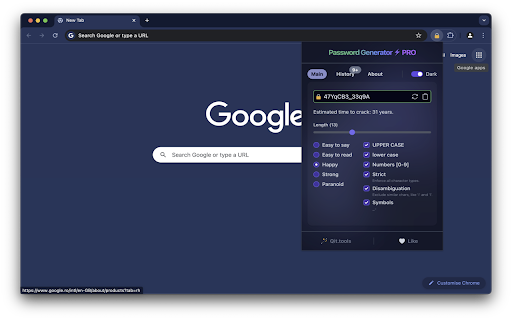


Powerful and user-friendly extension/add-on with PRO features for randomly generating and checking passwords security. Password Generator ⚡ PRO is a user-friendly extension for generating strong passwords, evaluating their resistance to hacking, and indicating how secure they are. Perfect for anyone who values the security of their data. ☑️ Length: Customize the password length. ☑️ Complexity Categories: "Easy to say," "Easy to read," "Happy," "Strong," "Paranoid." ☑️ Characters: Include upper and lower case letters, numbers, symbols. ☑️ Cracking Time Estimate: Determines how many years it would take to crack the password. ☑️ Security Highlight: Color indication of secure and insecure passwords. ☑️ Theme: Switch between light and dark themes. ☑️ History: View previously generated passwords. ☑️ Strict: Ensures all character types are included. ☑️ Disambiguation: Excludes similar characters for better readability. ☑️ Copying: Quick password copying.

Proton Pass: Free Password Manager
Free and fully encrypted password manager to keep your logins and passwords safe. Free and unlimited password manager to keep your login credentials safe and manage them directly in your browser. Get the password manager created by the former scientists who met at CERN behind Proton Mail, the world’s largest encrypted email provider. Proton Pass is open-source, end-to-end encrypted, and protected by Swiss privacy laws. Pass offers more than other free password managers and has no ads or data collection. You can use it for free forever on all your devices to create and store unlimited passwords, autofill logins, generate 2FA codes, create email aliases, secure your notes, and more. * Protect your logins and their metadata with battle-tested end-to-end encryption While many other password managers only encrypt your password, Proton Pass uses end-to-end encryption on all your stored login details (including your username, the website address, and more). * Audit Pass’s open-source code Like all other Proton services, Pass is open source and built on the principle of trust through transparency. As scientists, we know that transparency and peer review lead to better security. All Proton Pass apps are open source, meaning anyone can verify our security claims for themselves. * How can Proton Pass be free forever? We offer Pass for free because everyone deserves online privacy and security. This is possible thanks to our supportive community on paid plans. If you would like to support our work and get access to premium features, consider upgrading your plan. * Protect more than just your passwords. Join over 100 million people who have signed up for Proton’s privacy ecosystem, which includes Proton Mail, Proton Drive, Proton Calendar, Proton VPN, and more. Take back control of your privacy online with our encrypted email, calendar, file storage, and VPN. With Proton Pass, you can: - Store and auto-sync unlimited logins on unlimited devices: You can create, store, and manage your credentials from anywhere with our browser extension and apps for Android and iPhone. - Sign in faster with Proton Pass autofill: You no longer need to copy and paste your username and password. Easily and securely log in with Proton Pass autofill technology. - Avoid weak passwords: With our built-in secure password generator, you can easily generate strong, unique, and random passwords based on the security requirements for every website you sign up to. - Safely store encrypted notes: You can save private notes in Pass and access them on all your devices. - Create unique email addresses with hide-my-email aliases: Proton Pass helps you hide your personal email address with email aliases. Keep spam out of your inbox, avoid being tracked everywhere, and protect yourself from data breaches. - Make 2FA easy with our built-in authenticator: With Pass’s integrated 2FA authenticator, using 2FA is finally fast and convenient. Easily add a 2FA code for any website and use it when you log in. - Easily organize and share your sensitive data with vaults (paid feature): Manage your logins, secure notes, and email aliases with vaults. In the next version of Pass, you’ll be able to share vaults with your family, friends, or colleagues. - Quick offline access to your login data: Access your stored passwords and notes in Pass from wherever you are, even when you don’t have internet connection. - Secure your Pass account with additional security measures: Protect all your data with another layer of protection, either with TOTP or U2F/FIDO2 security keys. For more information, visit: https://proton.me/pass Learn more about Proton: https://proton.me

Strong Password Generator
Use Strong Password Generator: a powerful random password generator and password creator to keep your accounts secure. 🔒 This extension is the comprehensive solution to all your password-related woes. It's the ultimate tool for creating and storing secure credentials. 🔐 The challenges of create secure password management: ● Secure random password generator 1. With our Strong Password Generator, you can create complex, nearly impossible to crack ● Avoid Reuse: Do you often use the same credential for multiple accounts? 1. Our tool allows you to create unique logins for each account, ensuring security 2. It can create random passwords on the fly 3. You never have to worry about reuse again ● Ease of Use: Is remembering a multitude of complex credential daunting for you? 1. Google password generator helps you create passwords 2. With our extension, you'll have a Strong Password Generator free of charge 3. It keeps a history of all your generated passwords 4. This makes it easy to retrieve them whenever needed 🔑 Key Features and Benefits: ▶ Robust Generation: – Our tool offers strong generation capabilities to protect your most sensitive accounts – Whether you need a 15 character password or a shorter one, it can be customized – Our tool meets all your security requirements ▶ Secure Storage: – This extension stores the history of your generated credentials – Access your generated pass anytime without the fear of forgetting them ▶ User-Friendly Interface: – With a simple and intuitive interface, our extension makes it easy to create password – The online password generator google is accessible right from your browser, making it convenient to use at any time ▶ Versatility: – Provides strong logins – Our extension can generate strong logins tailored specifically for Google accounts ▶ Suggestions and Ideas: – Our tool can suggest strong password and and provide password ideas to keep your accounts protected ⚡ Additional Benefits: 1️⃣ Convenience and Time-Saving: ➞ Automatic credential creation: Quickly generate complex passwords for each account ➞ Easy management: Simple credential management through a user-friendly interface 2️⃣ Privacy: ➞ Complete confidentiality: Your data is not shared or sold to third parties ➞ Data control: Privacy settings give you full control over your credential 3️⃣ User Support: ➞ Access to a dedicated support team ready to assist you with any issues 🚀 In today's digital landscape, a strong, secure credential is your first line of defense against cyber threats. The генератор паролей extension provides a reliable and easy way to create, store, and manage secure logins. With this tool, you can finally say goodbye to weak, easily hackable combinations. 🌟 Install Strong Password Generator and take the first step towards a more secure online presence. Experience the ease of generating and managing logins with just one click – your ultimate solution for account security. FAQs: 📌 How can I use google password maker with this extension? 💡 Simply open the extension, and it will act as your go-to tool for generate secure password compatible with all your Google accounts. 📌 Can the extension generate password google accounts specifically? 💡 Yes, it will create a strong and unique credential tailored for your Google account needs. 📌 Can the extension suggest password for me? 💡 Absolutely! The extension includes a smart feature that can suggest a combination based on your desired length and complexity. 📌 How do I create secure pass? 💡 To create a secure credential, open the extension and select your preferred settings for length and complexity. The extension will then generate a secure combination ensuring your accounts are well-protected. 📌 Can I generate a 15 character password? 💡 Yes, simply set the length to 15 characters in the settings, and the extension will create a strong and secure credential of that length. 📌 What kind of support is available for users? 💡 We offer dedicated support to assist you with any issues. Our team is ready to help, and you can also access detailed guides and FAQs for additional assistance.

Random password generator
Simple tool to generate strong and secure passwords. Simple tool to generate strong and secure passwords With this extension you can easily generate strong and secure passwords. You can specify password length and used chars (lowercase, uppercase, numbers or custom). Generated password can be copied directly to your clipboard, the passwords are NOT saved online. So you can ensure the security of your password

Authenticator Pro
Setting up your OTPs has never been easier! ➤ Add Secrets Easily: Quickly add secrets via image URL, image file, or scan QR codes through the webcam with the Advanced Add Button. ➤ Autofill: Automatically fill in OTPs on selected websites for a seamless login experience. When enabled, this feature updates the OTP field every 30 seconds, ensuring the most current OTP is available. ➤ Bulk Add: Import multiple OTP entries at once (CSV or JSON) using the Bulk Add button—perfect for migrating from other authenticators or setting up lots of accounts quickly (please see documentation on Github for proper CSV/JSON formatting). ➤ Chrome Sync: Access your OTPs on any Chrome device logged into the same account, ensuring continuity across devices. ➤ Clipboard Copying: Copy OTPs to the clipboard by clicking the corresponding token box, making it easy to paste where needed. ➤ Online Time Sync: Syncs the 30-second OTP timer with the internet for better accuracy. ➤ Password Protection: Secure your OTPs and secrets with encrypted password protection, ensuring they are only accessible to you. ➤ Popup Mode: Open Authenticator Pro in a separate popup window, providing quick and convenient access to OTPs. ➤ QR Code Retrieval: Retrieve your stored secrets via QR code or text string for easy reference. ➤ Themes: Choose between Light and Dark Themes to match your browser's aesthetic (more themes coming soon). ➤ Token Management: View, edit, and delete active OTP tokens directly within the extension. Authenticator Pro offers a user-friendly interface with powerful customization options, making it the ideal tool for managing OTPs and securing account access. This is open source software, and you can contribute or review the source code on GitHub.
