
fjhnpnojmkagocpmdpjpdjfipfcljfib
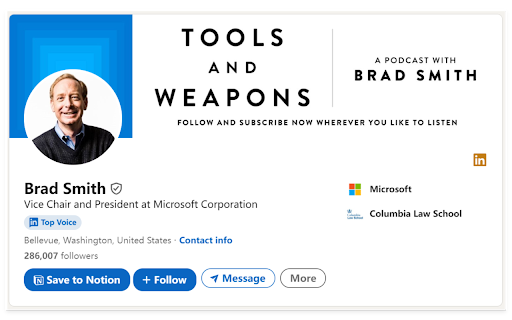
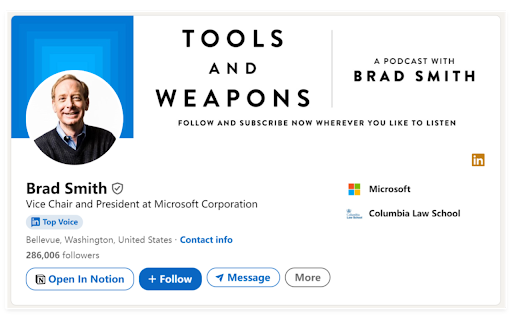

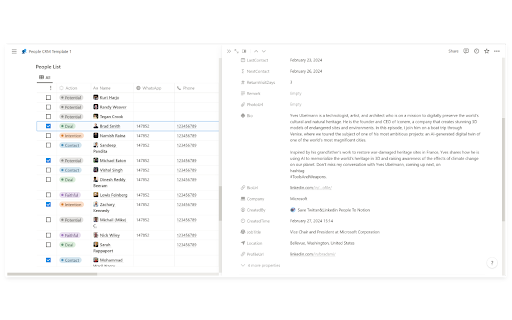
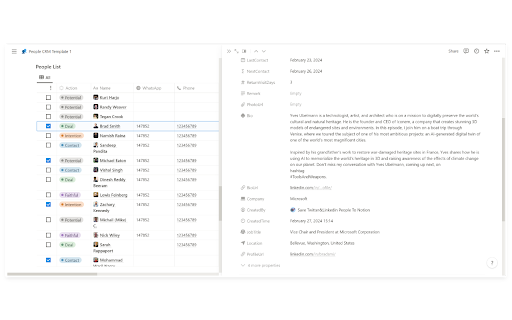
Import Twitter and LinkedIn contact information to Notion CRM with one click, streamlining CRM processes. Effortlessly streamline your CRM process with the Save Twitter & LinkedIn People to Notion CRM plugin. Designed specifically for social media managers, sales professionals, and CRM enthusiasts, this plugin allows you to quickly import valuable contact information from both Twitter and LinkedIn into your Notion CRM. With just one click, you'll be able to: Track and manage customer relationships effectively Organize and centralize all contact data Optimize your sales pipeline with accurate, up-to-date information Strengthen customer communication records for better engagement Update Log: 2026-02-28: Fixed the display issue of the save button in the LinkedIn version and optimized the UI experience. 2025-8-9: Fix the problem that the save button cannot be displayed 2024-2-27: New Feature: Now supports saving user information from both Twitter and LinkedIn simultaneously. This tool is a must-have for anyone looking to enhance their CRM workflows, improve efficiency, and maintain stronger, data-driven relationships with clients.

Streak CRM for Gmail
Manage sales and customer relationships directly inside Gmail. Streak is the CRM that lives in your Gmail inbox. Track deals and relationships inside Gmail with Streak CRM. Whether you're a sales professional, business owner, or freelancer, Streak helps you organize emails and close deals without leaving your inbox. ➤ Key Features: 📧 Gmail Integration: Fully embedded in Gmail. Syncs with Google Calendar & Drive. 📊 Customizable Pipelines: Track deals, support tickets, orders, fundraising, and more. 📈 Reports & Analytics: Pipeline status, conversion rates, activity trends, exported for deeper insights. ✅ Task Management: Set reminders, to‑dos, and deadlines. ⚙️ Integrations & Automation: Connect with the apps that power your business and automate repetitive tasks. 💼 LinkedIn Integration: Instantly add leads from LinkedIn to Streak. 🤖 AI Co-pilot: Smart data entry, deal summaries, Q&A, and call & meeting agenda generation. 📬 Email & Link Tracking: See when emails are opened and links are clicked. 📨 Mail Merge + Auto Follow-Up: Send personalized emails to multiple recipients and boost reply rates. 👥 Team Collaboration: Share pipelines, track team progress, and work together in real time. 📱 Mobile Access: Use Streak on the go with Android & iOS apps. 🔒 Enterprise-Grade Security: Built on Google Cloud with rigorous privacy standards. Join 750,000+ professionals who trust Streak to manage their customer relationships and close more deals - right from their inbox. 📌 Install & Get Started 1. Click “Add to Chrome.” 2. Authorize Streak in your Gmail account. 3. Pick a pipeline (sales, hiring, support, fundraising). 4. Import or add leads from your inbox to start tracking conversations and deals

inNotion: Import & Enrich LinkedIn Profiles for Notion
inNotion — Import & enrich LinkedIn profiles to Notion CRM. Get emails, phone numbers, add private notes and automate networking. Import LinkedIn profiles to Notion with automatic email and phone enrichment — no more tab switching. What it does ************* inNotion connects LinkedIn to your Notion CRM via your browser's side panel. Import profiles in one click, automatically enrich contacts with verified emails and phone numbers, automate your live events networking workflow, add private notes and reminders that stay in your browser, not in Notion. Your CRM always stays visible while you browse. No more copying data between tabs. Why it matters *************** Manual CRM data entry is super-slow & boring: open LinkedIn, copy name, switch to Notion, paste, go back, copy company, switch again. Repeat for every field, every contact. inNotion eliminates this. One click imports all profile data. Automatic enrichment adds contact details you'd otherwise search for manually. Side panel means zero context switching. Core features ************** - LinkedIn profile import: One-click People to Notion import from any LinkedIn page - Email & phone enrichment: Automatic contact data retrieval - Live events networking automation: keep the conversation rolling - LinkedIn import - Email/phone enrichment - Contextualized note & follow up reminder - Contextualized LinkedIn invitation message - Real-time sync: Changes appear in Notion immediately - Private notes & reminders: Browser-only storage, not synced to Notion - Side panel workflow: Your Notion CRM stays visible beside any webpage - QR code scanner: Capture LinkedIn profiles at in-person events (mobile) - Multi-database support: Switch between different Notion CRMs Built for ******** - Sales teams tracking prospects - Recruiters managing candidates - Freelancers organizing clients - Anyone running a CRM in Notion. Setup ****** 1- Install extension 2- Connect your Notion database 3- Import your first profile! Privacy ******** Data flows between your browser and Notion only. Private notes stay local. We don't store or access your information. Legal disclaimer ***************** inNotion is not affiliated with, endorsed by, or sponsored by LinkedIn or Notion. LinkedIn™ and Notion™ are registered trademarks of their respective owners. inNotion is an independent third-party browser extension.

noCRM: Simple Sales CRM for WhatsApp™
Manage and create leads easily from WhatsApp™ and instantly log interactions in noCRM! 🌟 NOCRM WHATSAPP EXTENSION – SIMPLE SALES CRM FOR WHATSAPP 📱 Take your sales game to the next level with the noCRM WhatsApp Extension! Connect WhatsApp™ with noCRM.io, the lead management tool built to help your sales team close deals faster and more efficiently. This Chrome Extension allows you to manage your WhatsApp interactions effortlessly, saving valuable time and keeping your sales process organized. Whether you're a current noCRM customer or exploring tools to simplify your sales journey, this extension is your solution. ✨ New to noCRM? Learn more at https://www.nocrm.io/ and unlock the full potential of this extension! 🌐 WHY noCRM.io Unlike traditional CRMs, noCRM is built with simplicity in mind, empowering sales teams to focus on what matters: closing deals. Trusted by thousands of businesses worldwide, noCRM ensures your pipeline stays organized and effective. FEATURES YOU’LL LOVE ✨ - 🗂️ LOG INTERACTIONS EASILY: Save customer conversations directly in noCRM for full tracking. - 🤝 MANAGE YOUR LEADS FROM WHATSAPP: Instantly access lead details and setup reminder from noCRM whenever a lead is linked to a WhatsApp number. - 💬 SEND PRE-SET TEMPLATES: Use customizable message templates to respond quickly and professionally. WHY USE THIS EXTENSION 🚀 The noCRM WhatsApp Extension bridges the gap between conversations and actionable leads, helping you stay on top of your pipeline while ensuring no sales opportunity slips through the cracks. - 🔍 Perfect for sales teams, small businesses, and entrepreneurs who use WhatsApp for customer interactions. - 🛠️ Works seamlessly with noCRM.io to keep your pipeline organized and sales-focused. 1️⃣ INSTALL the extension and log into your noCRM.io account. 2️⃣ OPEN WhatsApp Web and connect your conversations to noCRM. 3️⃣ START creating and managing leads, saving interactions, and sending templates—all without leaving WhatsApp Web. The noCRM Chrome Extension supports regular Whatsapp and Whatsapp Business. Please note that only works with the Whatsapp Web on the browser. 🤝 Subscriptions: Start with our free browser extension or unlock full features with the Dream Team or Solopreneur edition. 💼 With the noCRM WhatsApp Extension, you can save time, stay organized, and focus on what truly matters—closing deals. If you have any problems or suggestions please contact our support team This Chrome Extension is not endorsed, certified, or affiliated with WhatsApp Inc., Meta, Facebook, or Instagram. noCRM is an independent lead management software and is in no way related to or associated with Meta or its products.

Gemini to PDF: Export Gemini Chats to PDF, Markdown, JSON
Export Gemini chats to PDF or Markdown instantly. Save Gemini conversations, download chats, and archive discussions with one clic Never lose an important Gemini conversation again. Gemini to PDF lets you export chats to PDF, Markdown, or JSON instantly. Save, download, and archive your Gemini conversations with one click — including code, images, math, and full formatting. Perfect for saving Gemini chats as clean, shareable files. Gemini to PDF captures your conversations exactly as you see them: • Code blocks keep their syntax highlighting • Tables, math (LaTeX), and structured content stay intact • Images and attachments are included • Links, headings, and formatting are preserved • The original layout remains clean and readable • Even very long chats export without breaking Your exported files are polished, easy to read, and ready to share, store, or revisit anytime. • One-Click Export — Save the current chat instantly • Batch Export — Export multiple conversations at once • Multiple Formats — PDF, Markdown (.md), JSON, or Plain Text • High-Quality PDF Export — No cut-off pages or broken layouts • Formatting Preserved — Headers, lists, links, and styles stay intact • Works Offline — Export chats without an internet connection • Works with Long Chats — Handles large conversations smoothly • Automatic backups to Google Drive, Dropbox, Notion, or Yandex Disk • Access your exported chats from anywhere • Keep your Gemini conversations organized and secure Your data stays on your device. Everything is processed locally, making it safe for sensitive work, research, and personal use. 🛠️ WHO IT’S FOR Developers, students, writers, professionals, and researchers who want to save, organize, and revisit your Gemini conversations. • Developers — Save code snippets and debugging sessions • Students — Keep study material and research organized • Writers & Creators — Store ideas, drafts, and content • Professionals — Document workflows and planning • Researchers — Preserve detailed discussions ✔ Fast and reliable, even for very long chats ✔ Cleaner and more accurate than copy-paste or print methods ✔ Designed specifically for Gemini chat export ✔ Lightweight, simple, and easy to use ✔ Supports multiple export formats Install Gemini to PDF and start saving your Gemini chats as clean, shareable files in seconds.
