
fjgpfjohfddffjhkekipahjnfdioijad
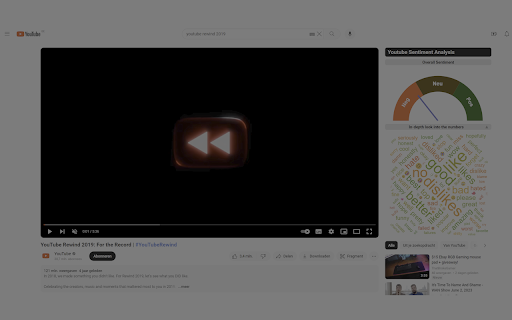
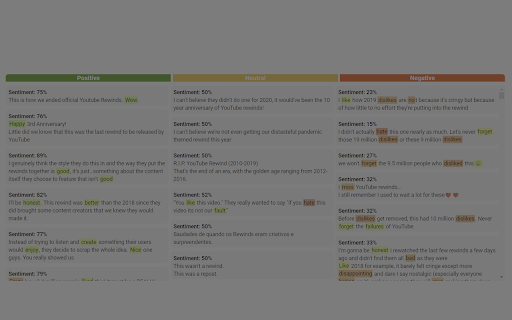
Introducing the Youtube Sentiment Analysis Chrome extension! Developed as part of a KU Leuven course, this extension employs the… Introducing the Youtube Sentiment Analysis Chrome extension! Developed as part of a KU Leuven course, this extension employs the powerful VADER sentiment model to analyze comments under YouTube videos, offering insightful sentiment visualizations. Our extension embeds sentiment visualizations directly into the YouTube frontend. This aims to enhance your understanding of the sentiment present within the youtube comments. In our ongoing research, we aim to uncover the most effective visualizations for enhancing your comprehension of the underlying VADER model. We invite you to participate in our user study and be a pivotal part of this groundbreaking research initiative. Simply watch three videos, share your insights through a questionnaire. Join us on this exciting journey of discovery! Elevate your YouTube experience, contribute to cutting-edge research, and download our extension now!

Comment Insights: Interactive AI-Powered YouTube Comment Analyzer
YouTube comment insights with ChatGPT. Unlock the collective wisdom of your audience. Unlock the power of YouTube comments with Comment Insights! This AI-driven tool not only analyzes and refines comments but also allows you to send queries directly to AI (ChatGPT) for interactive insights. Access valuable, dynamic feedback right from your Chrome extension or embedded panel on the YouTube page, and gain a deeper understanding of YouTube comments to enhance your insights and decision-making. • AI-Powered Analysis: Utilize advanced AI technology to extract key insights from YouTube comments. • Interactive Queries: Send your specific questions directly to AI (ChatGPT) for personalized, dynamic feedback. • Noise Reduction: Focus on the most relevant comments, cutting through the clutter. • Sentiment Analysis: Understand the emotional tone of comments to better gauge viewer sentiment. • User-Friendly Interface: Seamlessly integrates with your YouTube experience, providing easy access to refined comment insights. Experience the future of YouTube comment analysis with Comment Insights. Download now and unlock the collective wisdom of your audience through interactive AI-powered insights.

Youtube Comments Insights
Analyzes the comment section of a youtube video according to the themes that are discussed the most This Chrome extension is a unique tool designed specifically to analyze the comment section from videos of your favourite Youtube channels. Whether you want to grab a quick glance of the most popular discussed topics or explore emerging trends based off the comments from your favourite creators, this extension can help provide you with a quick overview, which is especially useful for videos that contain thousands of comment threads. Youtube Comments Insights also possesses a filter for the number of total comments you want to retrieve for a useful analysis which are given the percentage values of 50%, 75%, or 100%. Additionally to the most repeated words, the result from each analysis also identifies the most repeated bigrams, and trigrams which will provide a clear insight into the general themes being discussed within the comments section of the video you wanted to analyze.

YouTube Comment Analyzer
Turn YouTube comments into AI summaries, sentiment insights, content ideas, sponsor leads, and authentic replies. YouTube Comment Analyzer is an advanced, AI-powered tool designed to help YouTube creators, marketers, and brands analyze, understand, and engage with their audience at a much deeper level. Move beyond simple metrics and unlock actionable insights from viewer comments instantly. 🔥 What's New & Core Features: 📊 Deep Audience Analytics & Sentiment Sentiment Analysis: Automatically categorizes comments into Positive, Neutral, or Negative to give you an instant pulse on audience feedback. Toxicity & Spam Filter: Instantly calculates the "Toxicity / Spam Ratio" of your comment section locally, keeping your community safe. Vibe & Demographics Analyzer: Dive deeper into your audience's profile! Our AI identifies likely age groups (Gen-Z, Millennials, etc.), dominant slang used, and the overall emotional tone towards your content. 💼 Scan for Leads & Sponsors Automatically scans hundreds of comments EXCLUSIVELY for potential brand sponsorships, collaboration requests, or direct business inquiries from viewers and companies. Never miss a business opportunity hidden in the comments! ❓ Q&A with Timestamp Extraction Identifies the most insightful and frequently asked questions from your viewers. Smart Detection: Automatically extracts and includes video timestamps (e.g., 05:24) left by viewers alongside their questions so you can address exactly what they are referring to. 💡 Content & Competitor Ideas Generates neutral, objective, and highly engaging video concepts based on actual viewer demand. Competitor Tracking: Automatically detects and lists if your audience is mentioning or comparing your content to Competitor Channels, giving you a strategic edge. 📝 Smart Summaries Creates concise, high-level summaries of key topics being discussed, helping you grasp the overall conversation of thousands of comments at a glance. ✍️ Authentic Comment Replies Provides AI-generated responses for engaging with viewers. Choose your tone (Casual, Professional, Funny, Supportive, Critical, etc.) and generate replies based on the comment text, your video’s caption, or both! 📥 Export & Share (CSV + Notion) Export to CSV: Download all analyzed data in a CSV file for detailed offline reporting. Copy for Notion: Instantly copy formatted Markdown tables directly from your AI results, perfect for pasting straight into Notion, Obsidian, or your project management tools. Multi-Language Support: Customize the language for AI analysis and responses to suit your global audience How It Works: 1. Scroll through the comments section of any YouTube video. 2. Click the “Analyze Sentiment” button to gather and process visible comments. 3. Explore deep, AI-driven insights across the Analytics, Summary, Q&A, Ideas, Leads, and Reply tabs. 4. Export your data via CSV or copy the sleek Markdown tables straight to your Notion dashboard. Why Use YouTube Comment Analyzer? Whether you're a content creator, marketer, or brand manager, extracting value from YouTube comments shouldn't take hours. Save time, uncover hidden sponsorships, track what your audience really thinks (and who they compare you to), and build stronger community connections with this all-in-one extension. Note: Sentiment and Toxicity are processed locally and for free.

Highlights for YouTube
View highlights on the video player, that are generated from timestamps found in the description and top comments. ✨ UPDATE: Added controls for navigating between highlights. 🎬 See chapters or interesting moments without the need to scroll to the comment/description section. You can toggle the highlights directly from the video player options. ⚠️ Not all videos will have highlights on them since they are generated from timestamps. 🔗 Open Source: View code and report issues on GitHub: https://github.com/Ermag/yt-highlights-chrome 💭 Feedback is greatly appreciated!
