
fjgebdmbjiahfjcjaemkmifpdjaldfcc
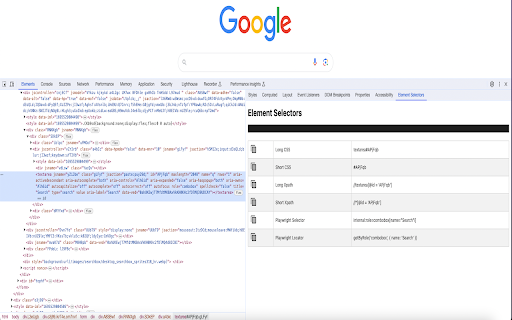
Chrome extension to find element selectors Xpath and CSS plugin to auto generate shortest xpath, css & Playwright Locators Element Selectors plugin can also be used to auto generate the unique shortest xpath, shortest css and Playwright selectors. Steps to generate xpath, css and playwright locator 1. Once installed, please restart your browser 2. Open the page you can want to get css selector 3. Open Devtools by clicking on the inspect window or F12 (Function F12) 4. Open the Element Selectors sidebar panel located in the devtools 5. Inspect the desired element to get the css locator Features- a) Playwright Locator b) Short and Long CSS c) Short and Long Xpath If you are facing any issue or want to give a feedback, feel free to reach out to me at genaidevguru@gmail.com

pH - Playwright Helper
Find Playwright UI elements - id, name and custom attributes highlighted in different colors;Generates Playwright page Objects Find Playwright Test locators such as - id, name and custom attributes highlighted in different colors;Generates Playwright Page Objects

Playwright Locator Assistant
Instantly generate and verify the best Playwright locators for any element on the page. Playwright Locator Assistant helps QA engineers and developers generate, verify, and manage Playwright locators directly from the browser — no DevTools diving, no manual selector writing. ───────────────────────────────────────── GENERATE THE BEST LOCATOR INSTANTLY ───────────────────────────────────────── Click any element on the page to capture it, or use the keyboard shortcut (Alt+Shift+L on Windows/Linux, ⌘+Shift+L on Mac) to lock in the element under your cursor without clicking — keeping dropdowns, menus, and hover states open. The extension automatically picks the most robust Playwright strategy available, in priority order: • getByTestId — data-testid, data-cy, data-qa, data-test, data-automation-id, data-test-id • getByRole with accessible name — buttons, links, headings, inputs, and more • getByLabel — for form controls associated with a • getByPlaceholder, getByAltText, getByTitle • Native dropdowns — generates a ready-to-use selectOption() call • Table cells — row-anchored via .filter({ hasText }) so locators survive row reordering • Chained ancestor locators — when no global unique match exists • CSS selector fallback — with a clear warning to add a test ID ───────────────────────────────────────── SKIPS DYNAMIC VALUES AUTOMATICALLY ───────────────────────────────────────── Exchange rates, prices, dates, times, and counters are detected at capture time and excluded from the locator. Your tests stay green across data refreshes. ───────────────────────────────────────── UNIQUENESS BADGE ───────────────────────────────────────── Every captured locator is checked against the current page instantly: ✓ 1 — unique match, safe to use ⚠ 3 — not unique, consider a more specific locator ✗ 0 — no match found (page state may have changed) ───────────────────────────────────────── ALTERNATIVE STRATEGIES ───────────────────────────────────────── Expand the "Alternatives" panel below any captured locator to see up to 5 other valid strategies for the same element — each with its own Copy button. ───────────────────────────────────────── VARIABLES FOR PARAMETERISED TESTS ───────────────────────────────────────── One click on the { } button converts table cell values, row identifiers, and select options into named variables (rowText, cellValue, optionText in JS; row_text, cell_value, option_text in Python) — ready to paste into a parametrised test function. ───────────────────────────────────────── VERIFY ANY LOCATOR ───────────────────────────────────────── Paste any locator into the Verify section and the extension highlights all matching elements on the page with a red outline. Supports: • Playwright syntax: getByRole, getByLabel, getByText, getByPlaceholder, getByAltText, getByTitle, getByTestId, locator() • Chained locators: page.getByRole("nav").getByRole("link", { name: "Home" }) • XPath: //div[@id="main"] or xpath=... • Playwright shorthands: text=Submit, css=.my-class • Plain CSS selectors • Python snake_case: get_by_role, get_by_label, select_option, etc. ───────────────────────────────────────── LOCATOR HISTORY ───────────────────────────────────────── The last 8 captured locators are saved and shown in the popup. Each entry has its own Copy button, so you can build out a full test scenario without losing earlier work. ───────────────────────────────────────── PYTEST & JAVASCRIPT SUPPORT ───────────────────────────────────────── Toggle between Pytest (Python) and JavaScript at any time. Every locator — including options, chaining, and exact flags — is formatted correctly for your chosen framework. ───────────────────────────────────────── BUILT-IN WARNINGS ───────────────────────────────────────── Elements inside an or Shadow DOM are flagged inline so you know exactly what extra step is needed (frameLocator() or a pierce: selector) before the locator will work in your test. ───────────────────────────────────────── HOW TO USE ───────────────────────────────────────── 1. Open the extension popup on any page. 2. Click "Pick Element" and click any element on the page, OR hover over an element and press Alt+Shift+L (⌘+Shift+L on Mac) to capture it instantly. 3. The locator appears in an overlay on the page and in the popup. Copy it directly. 4. To verify a locator, paste it into the "Verify Selector" box and click "Check Selector". 5. Recent locators are saved in section 3 of the popup for quick access. For native dropdowns: Click the dropdown to open it, press Escape to close it (without selecting), then press the shortcut. The locator is generated from the currently selected value — replace it with your desired option in the test.

SelectorsHub
Locators Plugin to Auto Generate and Verify Playwright Locators, XPath & CSS Selectors. SelectorsHub - Auto-generate Playwright Locators, XPath & CSS Selectors SelectorsHub is a powerful developer tool that automatically generates and verifies Playwright locators, XPath, and CSS selectors for web automation testing. Key Features: 1. Auto-generation: Instantly generates multiple selector types including native Playwright locators, XPath, CSS selectors, IDs, names, and more. 2. Advanced element support: Works seamlessly with iframes, Shadow DOM, SVG elements, dynamic elements, dropdowns, and complex UI components. 3. Smart suggestions: Auto-suggests attributes, text values, and occurrences to help you build selectors faster—no more copying and pasting from the DOM. 4. Error detection: Provides clear error messages indicating what's wrong with your XPath or CSS selectors. 5. Element highlighting: Automatically highlights matching elements and scrolls them into view for easy verification. 6. XPath Healing: Verify all the xpath in one shot. 7. Locators Page: Generate Locator Page in one go. How to Use: 1. Open Chrome DevTools (F12 or right-click > Inspect) 2. Navigate to the SelectorsHub tab in the DevTools sidebar, or click the SelectorsHub icon in your browser toolbar 3. Inspect any element to automatically generate all selector types 4. For Playwright locators, click the "Playwright Selectors" button, then inspect the element 5. Type or edit selectors in the input box—smart suggestions will help you complete them quickly 6. Press Enter to verify and highlight all matching elements on the page Perfect for: a) QA Engineers and Test Automation professionals, b) Web developers working with Playwright, Selenium, Cypress, or other testing frameworks c) Anyone who needs reliable, maintainable element selectors

Web Element Selector
Advanced element locator with AI-powered xpath and css selector generation. Supports ChatGPT, Gemini, DeepSeek, and Claude. WEB ELEMENT SELECTOR v5.0 The Professional AI-Powered Automation Companion for QA and Developers Web Element Selector is a comprehensive Chrome extension re-engineered for Test Automation Engineers, QA Professionals, and Web Developers. Going beyond simple selector generation, v5.0 transforms into a full-featured automation assistant capable of generating robust Page Object Models (POM), handling complex relative locators, and validating elements with AI-driven confidence scoring. Designed for reliability in CI/CD pipelines and dynamic web environments, Web Element Selector ensures your test scripts are resilient, maintainable, and generated in seconds. KEY CAPABILITIES [1] INTELLIGENT AI LOCATOR GENERATION Leverage the combined power of ChatGPT, Gemini, DeepSeek, and Claude to generate context-aware XPath and CSS selectors. Unified AI Engine: Get the single best locator with an automatic Confidence Score. Persistent Context: The AI remembers your session history, allowing for iterative refinement even after page reloads. Smart Validation: Instantly validate and highlight elements to ensure locator accuracy before adding them to your code. [2] AUTOMATED PAGE OBJECT MODEL (POM) EXPORT Stop writing boilerplate code manually. Export complete Page Object classes instantly. Framework Agnostic: Native support for Playwright, Selenium (Java/Python/C#), and Cypress. Smart Integration: Automatically incorporates AI-optimized locators into your preferred design pattern. Batch Processing: Select multiple elements and export a full page object in one click. [3] RELATIVE LOCATOR SUPPORT Build resilient tests for dynamic applications where IDs and attributes change frequently. Visual Guidance: Visual indicators help you map the DOM structure to create the most stable relative path. Deep Freeze: Pauses JavaScript timers, CSS animations, and DOM mutations. Precision Capture: Allows you to inspect and select elements that are impossible to catch with standard dev tools. Client-Side Security: API keys are stored locally with encryption. Optimized Performance: The v5.0 bundle is 75% smaller and 60% faster, ensuring zero impact on browser performance. IDEAL FOR QA Engineers building scalable test automation frameworks. DevOps Teams requiring stable locators for consistent CI/CD pass rates. Test Architects designing maintainable Page Object Models. WHATS NEW IN VERSION 5.0 MAJOR UPDATE: Complete architecture overhaul for speed and stability. NEW: Complete POM Export for Playwright, Selenium, and Cypress. NEW: Relative Locator generation for dynamic content. NEW: Unified AI suggestions with reliability scoring. IMPROVED: Enhanced Shadow DOM and iframe support. IMPROVED: 40% reduction in memory usage and optimized garbage collection. Download the latest release package. Enable "Developer Mode" in your browser's extension settings. Select "Load Unpacked" and choose the extension directory. OPEN SOURCE & COMMUNITY Web Element Selector is open-source software. We believe in transparency and community-driven development. Privacy Policy: We do not collect personal data. All AI operations are performed via your own API keys stored locally on your device.
