
filgplhfalgafolkffphilkgckdgnona


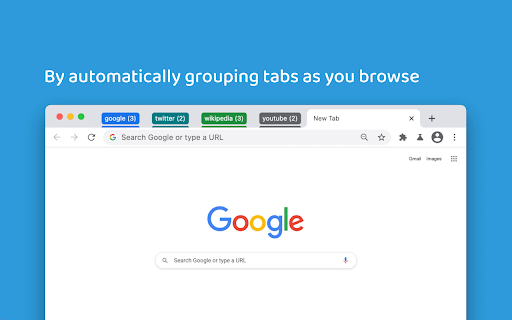
Mark is a minimalist tab manager that organizes tabs as you browse. With Mark, tabs are automatically grouped by domain and sorted alphabetically so you can easily find them later. Mark uses the native tab groups feature of Chrome, meaning there’s no learning curve to get started. Simply install Mark and any open and newly created tabs will be grouped and sorted. Mark can be configured to only group tabs or only sort tabs depending on how you like to browse. Additionally, you can enable Mark to consolidate tabs across windows - meaning you won’t lose a tab because it’s hiding in its own window. You can pin the extension to your browser toolbar by clicking the puzzle looking icon located in the top right of your toolbar, scrolling down to Mark, and clicking the “Pin” icon. Pinning the icon makes it easily accessible for clicking to manually organize tabs in cleanup mode, which will collapse any open groups. Change one of the configuration settings by right clicking on the Mark extension icon, navigating to the “Settings” menu, and toggling one of the settings. Depending on the way you would like to browse, customizing some things could make for an even better experience. If you find yourself more curious about how Mark works or what other options and functionality are available, visit the “Resources” menu at any time by right clicking the Mark extension icon.

Tabmanager.io - Tab Session Manager
Manage, save and restore your windows, tabs and sessions. Tabmanager.io is an all-in-one session, window and tab manager extension for Chrome that helps you manage your open tabs, tab-groups and windows in one convenient place. ★ Windows & Tabs Our manager empowers you to swiftly navigate through open windows and tabs using either your mouse or keyboard. You can effortlessly switch between tabs and windows, search and filter tabs by title or URL keywords, and efficiently manage various aspects of your tabs such as pinning, sorting, grouping tabs by domain, suspending, identifying tabs with sound, and removing duplicates. Additionally, you have the option to export your tabs and windows as files for backup, save tabs for future use, and synchronize them across multiple devices. Our manager presents a multiple column layout that enables you to gain a comprehensive overview of all your open windows and tabs while providing the flexibility to organize your windows by renaming them. Through simple drag and drop functionality, you can easily move tabs between windows, open them in new windows, or merge entire windows. The tab manager also offers convenient features to save tabs for later restoration. You can save specific tabs within a window, save all tabs within a window, or save the entire session encompassing all open windows. ★ Tab Groups The tab manager comes with built-in support for managing your tab-groups. You can easily create a new tab group, move groups between windows, merge tab groups, rename tab groups and save your tab groups and restore them with the window at a later time. ★ Session Manager The session manager provides a comprehensive view of all your saved sessions, allowing you to effortlessly manage and swiftly restore previously saved sessions. Our intelligent restore feature ensures that opening tabs in a new or existing window does not slow down your computer, as tabs are opened in a suspended state. You can also sync your saved sessions to the cloud, ensuring data integrity and accessibility across all your devices. ★ Session History You can access a timeline overview of your browser sessions, enabling you to easily restore individual windows or tabs from earlier points in time. Save session snapshots from either the manager or the menu, providing you with the flexibility to quit your browser or temporarily use a blank browser without the risk of losing your tabs. Enabling the auto-save session feature helps you track your local browser session history in case of a browser crash. Sessions in the session history is saved on your local machine and are not saved to the cloud. ▪ Overview of active Windows and Tabs ▪ Keyboard navigation support ▪ Rename Windows ▪ Switch between Tabs and Windows ▪ Multiple Window columns for wide screens ▪ Light/Dark theme ▪ Filter Tabs with search ▪ Drag and drop Tabs and Windows ▪ Merge Windows by drag and drop ▪ Group Tabs by domain ▪ Sort Tabs ▪ Remove duplicate Tabs ▪ Suspend/Discard Tabs from memory ▪ Find Tabs playing audio ▪ Mute/Unmute Tab playing audio ▪ Create new Tab-group ▪ Drag and Drop Tab-group ▪ Merge Tab-groups ▪ Save Tab-groups for later ▪ Save Tabs for later ▪ Save Windows for later ▪ Save Session for later ▪ Quickly restore Windows and Sessions ▪ Share Windows by URL ▪ Automatic Sessions history snapshot ▪ Take Session snapshots for easy restore later ▪ Export Tabs, Window or Session as JSON/CSV ▪ Import exported Tabs, Window or Session ▪ Backup & Sync ▪ Cloud Backups ▪ And more... Send us an email at support@tabmanager.io if you need support or have suggestions about missing features.

Auto-Group Tabs
Automatically add tabs to your configured groups, based on their URL. Categorize your frequently used websites and automatically add them to tab groups whenever you open them.

Group Tabs
This is a Chrome extension that sorts and groups tabs. * Feature: Not group for domain or sub-domain that has only 1 tab. # Access to data This extension access all tabs, but uses only the URL of the site open in the tab. Use this information when sorting or grouping tabs.

TabMate
TabMate helps you manage the tab clutter. Easily switch between tabs, save & restore set of tabs or windows, and more. TabMate helps you manage tab clutter and be more productive. Stash a set of tab/windows that you want to save for later and easily restore them when needed. Use quick switcher to search among open tabs and stashes and switch to them. Drag and drop the tabs to rearrange them with in windows or stashes. Name stashes so you can easily remember the purpose for each set of tabs. Easily send tabs to named stashes through right click context menu. Common usages: - Quickly search and switch between all the open tabs and stashes - Save the pages you've visited during your research session and restore all of them later. - Logically group all the pages you visit often and load each group when needed. - Easily manage existing open tabs by saving unnecessary tabs as a session.
