
fhncpllbpbfeihiibllhgghfmcbgmpfg
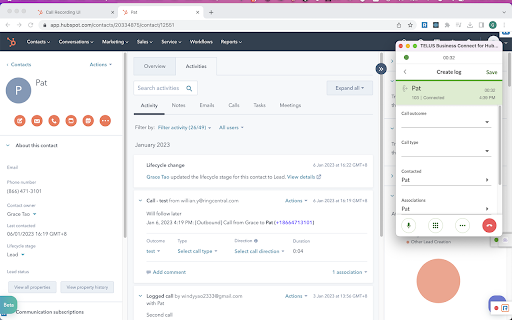
TELUS Business Connect for HubSpot With TELUS Business Connect for Hubspot, we embed key TELUS Business Connect capabilities into your Hubspot CRM account, allowing you to get more work done and communicate directly from Hubspot. Features * Call controls: Leverage TELUS Business Connect calling capabilities, answer inbound and make outbound calls without ever navigating away from Hubspot. * Message hub: Access all TELUS Business Connect text messages, voicemails, and faxes from one place. * Click-to-call and Click-to-SMS : Easily click HubSpot phone entries to call or text right within your browser or your TELUS Business Connect chrome extension. * Instant screen pop: When a call comes in, TELUS Business Connect for Hubspot instantly responds; identifying the caller by their corresponding Hubspot record. If no record is available, you’ll get the option to easily add a new record as a contact. * Association call logging: You may manually log calls with several associations. Be able to log a call under several associations, such as the contact, company, active deals, or tickets. You may also let the app log your calls automatically. * Server side text logging: Support logging a message as Activity under several associations, such as a contact, company, active deals or tickets either automatically or manually. The app can log new texts received to your HubSpot record even when you are offline. * Analytics: Make custom reports, and view your TELUS Business Connect data within Hubspot. Get actionable insights with invaluable metrics into individual and team performance. * Work the way you want: There’s no software to download; you can log on and get access to TELUS Business Connect for Hubspot from any PC or Mac.

Alignerr Connect Extension
The Alignerr Connect Extension facilitates time tracking for Alignerr experts working on projects external to the Labelbox… The Alignerr Connect Extension facilitates time tracking for Alignerr experts working on projects external to the Labelbox platform. Log hours directly from any website for accurate record-keeping.

RingCentral for HubSpot
RingCentral for HubSpot RingCentral for HubSpot Chrome extension will be retired soon. Install the new RingCentral for HubSpot native app for a faster, seamless calling experience inside HubSpot. RingCentral for HubSpot native app https://ecosystem.hubspot.com/marketplace/apps/ringcentral-for-hubspot-362105 With RingCentral for Hubspot, we embed key RingCentral capabilities into your Hubspot CRM account, allowing you to get more work done and communicate directly from Hubspot. Features * Call controls: Leverage RingCentral calling capabilities, answer inbound and make outbound calls without ever navigating away from Hubspot. * Message Hub: Access all RingCentral text messages, voicemails, and faxes from one place. * Click-to-call and Click-to-SMS : Easily click HubSpot phone entries to call or text right within your browser or your RingCentral chrome extension. * Instant screen pop: When a call comes in, RingCentral for Hubspot instantly responds; identifying the caller by their corresponding Hubspot record. If no record is available, you’ll get the option to easily add a new record as a contact. * Association call logging: You may manually log calls with several associations. Be able to log a call under several associations, such as the contact, company, active deals, or tickets. You may also let the app log your calls automatically. * Server side text logging: Support logging a message as Activity under several associations, such as a contact, company, active deals or tickets either automatically or manually. The app can log new texts received to your HubSpot record even when you are offline. * Analytics: Make custom reports, and view your RingCentral data within Hubspot. Get actionable insights with invaluable metrics into individual and team performance. * Work the way you want: There’s no software to download; you can log on and get access to RingCentral for Hubspot from any PC or Mac. Documentation User guide https://netstorage.ringcentral.com/guides/hubspot_user_guide.pdf Administrator guide https://netstorage.ringcentral.com/guides/hubspot_admin_guide.pdf

HubSpot Click-to-Call
HubSpot Click-to-Call enhances your HubSpot CRM experience by automatically detecting phone numbers and converting them into actionable call links. Key Features: • One-Click Calling: Instantly launch your default calling application with properly formatted phone numbers • Automatic Detection: Works with all phone number fields in HubSpot CRM • Call Tracking: Automatically updates the page URL to include call interaction parameters • Dynamic Updates: Links update in real-time as you edit phone numbers • Seamless Integration: Styled to match HubSpot's interface for a native experience How It Works: The extension identifies phone number fields in HubSpot's CRM interface It creates clickable "Initiate Call" links below these fields When clicked, your default calling application opens with the formatted number After initiating the call, the page updates to include "?interaction=logged-call" in the URL Privacy & Security: • Minimal permissions required (only activeTab) • No data collection or external scripts • Works entirely within your browser Perfect For: • Sales representatives making frequent calls • Customer support teams using HubSpot • Account managers maintaining client relationships • Anyone who needs efficient phone communication through HubSpot Streamline your calling workflow and improve productivity with HubSpot Click-to-Call! Technical Details: • Compatible with the latest versions of Google Chrome • Built with Manifest V3 • Lightweight with minimal impact on page performance

AT&T Office@Hand for HubSpot
AT&T Office@Hand for HubSpot With AT&T Office@Hand for Hubspot, we embed key AT&T Office@Hand capabilities into your Hubspot CRM account, allowing you to get more work done and communicate directly from Hubspot. Features * Call controls: Leverage AT&T Office@Hand calling capabilities, answer inbound and make outbound calls without ever navigating away from Hubspot. * Message hub: Access all AT&T Office@Hand text messages, voicemails, and faxes from one place. * Click-to-call and Click-to-SMS : Easily click HubSpot phone entries to call or text right within your browser or your AT&T Office@Hand chrome extension. * Instant screen pop: When a call comes in, AT&T Office@Hand for Hubspot instantly responds; identifying the caller by their corresponding Hubspot record. If no record is available, you’ll get the option to easily add a new record as a contact. * Association call logging: You may manually log calls with several associations. Be able to log a call under several associations, such as the contact, company, active deals, or tickets. You may also let the app log your calls automatically. * Server side text logging: Support logging a message as Activity under several associations, such as a contact, company, active deals or tickets either automatically or manually. The app can log new texts received to your HubSpot record even when you are offline. * Analytics: Make custom reports, and view your AT&T Office@Hand data within Hubspot. Get actionable insights with invaluable metrics into individual and team performance. * Work the way you want: There’s no software to download; you can log on and get access to AT&T Office@Hand for Hubspot from any PC or Mac.
