
fhjegjndanjcamfldhenjnhnjheecgcc

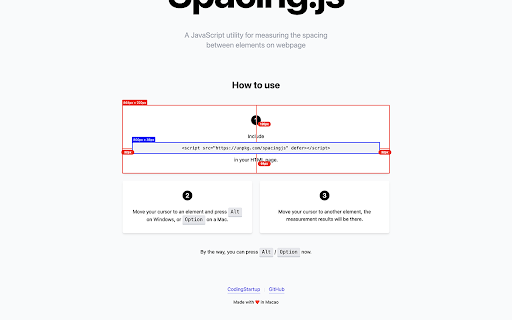

Precision spacing measurement tool for web developers and designers. Hold Alt/Option key and hover over elements to measure. Precision spacing measurement tool for web developers and designers. Measure distances, margins, and padding between webpage elements with pixel-perfect accuracy. 🎯 How to Use: 1. Click the extension icon to activate SpacingJS 2. Hold Alt (Windows) / Option (Mac) and hover over any element 3. Move cursor to another element to see precise measurements 4. Click the icon again to deactivate ✨ What's New in v1.1.0: - Smart Toggle: Visual feedback shows when active (green dot on icon) - Keyboard Shortcuts: Quick activation with hotkeys - Enhanced Measurements: Shows element tag, class, and font size - Better Compatibility: Works with all element types including SVG 💡 Pro Tips: - Hold Shift to keep measurements visible longer (perfect for screenshots) - Works on any website (except browser internal pages) Perfect for designers, developers, and QA teams who need precise measurements for pixel-perfect layouts.

稀土掘金
为程序员、设计师、产品经理每日发现优质内容。 在新标签页展示聚合内容,包含前端、Android、iOS、后端、产品、设计六大频道,每个频道内都有一到多个内容源; 此外提供综合搜索及开发辅助小工具等能力为开发者的工作提效,浏览器激活状态下双击"j"键可快速唤起搜索框; 用户可以根据自己的需求和喜好自定义页面布局、切换日间/深色模式; 此浏览器拓展由稀土掘金技术社区(juejin.cn)提供支持,在线问题反馈请访问 https://juejin.cn/topic/6824710202692993037?sort=newest 。

CSS Peeper
Inspect website styles in seconds. Supercharge your workflow, and save hours of work. CSS Peeper is the ultimate Chrome extension for designers and developers who want a seamless way to inspect and extract design properties from any website. Say goodbye to digging through complex code. CSS Peeper provides an intuitive, organized interface to access key design details. Professionals deserve tools that save time. Let CSS Peeper streamline your workflow and help you work smarter, not harder. Join 500,000+ professionals who are already making the most of their time. Supercharge your workflow with advanced design inspection features and save hours of work. No more digging in a code. 👉 Get CSS Peeper for Free! Install now and start inspecting websites in seconds. Visit https://csspeeper.com for more details. ✦ Inspect design properties effortlessly. Stop digging through the code. Save hours by quickly inspecting element properties with a simple point-and-click. ✦ Explore colors used on your favorite sites. Browse a variety of colors, find inspiration, and easily check contrast. Love a palette? Export it to your favorite design tool. ✦ Identify typography. Explore the typography across any site, uncover unique font pairings, and check the most relevant text properties. ✦ Explore assets. Browse and download all images, icons, and graphics used across a website. ✦ Instantly preview and copy the CSS of any element, turning great design into reusable code. ✦ Browse and explore the typography in use on any website. Preview the typography hierarchy to understand font choices, sizes, and styles, helping you design confidently and efficiently. ✦ Effortlessly identify typography instances and gain deeper insights into font style applications. Navigate to a dedicated screen to inspect each type of style with precision. ✦ Browse colors by semantic grouping including typography, background, border, and more. Identify colors in context to get more insights. ✦ Inspect individual color instances and explore their use cases, including value, category, class, and design token. ✦ Explore gradients color by color and preview every shade to recreate stunning visual effects with precision. ✦ Contrast scanner helps you stay aligned with the best accessibility practices. Instantly assess contrast issues, ensuring your websites are beautiful and accessible. ✦ Smart Inspector offers an advanced way to inspect design details at a glance. It provides deeper insights into design properties, including color contrast, shadows, and elevation effects. ✦ Switch to Sidebar Mode to gain full access to the website’s viewport. You can see the full list of available features at https://csspeeper.com/pricing By using the CSS Peeper extension, you agree to our Terms & Conditions (https://csspeeper.com/terms-and-conditions) and Privacy Policy (https://csspeeper.com/privacy-policy). CSS Peeper is proud to support Learn to Code, a nonprofit that supports our mission to help everyone become better coders. By using affiliate links, we invite you to help our mission when you are shopping at partner stores, at no cost to you. Support is always optional, and can be permanently disabled at any time.

Measuremate — Pixel Ruler for Web Design
Measure distances, inspect the box model, drop guides on any live page. A pixel ruler for the web — no DevTools. Measure distances between any elements on any website. Pixel ruler, CSS inspector, and alignment guides — everything you need for pixel-perfect design handoff, right in your browser. Measuremate is a measuring tool built for frontend developers, web designers, and QA engineers who need precise pixel measurements without leaving the browser. Lightweight, private, and fast. 🔍 INSPECTOR MODE — Click any element to inspect it. See dimensions, distances to neighboring elements, and full CSS details. Hover to preview before selecting. 📐 GUIDES MODE — Place vertical and horizontal ruler guides anywhere on the page. Snap to element edges, measure between guides, and verify alignment like in Figma. Switch between modes with a single keystroke. ━━━━━━━━━━━━━━━━━━━━━━━━ WHAT YOU CAN DO ━━━━━━━━━━━━━━━━━━━━━━━━ 📏 MEASURE DISTANCES between any two elements — spacing, gaps, padding, margins. On-page dimension lines show exact pixel values. 🎯 INSPECT THE CSS BOX MODEL with visual breakdown of content, padding, border, and margin (including negative margins). 🔬 VIEW DETAILED CSS by category — Layout (display, position, flex, grid, z-index), Text (font, color, line-height, letter-spacing), and Attributes. 🌳 NAVIGATE THE DOM TREE — browse from root to any element, hover to preview, click to inspect. 📐 DROP VERTICAL OR HORIZONTAL GUIDES on any page with a single keystroke. Use arrow keys for 1px precision, Shift+arrows for 10px jumps. 🧲 SNAP TO ELEMENTS — guides and cursor automatically snap to element edges and centers. Cmd+Shift+M (Mac) / Ctrl+Shift+M (Win) — Toggle Measuremate on/off 1 — Switch to Inspector mode 2 — Switch to Guides mode M — Show/hide the control panel V — Drop a vertical guide at cursor H — Drop a horizontal guide at cursor S — Toggle snap-to-alignment Q — Clear all guides Arrow keys — Move cursor/guides 1px (Shift for 10px) Esc — Clear selection ━━━━━━━━━━━━━━━━━━━━━━━━ WHO IT'S FOR ━━━━━━━━━━━━━━━━━━━━━━━━ • Frontend developers verifying pixel-perfect implementation against designs • Web designers checking spacing, alignment, and typography on live sites • QA engineers validating responsive layouts across breakpoints • Teams doing design handoff from Figma, Sketch, or other design tools • Anyone who needs a fast, clean ruler for the web ✓ Clean UI — does nothing until you activate it. No interference with the pages you browse. ✓ Lightweight — under 500 KiB, no bloat, no telemetry. ✓ Privacy-first — zero tracking, zero data collection. ✓ Works on any website, including SPAs and iframes. ✓ Figma-like distance measurements you already know how to read. ✓ Keyboard-first workflow for power users. 1. Click the Measuremate icon in your toolbar (or press Cmd/Ctrl+Shift+M) to activate 2. Hover over any element to preview its dimensions 3. Click to select — see distances to nearby elements appear on the page 4. Open the Main Panel with M to see full CSS, box model, and DOM tree 5. Press 2 to switch to Guides mode and drop alignment rulers ━━━━━━━━━━━━━━━━━━━━━━━━ FREE AND PRO ━━━━━━━━━━━━━━━━━━━━━━━━ We ship updates regularly. Feature requests and bug reports are always welcome.

Measure Everything
Measure Everything is a powerful tool for measuring distances between DOM Elements on a webpage. Just click an element and then hover your mouse pointer over another element in order to get instant distance measurements. You need to activate the extension by clicking on its icon before using it or pressing the hotkey Alt+Shift+M. Consider pinning the icon of this extension for easier use. Any feedback and reviews are welcome.
