
lecdifefmmfjnjjinhaennhdlmcaeeeb

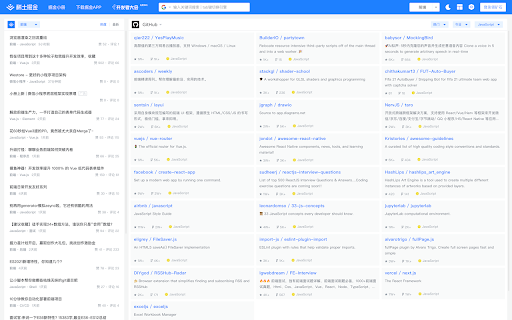


为程序员、设计师、产品经理每日发现优质内容。 在新标签页展示聚合内容,包含前端、Android、iOS、后端、产品、设计六大频道,每个频道内都有一到多个内容源; 此外提供综合搜索及开发辅助小工具等能力为开发者的工作提效,浏览器激活状态下双击"j"键可快速唤起搜索框; 用户可以根据自己的需求和喜好自定义页面布局、切换日间/深色模式; 此浏览器拓展由稀土掘金技术社区(juejin.cn)提供支持,在线问题反馈请访问 https://juejin.cn/topic/6824710202692993037?sort=newest 。

Console Importer
Import JavaScript and CSS resources from console, with one command A tool for developers to easily import JS and CSS resources from Chrome console

Axure RP Extension for Chrome
An extension that allows viewing of locally published Axure RP prototypes (HTML files) from Google Chrome. Add this extension to view locally published prototypes (HTML files) created from Axure RP in Google Chrome. This extension requires a high access level to allow the viewing of the file:// protocol. This extension only requires these permissions to allow viewing of prototypes in Chrome - Axure does not track or access any of your information. IMPORTANT: After installing the extension you must check the setting "Allow access to file URLs". You can access this by going to: Tools > Extensions > Axure RP Extension for Chrome from the Chrome > Preferences menu. This extension allows you to view Axure RP prototypes in Google Chrome. It is not used to open Axure RP project files (.rp, .rpteam) for editing in Google Chrome. You do not have to install this extension if you want to view prototypes hosted on the web. For example, you don't need this to view prototypes from Axure Cloud (app.axure.cloud) or Axure Cloud for Business (axure.com/enterprise). If you have any issues or questions, please email support@axure.com To download the latest version of Axure RP or a free 30-day trial, visit axure.com/download.

Ajax Modifier
To modify ajax responses on any page 1. It is recommended to turn off this extension(the icon should be gray) when you are not using it. 2. This extension only overrides the response data in the XMLHTTPRequest object as well as the fetch method. The original response which you can see in DevTools' "Network" panel will not be modified. github: https://github.com/YGYOOO/ajax-interceptor

Sourcegraph
Connect Sourcegraph to GitHub. Open repos, compare revisions and search code directly from Chrome's Omnibox for faster development. Make it work on your code host • GitHub: No action required. Your extension works here by default. • GitHub Enterprise: click the extension icon and update the "Sourcegraph URL" Make it work for private code To use the browser extension with your private repositories, you must set up a private Sourcegraph instance and connect it to the extension.
