
fhhpmicpjmegopoolojoofmkokajplfc
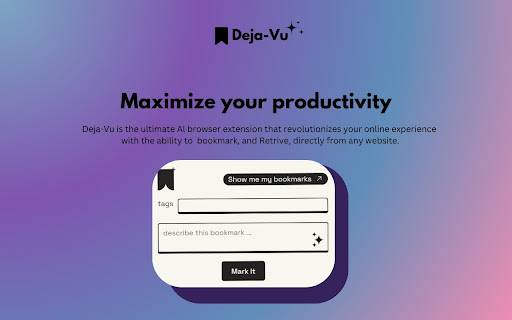

Introducing Deja Vu, the ultimate AI-powered Chrome extension revolutionizing your bookmarking experience directly from any website. Effortless Bookmarking Quickly capture and store bookmarks from any webpage without the need for manual organization. AI-Powered Search Simply type in vague details or keywords, and Deja Vu instantly locates your bookmarks for you. ⌨️ How to use? To easily launch Kome, visit any website and follow these simple steps: 1. Open the extension and bookmark pages with tags and descriptions. 2. When you need to retrieve a bookmark, simply scratch any detail of the website. 3. Deja Vu will instantly provide the page you're looking for. Say goodbye to bookmark struggles and hello to streamlined browsing with Deja Vu!

Taaabs - Free zero-knowledge bookmarks & AI
Unleash the joy of your web research. Save bookmarks to your personal library. Assist browsing with AI. Perfect for students, professionals and curious minds. - Free and open-source. No user tracking & no ads. - Integrates your browser with all popular AI assistants. - Sends locally parsed web content to AI: generic articles, YouTube transcripts, X posts, Gmail emails, AI conversations, and more. - You can sign up and build personal library with unlimited bookmarks. - Private bookmarks are encrypted End-to-End with AES-CBC 256-bit, encryption key is derived with Argon2id, a combination considered unbreakable. - Publish selected bookmarks to your public profile and connect with like-minded people. Add Taaabs to your browser and unlock the joy of your web research! Does Taaabs Web Clipper collect any data? One of the main reasons for creating Taaabs is privacy. When using AI assistants, pages are parsed 100% locally and sent directly to supported assistants like ChatGPT using browser built-in communication channels. When you sign in to the service and start building your personal library of bookmarks, all data is secured through the use of end-to-end encryption locally your browser, no data ever leaves your computer unencrypted. We cannot know what you saved until you explicitly publish something to your public profile. Is it free? Thanks to local page parsing and using browser built-in communication channels, using AI features is totally free. All basic bookmarking features are free, including unlimited saves.

Tabsets.net
Use tabsets.net to safely keep track of all your tabs and links in the Side Panel, stored locally on your browser With the Tabsets Extension, you'll have a new way to organise your Links, Tabs, and Bookmarks - store and find any website quickly. * It runs in the Side Panel :) * Your data is stored solely on your own computer * Integrates Bookmarks: simply use both * Organise your tabs using: tags, domains, folders, colours etc. The code is open source and available at GitHub. Do not navigate through multiple levels of folders of your browsers bookmark manager until you might find what you were looking for. This is what you can do instead: - Organise and Manage everything in your Browser's SidePanel - Utilise multiple windows and access them with inline window manager - Search for websites easily (by URL, title, or even content) - Quick access to your bookmarks (optional feature*) - Conveniently find and open an URL, or open all tabs of a set - Archive Tabsets (for later use) (optional feature*) - Quick access: newest tabs, most used tabs, tabs by domain Further Features: - Dark Mode - Import and export Tabsets as JSON - Use Color Markers for Organising (optional feature*) *) optional features need to be activated in the settings page

AIBookmarker: AI Web Clipper
Save web pages as Markdown & X videos with AI summaries. One-click sync to Notion & NotebookLM to build your second brain. Organize bookmarks with AI, sync to Notion & NotebookLM, and export web content to Markdown. No API keys needed—just login and go. Revolutionize Your Knowledge Management with AI Bookmarker 2.0! Say goodbye to disorganized bookmarks and manual copy-pasting. AI Bookmarker 2.0 is the all-in-one solution for saving, summarizing, and syncing your web discoveries. 🚀 MAJOR UPDATE v2.0.0: Zero Configuration, Infinite Possibilities We’ve completely removed the complexity. You no longer need to configure your own API keys. Simply log in and start using our advanced AI models immediately to organize your digital life. 📘 One-Click Sync to NotebookLM: Seamlessly send your bookmarked content directly to Google NotebookLM. Turn your reading list into an interactive knowledge base for deeper learning and research—instantly. 📝 Markdown Web Content Extraction: Need clean data for your notes or LLMs? Extract the core content of any webpage as clean Markdown with a single click. Perfect for developers, writers, and Obsidian/Logseq users. ☁️ Enhanced Notion Sync & Security: Keep your data safe and synchronized. We support automatic backups to Notion and web, ensuring your bookmark library is secure, private, and accessible across all your devices. AI-Powered Summaries: Get concise summaries of webpages without reading the entire article. Full-Text Search: Find anything you’ve saved instantly with our powerful search engine. Multi-Language Support: Optimized for English, Japanese, Korean, French, and Chinese users. --- v2.0.2 (fix the default auto summarize bug.) --- --- v2.0.1 (change the right api url) --- v2.0.0 (The "Simplicity" Update) --- NEW: Removed custom API key requirements. Direct login for instant AI access. NEW: Support for NotebookLM sync. Updated AI models to Gemini 2.0 Flash / 2.5 Flash. Visit any webpage and let AI do the rest! For more details and guides, visit: https://aibookmarker.com/

Hyper Mark
Pocket users - you can now import all your Pocket saved articles to Hyper Mark! Don't lose your data when Pocket goes dark!… Pocket users - you can now import all your Pocket saved articles to Hyper Mark! Don't lose your data when Pocket goes dark! Elevate your learning journey with Hyper Mark, the ultimate AI-powered bookmark manager designed to simplify knowledge management for curious minds. Effortless Organization - Automatic Summarization: Hyper Mark crawls and summarizes your saved websites, extracting key topics and keywords. - No Manual Sorting: Eliminates the need for folders or manual tagging; everything is organized for you. Powerful Semantic Search - Natural Language Queries: Find exactly what you’re looking for using everyday language. - Comprehensive Results: Searches across summaries, topics, and your personal notes. Chat with Your Bookmarks - Interactive Interface: Ask questions about your saved sites and get instant answers. - Effortless Recall: Retrieve bookmarks by asking natural questions like, “What’s the site that helps you optimize images?” Explore and Discover - Topic Exploration: Browse bookmarks by topics and subtopics within an intuitive, visual interface. - Rediscover Hidden Gems: Uncover forgotten bookmarks and valuable information you’ve saved. Personalization - Custom Tags and Notes: Add your own tags and attach notes to each bookmark. - Enhanced Searchability: Your notes are included in search results, aiding memory and context. Smart Views and Filters - Built-In Views: Access recent bookmarks, most visited, and overlooked bookmarks with ease. - Stay Organized: Quickly manage and revisit your resources through smart filtering options. Lightning-Fast Performance - Instant Access: Enjoy rapid load times and swift search results to keep your learning uninterrupted. - Delightful UI: Experience a sleek, intuitive interface designed for maximum productivity. Seamless Import and Data Ownership - Easy Import: Bring all your existing Chrome bookmarks into Hyper Mark with one click. - Full Control: Export all your bookmarks, including topics, notes, summaries, and tags, anytime. Your data is yours. Created by lifelong learner and developer Shahar Nechmad, Hyper Mark was born out of a personal need for a better way to manage an ever-growing base of knowledge. It’s more than a tool—it’s a companion for those who love to learn and explore.
