
fhdgfenjelpgogebfamlckjiooaekcdl
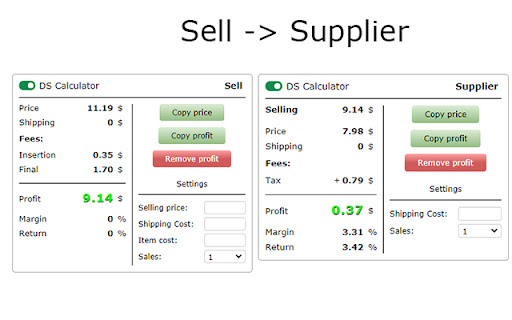
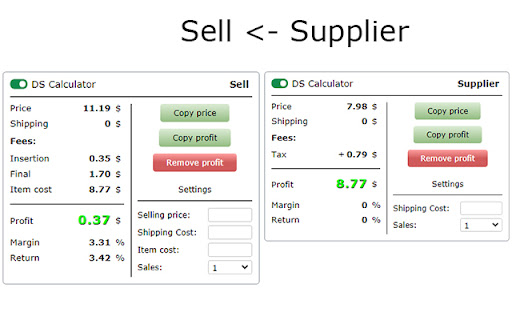
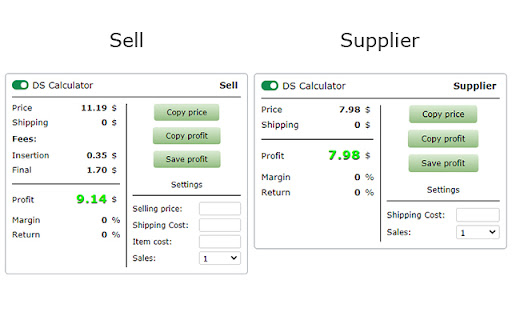
Dropshipping Calculator - Ebay / Amazon / Walmart deducts fees and item price from supplier. Subtract the price of the product from the selling price. Slide (2) - The extension saves the selling price (takes away all fees), and on the supplier page subtracts the price of the product, and shows the net profit. Slide (3) - Or it saves the price of the product from the supplier, and the page for selling the product, takes away all commissions and the price of the product (supplier) from the sales price, and shows the net profit. The extension is inserted into the page. All settings are saved for your account (Google). Settings in the sales block: - Upgrades - Select optional listing upgrade. - Listing - Select format listing. - Store / Account - Select a sales account. - Fees - Sales fees, the extension receives fees for each account. - You can enter your individual fees. - Eprice.it - Extensions receive no sales fees. You need to enter individual fees. - Payments - You need to enter individual payments. - VAT - You can enter the VAT of your country and your country's VAT will be added to the fees. - Sellers performance. - Margin - Percentage. - Return - Percentage. - Fields - For entering individual data: - Selling price - Your selling price of the item. - Shipping Cost - Your shipping cost. - Item cost - The price of the item, from the supplier. - Sales - Select the number of sales. Settings in the supplier block: - Cash back - Percentage of popular services. - Other fees - You can add or subtract an additional fee to the price of the item, delivery or profit. - Sales tax (US, product price) - You can enter sales tax, percentage. - Shipping - You can choose whether you have Amazon Prime, Walmart +, and other suppliers so the extension gets Prime shipping or not. - Delivery option - If the supplier has several delivery options, you can select the required delivery option and the extension will receive the price of the selected delivery. - Margin - Percentage. - Return - Percentage. - Fields - For entering individual data: - Shipping Cost - You can manually enter the shipping cost. - Purchase qty (not all suppliers have) - Select the purchase quantity of the product. - Sales - Select the number of sales. *Technical Information (Important): - If in the extension the delivery price is “-” - it means that the extension cannot get the delivery price for the product, it is only for a few sites. - If the product price or shipping price is incorrect in the extension, or does not appear on the extension page. This is because the site is redesigning and the extension is receiving incorrect data from the site page. If you notice such an error, please inform the developer by email, so the error will be fixed faster. - The extensions are constantly checked, and if an error is found, as soon as the developer fixes the error, your extension will be automatically updated and the error will disappear Sites on which the extension runs: The entire list of sites where the extension works. - https://docs.google.com/document/d/13cqYFnAG-SHysIXV9gNzRM7S8Zt4jCk9jR64lD-rrPU/edit * For all questions - dscalculator52@gmail.com

eBay Hot Product Finder
Product research made easy for eBay sellers. Find out what to sell on eBay fast! This eBay best selling item finder is a product research tool that allows you to find the top items to sell on eBay. If you’ve tried to research products to sell on eBay you’ll know that it can be a slow and arduous process, having to go into every item and look at the sales history for each to see how fast they are selling so you can decide whether it will be profitable to sell that kind of product, while making lots of notes to try and keep track of it all! Well, with this eBay seller tool, you can find out in moments what’s selling, at what volume and clearly see what is already making money on eBay so you can decide on the best items to sell. There are lots of Amazon seller tools out there to help sellers find hot products but until now there hasn’t been an extension for eBay sellers that does the same job. And it’s been brought to you by Frooition, an official eBay partner. To use it, simply install the plugin and register at www.frooition.com/insights. Then, go to eBay and search as normal with whatever search term you want for the products you’d like to research. Once the results page loads up, our tool will display a list of the fastest selling items on eBay for that specific search term, with all the sales information you need, such as average weekly sales and average prices, to make the decision if you should be selling the same or similar products. It will even show you the level of demand for each product and, if you want to, with one click you can then source a similar item from AliExpress or Alibaba, all from within the extension. When you find an item that you want to sell on eBay you can save it to your Favourites within your own dashboard at www.frooition.com/insights. That allows you to keep track of profitable items you've found. Not only that, but you can also then list them directly to eBay at the click of a button right from your dashboard, just adding your own images, price and description.

FBA calculator for Amazon Sellers : SellerApp
Is FBA the better choice for a product or FBM? Analyze profits with a single click . A trusted choice by 6-figure Amazon sellers. Researching and calculating the cost of goods sold, shipping fees, Amazon fees, and other expenses is crucial for your business. Understanding your true profit margins per unit ensures you make informed decisions, maximize profits, and scale your business successfully. A. Why use the SellerApp Amazon FBA Calculator? - The free Amazon FBA calculator provides multiple benefits for Amazon sellers, including: 1. Estimating all expenses upfront, including Amazon FBA fees, shipping charges, and seller fees. 2. Choosing products with lower fees to maximize profit margins. 3. Determining exactly how much you'll earn per sale, including total revenue and net profit. 4. Evaluating whether a product is worth selling by comparing expected revenue and costs. 5. Deciding between FBA and FBM based on estimated fees and profitability. Additionally, the FBA calculator extension gives you quick insights into: 1. Net profit 2. Net margin 3. Return on investment (ROI) B. How to use the SellerApp FBA Calculator? - If you're wondering how to use the FBA revenue calculator Amazon, follow these simple steps: 1. Install the SellerApp Amazon FBA Fee Calculator. 2. Visit Amazon.com and open the product listing you're interested in. 3. Launch the SellerApp FBA calculator for Amazon sellers. 4. Enter key cost factors, such as Cost of Goods Sold (COGS), shipping fees, fulfillment fees, and storage fees. The calculator will instantly generate your net profit, margin, and ROI, helping you make data-driven decisions. A. Is the FBA calculator free? - Yes! The SellerApp Amazon FBA calculator is 100% free to use. Just click the "Install" button to get started. B. Is the Amazon revenue calculator accurate? - The SellerApp FBA revenue calculator uses real-time data to provide highly accurate estimates. However, actual costs may vary due to Amazon’s dynamic pricing and fee structures. C. Is there any hidden cost for the Amazon seller fees calculator? - Absolutely not! The Amazon FBA fee calculator is completely free. D. How do I calculate the profit margin on Amazon FBA? - To calculate your profit margin, subtract all costs (COGS, fulfillment fees, and other expenses) from your total sales, then divide by the total sales price. Amazon determines FBA fees based on three key factors: product weight, size (dimensions), and category. You can learn more about the Amazon FBA price calculator and fee breakdown in our blog. Don't miss out on maximizing your profits! Use the SellerApp FBA Calculator today. For any questions, contact us at support@sellerapp.com.

Amazon Online Arbitrage, Wholesale, and Dropshipping
Instantly know whether a product is profitable for Dropshipping, Arbitrage, and Wholesale, as well as other similar selling models. AMZScout Amazon Online Arbitrage, Wholesale, and Dropshipping Extension is a powerful product research tool that helps sellers instantly evaluate profitability, competition, and restrictions directly on the Amazon site. Designed for dropshippers, online arbitrage sellers, and wholesale businesses, this extension shows each product's sales estimates, fees, ROI, and Buy Box history in real time. Save yourself hours of research, avoid risky products, and focus on sourcing items with the highest profit potential. — Real-time product insights: See estimated sales, revenue, and pricing data directly on Amazon listings to determine whether an item has real potential. — Integrated profit calculator: Instantly calculate your potential profit margins and ROI, including Amazon fees and shipping costs, and compare FBA vs. FBM to choose the most profitable option. — Buy Box ownership and history: Check who owns the Buy Box now, review its history, and see how often Amazon itself wins. Avoid listings where competition is difficult or margins are reduced. — Seller count and competition insights: View the number of other sellers, broken down by FBA, FBM, and Amazon, so you know if a listing is oversaturated before committing. — Sales and rank indicators: Track estimated monthly sales and monitor BSR drops over 30, 90, and 180 days to identify items with rising demand and strong sales momentum. — Sales restriction detection: Instantly find out if a product is gated, hazardous, trademarked, private label, or Prime-only. This helps you avoid compliance issues and wasted sourcing efforts. — Listing and product data: Access ASIN, UPC, size, weight, listing quality, and availability date to evaluate each item's sourcing, shipping costs, and listing strength. — Price and demand history: Review Buy Box and minimum price changes along with demand fluctuations to spot trends and plan pricing strategies. — Keyword insights: See the main keywords for which the product ranks to support SEO and advertising campaigns. — Integrated Amazon overlay: All insights appear directly on Amazon search and product pages in a clean, simple layout, allowing you to scan and compare products quickly. Data Shown with AMZScout Amazon Online Arbitrage, Wholesale, and Dropshipping: Search Page Data Displayed directly under each product in Amazon search results to quickly filter and dismiss unprofitable items: + Margin and profitability indicators + Amazon fees and estimated costs + Seller types (FBA, FBM, or Amazon) + Price history snapshot + Main keywords for which the product ranks + Availability date + Listing quality score Product Page Data Full breakdown available once you open a product page for deeper analysis: + Current Buy Box price + Buy Box owner and history + Minimum price across FBA and FBM sellers + Amazon fees for all seller types + Profit, margin, and ROI calculations + Number of sellers, including FBA, FBM, and Amazon + Amazon as a seller and its Buy Box share + Best Seller Rank (BSR) and full history + Rank drop frequency (30, 90, 180 days) + Price history and demand trends + Estimated sales and revenue + Sales restrictions (gated, hazardous material, private label, trademark, Prime delivery) + ASIN and UPC + Product size and weight This extension is built for resellers, dropshippers, and wholesale sellers who want accurate, real-time data directly on Amazon to help them find profitable products and lower sourcing risks.

Seller Assistant — Amazon Product Research Tool
Seller Assistant is a Product Research Software for selling on Amazon. It combines two extensions: Seller Assistant Browser Extension, and IP-Alert Chrome Extension by Seller Assistant, Amazon seller tools: Bulk Restrictions Checker and UPC/EAN to ASIN converter, and features: Side Panel View, FBM&FBA Profit Calculator, Quick View, ASIN Grabber, Stock Checker, IP Alert, and Restrictions Checker. Seller Assistant shows all necessary product data on Amazon search, product, and inventory pages, and on any website to help you find high-margin deals. By using this FBA and FBM product sourcing software, you can easily identify products that have the potential to be sold well on Amazon. Over 50,000 users worldwide trust Seller Assistant. It has analyzed over 250 million goods and discovered over 2 million high-margin arbitrage deals. Supported Amazon marketplaces all over the world. Start a 14-day FREE trial, no need for payment details. After the trial, choose a plan that suits you the most, from Free to Start ($15,99/month) or Pro ($29,99/month). What Can You Do with Seller Assistant? Transform your product sourcing process with clear, real-time data that helps you select the best products to sell on Amazon. Research products on any website and identify the most profitable deals for your Amazon FBA business. ✔️ Research in-depth product data on Amazon product pages (ASIN, BSR, category, product dimensions, size tiers, and more) with the Product Page View; ✔️Check how well the product sells on Amazon and how many product units you can sell monthly with Sales Estimator; ✔️Calculate your break-even point, targeted ROI price, and minimum price for Amazon Repricer; ✔️Estimate product profitability, calculate Amazon fees, logistics costs, VAT and taxes for your products with FBA calculator and FBM calculator; ✔️Identify competition level by the FBA and FBM seller offer count, prices, and rating; ✔️Determine competitor stock numbers with the Stock Checker; ✔️Check products for intellectual property complaints and their type with the unique IP Alert feature; ✔️Find out if you can sell a product on your Amazon account; ✔️See product alerts (restrictions, hazmat, heavy and bulky, meltable, and many more) with Notifications; ✔️Check restrictions in bulk up to 5000 ASINs with Bulk Restrictions Checker; ✔️Identify best-selling variations with Variation Viewer; ✔️Find and research deals on any supplier’s website with Side Panel View; ✔️Quickly lookup product suppliers by title, model, and UPC on Google, eBay, Alibaba, Walmart, and other popular websites; ✔️Quickly identify potential deals on Amazon search pages with Quick View widget; ✔️Find match between supplier and Amazon products with UPC to ASIN converter; ✔️Grab valuable ASIN details from search pages and storefronts with Amazon ASIN Grabber; ✔️Look up product sales history on the integrated Keepa charts; ✔️Add custom notes to products in order to save your ideas, Likes, and Dislikes with Notes; ✔️Export Amazon product data to Google Sheets in one click; ✔️Securely cooperate with virtual assistants by creating sub-accounts for VAs. Solutions for Amazon Sellers Seller Assistant offers the best pro-level user-friendly product sourcing solutions for online arbitrage, wholesale sellers, dropshippers, and product research virtual assistants. With it, you can instantly select winning products to sell on Amazon right now! 💸💸💸Online arbitrage sellers Seller Assistant helps Amazon online arbitrage sellers do product research directly on Amazon product and search pages and on any supplier’s website, instantly calculate profit and save data to Google Sheets in one click. The unique IP-Alert feature secures Seller Central from costly IP complaints. Bulk Restriction Checker lets you validate in bulk which products you are eligible to sell on your account. The Side Panel View and Quick Links feature let you find product suppliers on other retailer’s platforms in one click and discover profitable deals. 💰💰💰Wholesale sellers Seller Assistant offers a powerful toolkit for wholesale sellers looking for high-margin products. With Seller Assistant’s browser extension, you can quickly analyze your supplier products and identify what is worth selling, and will bring you the best margins. Unique functionalities such as Bulk Restriction Checker check the selling eligibility in bulk, UPC/EAN to ASIN Converter matches manufacturer UPCs and EANs to Amazon ASINs, and advanced IP Alert help proactively avoid products with Amazon policy violations. 💲💲💲Dropshippers Seller Assistant is a professional product sourcing solution for Amazon dropshippers who must research many products and wait until customers buy them. It lets you quickly find high-profit and low-competition products and ensure they will pose no risk when you sell them. With Seller Assistant showing all product metrics in one place: IP-Alert - to protect you from intellectual property claims; Bulk Restriction Checker - to conveniently verify product restrictions, you will easily outperform your competition. Additionally, the Side Panel View and Quick Links features allows dropshippers to look up product suppliers on other retailer’s stores in one click and find profitable deals. 👨💻Amazon virtual assistants Seller Assistant is the best tool for product sourcing VAs. It incorporates all the professional product sourcing features you need to effectively find high-profit deals and offers great value for money. Seller Assistant has special solutions for businesses working with virtual assistants — sub-accounts for virtual assistants that provide virtual assistants secure access to a seller account. A good alternative to RevSeller, SellerAmp SAS, and BuyBotPro
