
fgkboeogiiklpklnjgdiaghaiehcknjo

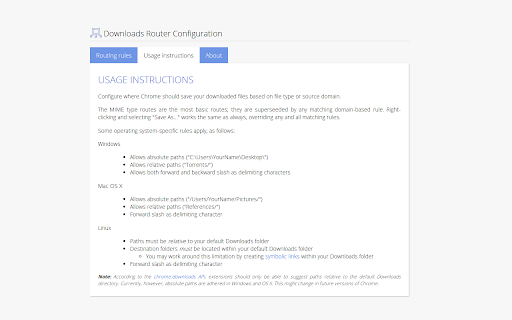
Organize your downloads automatically! Set custom download locations based on filetype, filename, or source domain. Latest news: ☆ Updated to support Chrome extension manifest v3 ☆ Torrent files downloaded as octet-streams now trigger application/x-bittorrent MIME routing rules ☆ Referrer routing now uses the source URL as a fallback, improving reliability Downloads Router is a tiny extension that helps you avoid cleaning the dreaded "Downloads" folder by automatically saving files in the right places. Downloads Router springs into action whenever you start downloading a file. It looks at the filename, filetype, or origin domain (source website) of the item, and matches this information against rules that you define on the extension's Options page. Should a matching rule exist, a "suggestion" is sent to the browser, indicating where it should save the file; this suggestion may however be overridden, as for instance when you use the "Save As..." feature. The Options page opens automatically after installing the extension, and may thereafter be reached from the chrome://extensions page.

SABconnect++
SABnzbd extension for Google Chrome. You also get a taskbar button that allows you to keep an eye on your SABnzbd: current downloads, pause (individual downloads, or pause all, or pause temporarily), or remove individual queued downloads. * One-click NZB downloads for many NZB index sites * Context menu option for sending links to SABnzbd * Options page that looks consistent with Chrome's own options layout * Download speed graph * Pause individual downloads * Pause all downloads * Remove individual downloads * Desktop notifications (Download Complete/Failed) SABconnect++ is a fork of the now unmaintained Chrome extension [SABconnect](http://code.google.com/p/sabconnect/). Configuration for SSL SABnzbd connection: https://github.com/gboudreau/sabconnectplusplus/wiki/SSLConnection Report issues, or ask for improvements: https://github.com/gboudreau/sabconnectplusplus/issues

Minimal Bookmarks Tree
Display a tree of bookmarks under a toolbar button, and search your bookmarks in the omnibox using the keyword 'bm'. This extension adds a button to Chrome in the top right corner (next to the "three-dot" settings button). When you click the button you get a tree of your bookmarks with folders that you can open and close by clicking them. A simple -non obtrusive- sliding animation is applied to the opening and closing of folders. You can open bookmarks in the following ways: - click: open in current tab - middle-click (scrollwheel): open in new tab and close minimal bookmarks tree - ctrl+click: open in new tab and keep minimal bookmarks tree open You can also right click a folder and click "Open all" to open all bookmarks in that folder in tabs. Right click also let's you edit/delete bookmarks and folders. The tree uses simple folder icons that show their state (open/close) and also shows the favicons for the websites you've bookmarked. The extension remembers which folders were open, so you can leave your favorite folders open at all times. Additionally the extension enables you to search through your bookmarks and bookmark folders easily by entering 'bm' into the URL bar (or "omnibox" as chrome calls it) and then type your search terms. It is not and will not be possible to search in the popup window itself because this wouldn't add anything to the extension; it would just duplicate behaviour. The extension needs permission to view and edit your bookmarks, but will only ever edit bookmarks if you instruct it to, it will never change bookmarks on its own. Minimal bookmarks tree is completely open source and available on github: https://github.com/rpkamp/chrome-minimal-bookmarks-tree Any and all suggestions are welcome!

Always Clear Downloads 3
A Google Chrome Extension to always clear the downloads list of all completed downloads. This extension makes up for the fact that Chrome does not have an option to keep its download list clear at all times. You can clear the downloads list yourself by hand, but Chrome currently doesn't have an option to automatically clear it for you. This extension does it for you automatically. This extension works in a very simple way: After a specified amount of time (the default is 5 seconds), the downloads list is cleared out for you. Don't worry, the files you downloaded are still there, and in-progress downloads are not harmed. Version 3: **You can now specify the amount of time before the extension clears the download list. Open the extension options and enter your own value.** The default interval is 5 seconds. If you are updating from version 2, Chrome may ask you to grant the extension more permissions. This is necessary to store your preference. As always, you can inspect the code yourself. The source for this extension can be found at https://github.com/tsuliwaensis/AlwaysClear

Popup my Bookmarks
A more efficient way to view and manage your bookmarks menu. - Search bookmarks when you type - Do what Bookmark manager can do and more (e.g., Sort bookmarks by name, Add separator) - Save 24px of your vertical workspace (Rock on Chromebook!) - Take as few permissions as possible, we never put your privacy at risk - No background running application, save computer memory and your privacy!
