
fgiepdkoifhpcgdhbiikpgdapjdoemko
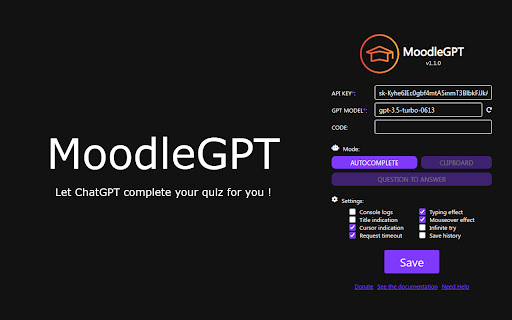

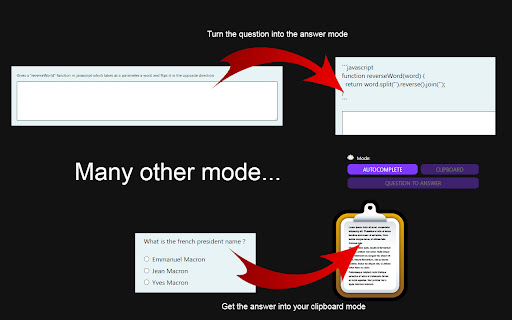
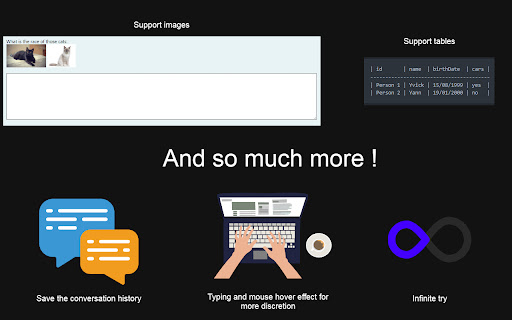
Hidden chat-gpt for your moodle quiz MoodleGPT: Transform Your Moodle Quiz Experience MoodleGPT is a revolutionary Chrome extension designed to elevate your Moodle quiz-taking experience to new heights. By seamlessly integrating the power of CHAT-GPT, MoodleGPT provides you with an invisible assistant that effortlessly guides you through quiz questions, delivering answers with precision and speed. Key Features: --- - Versatile Question Support: Whether it's Select, Put in Order, Resolve Equation, One Response, Multiple Responses, True or False, Number, or Text questions, MoodleGPT has you covered. - Dynamic Modes: Choose from Autocomplete, Clipboard, or Question to Answer modes to interact with answers in a way that suits your style. - Simple Setup: Load the extension, enter your OpenAI API key, choose a model, and you're ready to conquer your Moodle quizzes. - Customizable Settings: Tailor the extension to your preferences, including the choice of GPT model, cursor indication, title indication, typing/mouseover effect, include images, create conversation and more. Enhance Your Quiz-Taking Experience: --- MoodleGPT streamlines the quiz-taking process, providing you with accurate answers and saving you valuable time. It's the perfect tool for students and educators looking to optimize their Moodle experience. Support Us: --- If you find MoodleGPT helpful, consider supporting the project with a donation. Your support helps us continue improving and adding new features.

ChatGPT Token Counter
Counts tokens in the ChatGPT active conversation on chatgpt.com The ChatGPT Token Counter is a Chrome extension designed to help users keep track of their token count during long conversations with the ChatGPT language model on chat.openai.com. OpenAI is hiding what the context window is on the web version. ChatGPT 4o in Plus and Team should have a context window of 32,768 tokens (~24,000 words). 3 words ~ 4 tokens. When your conversation becomes longer than that, ChatGPT will start to "forget" what was discussed earlier. The box in the corner of the window lets you monitor the token usage and ensure that the conversations do not exceed the context window, which is particularly important for coaching, idea generation, and working with longer articles where retaining the context is crucial. With this extension, you will know when context can be missing and will have more productive and meaningful conversations with ChatGPT. This extension is written 99% by ChatGPT. The logo icon is created 100% by MidJourney. The number IS NOT exact but should be in the range of +/- a dozen.

GPT Folders
Organize your ChatGPT and Claude conversations into folders 📂 GPT Folders - Organize Your ChatGPT & Claude Conversations! Tired of endless scrolling through your AI chat history? Get organized with GPT Folders! ✨ MAIN FEATURES: • Create custom folders to organize your conversations • Drag and drop chats into folders • Save frequently used prompts for quick access • Clean, modern interface that matches both ChatGPT and Claude's design 🎯 KEY BENEFITS: • Find important conversations instantly • Group related chats together • Access your favorite prompts with one click • Seamless integration with ChatGPT and Claude 💡 PERFECT FOR: • Professionals managing multiple projects • Students organizing research conversations • Writers keeping track of different topics • Anyone who wants a more organized AI chat experience 🔒 PRIVACY FIRST: • All data stored locally on your device • No external servers or data collection • Works entirely within your browser • No account required 🚀 GET STARTED: 1. Install the extension 2. Create your first folder 3. Drag chats into folders 4. Save your favorite prompts Make your AI chats work better for you with GPT Folders - your personal chat organizer! 💪 Actively maintained and regularly updated

Pin GPTs - Pins and Folders for ChatGPT, Claude, Gemini, DeepSeek and Grok
Pin your chats and organize them using folders on ChatGPT, Claude, Gemini, DeepSeek and Grok Tired of losing your important chats on ChatGPT, Claude, Gemini, DeepSeek or Grok ? Pin GPTs allows you to Pin your conversations and have them always available to you right in the sidebar or the extension popup! With Pin GPTs, You can pin chats in ChatGPT, Claude, Gemini, DeepSeek and Grok! Additionally, organize your pinned chats using folders! ✨ Features: ✔ Pin Unlimited Chats - Save important conversations from ChatGPT, Claude, Gemini, DeepSeek and Grok. ✔ Quick Access Sidebar - View your pinned chats on any website. ✔ Organize with Folders - Keep your chats neatly structured. ✔ Extension Popup - Manage your saved chats easily from the extension. ✔ Sync Across Devices - Your pins stay with you, thanks to Google Drive Sync. ✔ File Backup & Restore - Easily import/export your pinned chats and folders into a file. ✔ Cloud Backup - Automatic backup to your Google Drive account. Stay in control of your AI conversations - download now and never lose a chat again!

ChatGPT for Google by cloudHQ
This extension gives you ChatGPT query responses alongside Google search engine results. This extension is easy to use and enhances your Google search experience. Features: ✅ OpenAI Responses alongside your Google search results ✅ A summary of search results ✅ Supplement responses with data after 2021 via search results ✅ OpenAI API and multiple version support ✅ Toggle on/off as desired ✅ Copy to clipboard ~~~How to use it~~~ 1. Get an OpenAI account here if you don't already have one: https://chat.openai.com/chat and create an account 2. Install this extension 3. Open Chrome and search for anything in Google Search 4. AI-generated responses alongside conventional search engine results will be displayed on the right side of your window 5. When in ChatGPT, simply type in your prompt, and the results will be ChatGPT's response, and will then provide you with a Google Search summary on the subject (very helpful for up to date information) ~~~FAQ~~~ 1. What is ChatGPT? ChatGPT is a computer program created by OpenAI that can generate human-like text. It's like a super-advanced version of autocorrect: it predicts and generates what it thinks should come next in a conversation or a piece of writing. This is useful for many things, such as writing emails, creating content, answering questions, and even tutoring in different subjects. It's important to note that it doesn't know any personal data unless you tell it during the conversation, and it doesn't know specifics about the documents it learned from. 2. What does this extension do? This browser extension is developed by cloudHQ LLC. The extension enhances search engine results with the power of artificial intelligence from OpenAI. The extension operates by displaying AI-generated responses alongside conventional Google search engine results, offering users an enhanced search result experience. 3. Is this extension free to use? Yes, the extension is free to use. 4. Is this extension integrated with other cloudHQ products? Yes. This extension is fully integrated with other cloudHQ products such as Save Emails to PDF by cloudHQ, Export Emails to Sheets by cloudHQ, and more. 5. Do I need an OpenAI (chat.openai.com) account? Yes, you need to have an OpenAI account to use this extension. Go to https://chat.openai.com/chat and create an account. If you choose to use an API, you need to have a developer account. You can create it here: https://platform.openai.com/ We hope you enjoy your new search result experience and find it helpful for your overall knowledge about anything you wish to know about. cloudHQ. Helping your productivity, 1 click at a time. cloudHQ website: https://www.cloudhq.net/ App website: https://www.chatgpt-for-google-search.com/ Pricing: https://www.chatgpt-for-google-search.com/pricing Support page: https://support.cloudhq.net/category/browser-extensions/chatgpt-for-google/ FAQ page: https://support.cloudhq.net/ Blog: https://blog.cloudhq.net
