
fgfcfincldjbfpkdoagajmfidhnffhao

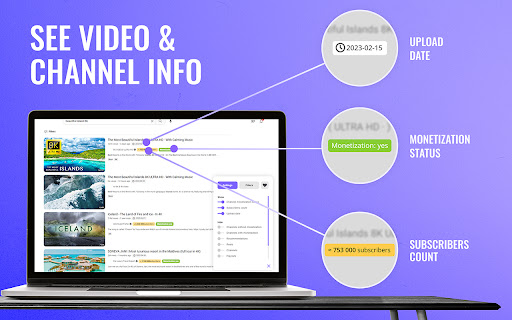
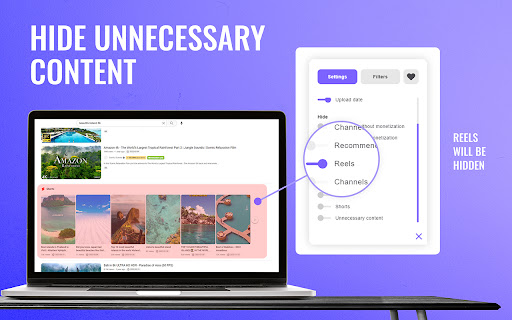
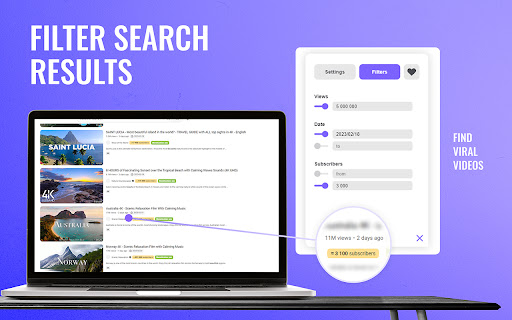
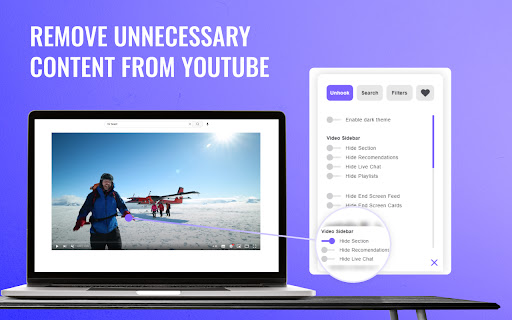
Exu is a hole new extension that allow you to get new expirience of using Youtube. Exu is a browser extension that will extend… Exu is a hole new extension that allow you to get new expirience of using Youtube. Exu is a browser extension that will extend your Youtube Search Filter. Find great topics before anyone else! We're in development, but we already want to let you know that the basic functionality is available and working. With our extension, you'll be able to filter your search results by the following criteria: Hide YouTube related videos, comments, shorts tab, suggestions wall, homepage recommendations, trending, and other distractions. A browser extension to remove YouTube distractions, including the recommended sidebar, endscreen video suggestions, user comments, homepage related videos feed, trending tab, turn off autoplay or annotations, and more. Toggle the options through the popup to customize your own YouTube experience! And a lot more will be avialable soon. Stay up to date on "explosive" videos with Exu.

SimilarTube - Find Similar YouTube Channels
AI Scanner & Analytics for Finding Niche YouTube Channels SimilarTube is a tool powered by AI (LLM) to scan and find similar channels on YouTube based on a given channel. Unlike searching through third-party influencer databases, which often lag updating information about nano and micro influencers. Our AI bot scans YouTube directly to deliver real-time results in just seconds. FOR MARKETERS SimilarTube helps you find similar influencers using a "look-alike" algorithm, displaying key metrics such as ER(engagement rate) and VVR(video view rate) for quick screening and targeting. AI automatically extracts public email addresses and other social media accounts (Facebook, Instagram, TikTok, etc.), enabling you to find their contact information quickly. With automatic email matching and template filling, you can get the outreach job done 10x faster. FOR SALES Enrich your database with new leads and get more sales. With automatic email match and outreach mail merge, you can get the outreach job done 10x faster. FOR YOUTUBERS SimilarTube helps you find competitors. If you are a new YouTuber hoping to identify ideas or niches, it can help you analyze the competitive landscape and determine if it's worth investing in. If you are a marketer looking to find influencers, you can use it to expand your targets. FOR ANALYSTS The AI Insight feature automatically assesses the value of the niche and highlights differences in core metrics among YouTubers of various tiers. Its filtering and sorting capabilities facilitate convenient analysis.

VidAI
VidAI: Supercharge your YouTube content creation with AI. Enhance video titles, boost SEO, streamline translation. VidAI: 🚀 The All-in-One YouTube Studio Assistant VidAI lives right inside YouTube Studio and helps creators ship faster - better titles, better descriptions, smarter comment replies, and one-click translations into 100+ languages. ✨ WHAT YOU CAN DO 🤖 AI Comment Replies Generate authentic, on-brand replies to viewer comments without ever leaving Studio. Per-channel persona, audience tuning, language matching, banned phrases, default instructions, and 1/2/3 alternative replies. Speed mode for fast triage, Quality mode for the messages that matter. 🏆 AI Council for Titles Three AIs draft title options in parallel; a judge model picks the strongest. A/B-test winners, save your best examples, and tune the tone per channel. Built for creators who care about CTR. 📝 AI-Powered Video Metadata One-click descriptions, tags, hashtags, keywords, and chapters — grounded on your actual video transcript, not just guessed from the title. Optional CTAs, hashtag forcing, chapter formats — all configurable per channel. 🌍 One-Click Translations Translate titles, descriptions, and subtitles into 100+ languages in seconds. Smart re-translation skips segments you've already localized. Background jobs handle long subtitle files without timing out. 📺 Multi-Channel Oversight Manage every channel you own from a single panel. Per-channel personas, audience profiles, default instructions — your "cybersec educator" channel and your "cooking with grandma" channel never get mixed up. 🎨 Playlist & Series Tools Generate playlist titles and descriptions, organize courses and podcasts, with the same per-channel context. ✨ GENEROUS FREE TIER Monthly title and description translations, daily AI requests, and full per-channel settings — all on the free tier. ⬆️ Upgrade to PRO for AI Council, 3-reply comments, advanced tags, and higher monthly limits. 🔒 PRIVACY VidAI only reads YouTube Studio pages you're actively viewing. No data is sold, no third-party tracking. Auth uses Google OAuth on vidai.help — never your YouTube password. What's new in 1.8.15 - 💬 AI Comment Replies — per-channel persona, audience tuning, language matching, multi-reply (1/2/3) and Speed/Quality modes - 🏆 AI Council for Titles — multiple AIs draft & a judge picks the best - ⚡ Async pipeline with live progress steps — no more blocking spinners - 🔔 Refreshed in-page notifier with sound toggle and rate-limiting - 🔐 Smoother sign-in (no infinite spinner, auto-continues after login) - 🌐 Polished Ukrainian / English / Russian copy - Stability: better error messages, draft-edit fixes, performance & QA hardening

YouTube Booster
Video speed, AI summary, Subtitles, audio normalization, OSINT, auto pause, looped #shorts, video markers, keywords, and more... You can watch a short tutorial about that extension here: It is a free extension. No account is required. Loving the extension? Show some love by treating me to a coffee! ☕ Check it out here: https://BuyMeACoffee.com/dweorh 'OSINT' In times of the massive amount of fake news, I added a new feature OSINT (Open Source Intelligence). In that section, I will place all links that may help to verify the current video. We start by searching thumbnails in Google and TinEye search engines. You can also capture a current frame of the video, download it, or click the right mouse button using google lenses or any other extension you have installed. If you know any services that can be linked there, leave them in a comment, please. As requested on Twitter, there is an option to download chat content from live videos. To retrieve the full chat, the tab with the video needs to be open at the beginning of the video, otherwise downloaded chat may be incomplete. 'Video Speed' Are some videos too slow? YT Booster has a slide bar to change the speed of the video up to x16! Use keyboard to change the speed. Buttons +/- will modify speed, = will reset to the default one. 'AI Summary' I've added an AI Summary feature! Just pop in your OpenAI (ChatGPT) API key with access to the 'GPT-4.1 mini' model, and voilà—enjoy quick, AI-generated summaries of your videos! Once you add your key, a shiny new Summary section with a "Generate" button will appear below the video. It only takes a few seconds to work its magic, so hang tight! 😄 Ready to get started? Grab your OpenAI API key here: OpenAI.com/api/pricing Make your experience even better with AI-powered summaries—try it today! 🚀 'Audio normalization' Some videos are very quiet, while others are very loud. This feature allows you to set a reference audio loudness and then automatically reduce the volume of excessively loud videos. 'Disable auto pause' Allows you to manage auto pause of the videos, when you watch/listen long playlists. 'Cards' Cards can be visible all the time, so you can see what else the creator prepared for you :-) To make them visible check 'Cards' checkbox in the menu next to your URL bar. 'Keywords' If you are a creator and you are wondering what keywords other creators use for their productions, now you have easy access to them. As a viewer, maybe you are interested in topics meant as a keyword by your favorite YouTuber. Now there are links to instant search. Easy click&explore :-) 'Chapters' That section displays chapters from the video, if available. Currently playing chapter is highlighted on the list to make navigation easier. There is a button to add any of the chapters as your Marker. 'Markers' That feature allows you to create personal markers for videos. Click 'Add' in the 'Markers' section, add a few words of description and save. Now you have quick access to that particular moment in the video. You can also organize your Markers using Tags. 'YT Orchestra' Have you ever experienced the nightmare of all chrome tabs playing simultaneously just because the OS did update & restart? If you are like me, with a few dozens of YT tabs open, you can feel that pressure to find them all playing... Now, YT Orchestra allows you to 'play only one video.' Once one video starts playing, all others will be paused. Also, at the bottom of 'YT Booster's frame, all YT tabs are listed with status and simple video control, and quick links to those tabs. Others I hope you will find a few other features helpful, like flip videos horizontally or vertically, and screens that usually appear at the end of the video. You have two export options in the 'Import & Export' section. One is a simple export of Markers to a text file. The second export is for backup purposes, the same as an import. Here you can import exported .json file. It allows you to move data between browsers or keep it as a backup :-) Besides the standard export, you can copy marker(s) to the clipboard by clicking the clipboard icon. That one next to '+' in Markers will copy the current timestamp and video title to your clipboard. The icon next to the video thumbnail on the Markers list will copy all markers from that video. And finally, the icon next to the 'delete' icon will copy details of the particular entry. PS. There is neither registration nor tracking. Everything is stored in your browser. If you uninstall this extension or cleanup caches of your browser, your list of markers will be removed permanently. Prons & cons of anonymous usage ;-) PS2. Remember to reload pages with YTBooster after updating this extension. ** Releases ** 0.5.8 - Support for a new YouTube's layout - 'Download Subtitles' function in 'Video settings' section 0.5.7 - AI Summary - bug fix 0.5.6 - AI Summary - support for a new transcript format 0.5.5 - AI Summary - integration with OpenAI (ChatGPT) 0.5.4 - common bug fixes 0.5.3 - support for a new YT player - hold autopause functionality if a video has been paused by a user 0.5.2 - audio normalization - flip video horizontally and vertically 0.5.1 - bug fix for Markers without tags 0.5.0 - bug fixes related to the previous changes in #shorts 0.4.9 - #shorts loop switch 0.4.8 - basic support in YT Orchestra for #shorts 0.4.7 - code cleanup + js error fix 0.4.6 - video speed buttons improvement 0.4.5 - fix for OSINT -> download chat functionality 0.4.4 - fix for video speed change section 0.4.3 - fix for subtitles when video speed change (up to x2) - add contact link to me for easier issue reporting - YT Booster is collapsable now 0.4.2 - manage auto pause 0.4.1 - fix for not updating video details after change - error fixes 0.4.0 - support for video speed change by pressing +/-/= - upgrade common libraries - upgrade manifest.json from v2 to v3 0.3.17 - jump to a marker without page reload within the current video. - button to capture a frame from the video - fixed speed control feature 0.3.16 - fix for Orchestra section to display tiles of tabs with videos only 0.3.15 - fixed re-play a video after the first pause or finish watching - fix YT Booster loader, extension is enable for the entire www.youtube.com vs the previous www.youtube.com/watch only 0.3.14 - improved 'download chat' for Live Streams - highlighted background for currently playing chapter - bugfixes 0.3.13 - 'download chat' in OSINT section 0.3.12 - new section OSINT - removed likes and avg rating sections because data is no longer available 0.3.11 - avg rating is not available anymore; display '-' instead of NaN - fix for chapters - give the extension more time to deploy itself 0.3.10 - fix for dislike estimation formula 0.3.9 - estimate number of dislikes if value not provided by YT 0.3.8 - fix player status reporting - fix chapters in case of not supported type 0.3.7 - new 'Likes' view to show likes and dislikes of the video - fix for an issue with visibility of the right panel 0.3.6 - new Cards feature - further improvements of the initializer 0.3.5 - improved YT Booster initializer - Video Speed feature 0.3.4 - fix YouTube Orchestra list 0.3.3 - marker line highlighted when mouse is over - fixed markers order, based on its time instead of order of adding them 0.3.2 - tags in markers - editing markers - video title over video thumbnail 0.3.1 - adjustment to a new YouTube chapters format 0.3.0 - more responsive layout - the whole content script rewritten with VueJS 3 0.2.5 - Video chapters section + button to add them to Markers - UX improvements 0.2.4 - Markers will sync between browsers - Reload button added to refresh list of open tabs

U1 BOOST: Обход замедления YouTube, ускорьте видео на YouTube
U1 BOOST — ускоритель YouTube: устраняет задержки, обеспечивает стабильное 4K и максимальную скорость видео. Работает автоматически. Мощный инструмент для обхода блокировок YouTube. С помощью U1 BOOST вы сможете смотреть видео без ограничений, наслаждаясь стабильным 4K и максимальной скоростью загрузки. Программа автоматически устраняет задержки, обходит любые ограничения доступа и обеспечивает беспрерывное воспроизведение. Простая в использовании и не требующая настройки, U1 BOOST идеально подходит для тех, кто хочет разблокировать YouTube и получать удовольствие от просмотра видео без преград. Работает на всех устройствах и браузерах. Скачайте U1 BOOST и верните себе свободу интернета!
