
dajnidicmkknmmbapmmmlemjdfolgjnf


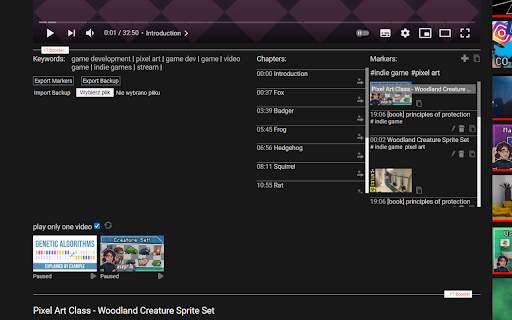

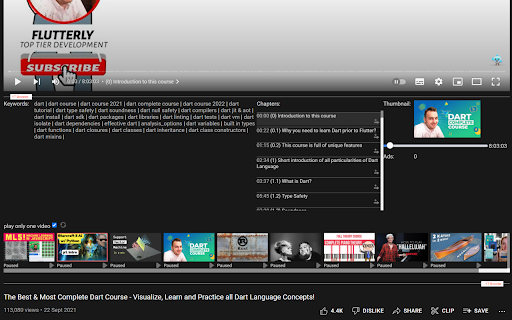
Video speed, AI summary, Subtitles, audio normalization, OSINT, auto pause, looped #shorts, video markers, keywords, and more... You can watch a short tutorial about that extension here: It is a free extension. No account is required. Loving the extension? Show some love by treating me to a coffee! ☕ Check it out here: https://BuyMeACoffee.com/dweorh 'OSINT' In times of the massive amount of fake news, I added a new feature OSINT (Open Source Intelligence). In that section, I will place all links that may help to verify the current video. We start by searching thumbnails in Google and TinEye search engines. You can also capture a current frame of the video, download it, or click the right mouse button using google lenses or any other extension you have installed. If you know any services that can be linked there, leave them in a comment, please. As requested on Twitter, there is an option to download chat content from live videos. To retrieve the full chat, the tab with the video needs to be open at the beginning of the video, otherwise downloaded chat may be incomplete. 'Video Speed' Are some videos too slow? YT Booster has a slide bar to change the speed of the video up to x16! Use keyboard to change the speed. Buttons +/- will modify speed, = will reset to the default one. 'AI Summary' I've added an AI Summary feature! Just pop in your OpenAI (ChatGPT) API key with access to the 'GPT-4.1 mini' model, and voilà—enjoy quick, AI-generated summaries of your videos! Once you add your key, a shiny new Summary section with a "Generate" button will appear below the video. It only takes a few seconds to work its magic, so hang tight! 😄 Ready to get started? Grab your OpenAI API key here: OpenAI.com/api/pricing Make your experience even better with AI-powered summaries—try it today! 🚀 'Audio normalization' Some videos are very quiet, while others are very loud. This feature allows you to set a reference audio loudness and then automatically reduce the volume of excessively loud videos. 'Disable auto pause' Allows you to manage auto pause of the videos, when you watch/listen long playlists. 'Cards' Cards can be visible all the time, so you can see what else the creator prepared for you :-) To make them visible check 'Cards' checkbox in the menu next to your URL bar. 'Keywords' If you are a creator and you are wondering what keywords other creators use for their productions, now you have easy access to them. As a viewer, maybe you are interested in topics meant as a keyword by your favorite YouTuber. Now there are links to instant search. Easy click&explore :-) 'Chapters' That section displays chapters from the video, if available. Currently playing chapter is highlighted on the list to make navigation easier. There is a button to add any of the chapters as your Marker. 'Markers' That feature allows you to create personal markers for videos. Click 'Add' in the 'Markers' section, add a few words of description and save. Now you have quick access to that particular moment in the video. You can also organize your Markers using Tags. 'YT Orchestra' Have you ever experienced the nightmare of all chrome tabs playing simultaneously just because the OS did update & restart? If you are like me, with a few dozens of YT tabs open, you can feel that pressure to find them all playing... Now, YT Orchestra allows you to 'play only one video.' Once one video starts playing, all others will be paused. Also, at the bottom of 'YT Booster's frame, all YT tabs are listed with status and simple video control, and quick links to those tabs. Others I hope you will find a few other features helpful, like flip videos horizontally or vertically, and screens that usually appear at the end of the video. You have two export options in the 'Import & Export' section. One is a simple export of Markers to a text file. The second export is for backup purposes, the same as an import. Here you can import exported .json file. It allows you to move data between browsers or keep it as a backup :-) Besides the standard export, you can copy marker(s) to the clipboard by clicking the clipboard icon. That one next to '+' in Markers will copy the current timestamp and video title to your clipboard. The icon next to the video thumbnail on the Markers list will copy all markers from that video. And finally, the icon next to the 'delete' icon will copy details of the particular entry. PS. There is neither registration nor tracking. Everything is stored in your browser. If you uninstall this extension or cleanup caches of your browser, your list of markers will be removed permanently. Prons & cons of anonymous usage ;-) PS2. Remember to reload pages with YTBooster after updating this extension. ** Releases ** 0.5.8 - Support for a new YouTube's layout - 'Download Subtitles' function in 'Video settings' section 0.5.7 - AI Summary - bug fix 0.5.6 - AI Summary - support for a new transcript format 0.5.5 - AI Summary - integration with OpenAI (ChatGPT) 0.5.4 - common bug fixes 0.5.3 - support for a new YT player - hold autopause functionality if a video has been paused by a user 0.5.2 - audio normalization - flip video horizontally and vertically 0.5.1 - bug fix for Markers without tags 0.5.0 - bug fixes related to the previous changes in #shorts 0.4.9 - #shorts loop switch 0.4.8 - basic support in YT Orchestra for #shorts 0.4.7 - code cleanup + js error fix 0.4.6 - video speed buttons improvement 0.4.5 - fix for OSINT -> download chat functionality 0.4.4 - fix for video speed change section 0.4.3 - fix for subtitles when video speed change (up to x2) - add contact link to me for easier issue reporting - YT Booster is collapsable now 0.4.2 - manage auto pause 0.4.1 - fix for not updating video details after change - error fixes 0.4.0 - support for video speed change by pressing +/-/= - upgrade common libraries - upgrade manifest.json from v2 to v3 0.3.17 - jump to a marker without page reload within the current video. - button to capture a frame from the video - fixed speed control feature 0.3.16 - fix for Orchestra section to display tiles of tabs with videos only 0.3.15 - fixed re-play a video after the first pause or finish watching - fix YT Booster loader, extension is enable for the entire www.youtube.com vs the previous www.youtube.com/watch only 0.3.14 - improved 'download chat' for Live Streams - highlighted background for currently playing chapter - bugfixes 0.3.13 - 'download chat' in OSINT section 0.3.12 - new section OSINT - removed likes and avg rating sections because data is no longer available 0.3.11 - avg rating is not available anymore; display '-' instead of NaN - fix for chapters - give the extension more time to deploy itself 0.3.10 - fix for dislike estimation formula 0.3.9 - estimate number of dislikes if value not provided by YT 0.3.8 - fix player status reporting - fix chapters in case of not supported type 0.3.7 - new 'Likes' view to show likes and dislikes of the video - fix for an issue with visibility of the right panel 0.3.6 - new Cards feature - further improvements of the initializer 0.3.5 - improved YT Booster initializer - Video Speed feature 0.3.4 - fix YouTube Orchestra list 0.3.3 - marker line highlighted when mouse is over - fixed markers order, based on its time instead of order of adding them 0.3.2 - tags in markers - editing markers - video title over video thumbnail 0.3.1 - adjustment to a new YouTube chapters format 0.3.0 - more responsive layout - the whole content script rewritten with VueJS 3 0.2.5 - Video chapters section + button to add them to Markers - UX improvements 0.2.4 - Markers will sync between browsers - Reload button added to refresh list of open tabs

VRubel - VPN for YouTube from 1₽ per day
❗️Follow all the news of the service in the Telegram channel @vrubelrussia (https://t.me/vrubelrussia ) Do you want to watch YouTube like before - without slowing down? Vrubel is a simple and effective VPN for YouTube to forget about video problems. The service speeds up the download of videos and allows you to use YouTube as before without ads. Forget about long loading times and problems. With Vrubel, your favorite videos will download quickly and in high quality. More than 500,000 users have already chosen VPN for YouTube Vrubel to watch videos every day without unnecessary worries - one button and everything works.

Speed Master for YouTube Video
Auto HD and control video speed on YouTube for each individual channel. SpeedMaster for YouTube - a helpful tool that allows you to easily change the playback speed of YouTube videos. With this extension, you can adjust the speed for each YouTube channel individually, and your preferred speed settings will be saved for future videos from the same channel. Along with controlling the playback speed, you can also specify your preferred video quality. This new feature allows you to enjoy videos at the quality level that suits your preferences and internet connection. Your preferred quality settings will be saved and applied automatically whenever you watch videos. You have two options to control the speed: 1. Clicking the buttons: ・To make the video faster, simply click the '+' button located at the top right corner of the YouTube player. ・If you want to slow it down, click the '-' button instead. 2. Using keyboard shortcuts: ・Press the '[' key to decrease the playback speed and enjoy a slower pace. ・Press the ']' key to increase the playback speed, making the video faster. In the option page of SpeedMaster for YouTube, you will discover even more ways to manage the playback speed for different channels. This extension provides you with additional options to fine-tune your speed preferences. You can customize the playback speed individually for each YouTube channel, ensuring that each channel plays videos at your preferred speed. Moreover, you can easily modify or update these settings at any time, granting you full control over the playback speed of specific channels. With these advanced options, you can tailor your YouTube experience to match your unique preferences for each channel you follow.

Youtube Unblocked
Enjoy unblocked YouTube with YouTube unblocked. This extension helps unblock YouTube and acts as a YouTube unblocker efficiently. Elevate your online experience with a Chrome extension, the premier solution for accessing restricted content. Whether you're at school, work, or traveling, our extension ensures you can watch your favourite videos without interruption. This chrome extension allows users to access content without restrictions. With our Chrome extension, you can maintain your privacy while watching videos. 🌟 Unrestricted Access 🔸 Enjoy unblocked Video platform for seamless entertainment. 🔸 Use unblock Video platform to bypass regional restrictions. 🔸 Discover the power of the Streaming service unblocker for uninterrupted viewing. 🔸 Keep your privacy intact with content hub proxy. 🔸 Stay connected with your favorite channels. 🔸 Streaming service unblocked for school ensures access to educational content. 1. streaming service unblock is essential for students to access learning resources. 2. How-to guides provide easy solutions. 3. Explore content hub unblocked methods for continuous access. 4. Discover various unblocked video platform sites for educational purposes. 5. This chrome extension allows users to access content without restrictions. 6. Enhance your online learning experience with unrestricted content. 7. Gain access to a wider range of educational content, supporting diverse learning needs. 🌐 Global Connectivity ◆ Access the streaming service unblocked website from any location. ◆ Enjoy this extension at school for educational content. ◆ Ensures privacy while browsing. ◆ Prevent blocking sites to overcome geographic barriers. ◆ This Chrome Extension for school facilitates learning. ◆ Discover unblocked content hub sites for school to support your learning needs. 💡 Innovative Solutions 🔹 This program tool provides a seamless way to view clips. 🔹 Unblock video platform site effortlessly with our tools. 🔹 Utilize the this chrome extension feature for uninterrupted access. 🔹 What about unblock unblock streaming service ? YT unblocked is popular among students for easy access. 🔹 This chrome extension is a straightforward solution for restricted content. 🔹 Proxy video platform helps maintain anonymity while browsing. 🔒 Robust Security 1️⃣ streaming service to proxy offers secure streaming. 2️⃣ Unblocker for content hub are valuable resources. 3️⃣ video platform in proxy helps avoid network restrictions. 4️⃣ This Chrome extension ensures safe access to video content. 5️⃣This Chrome extension provides unrestricted access. 📈 User Experience 🔸 Enjoy clips for uninterrupted viewing. 🔸 Access clips for seamless entertainment. 🔸 Use this program to maintain your privacy. 🔸 Stay connected with our extension. 🔸 For easy clip platform to unblocked 🔒 How to unblock video platform? 🔹 Your main contact remains concealed with our service. 🔹 We provide a free virtual number, ensuring your real details are never exposed. 🔹 Follow our step-by-step guide to use video hosting in any location. 🔹 Use our chrome extension for a hassle-free experience. 🔹 Enjoy unrestricted access with our simple tools. 📲 What benefits do additional video hosting contacts offer? 🔹 Do you want to ublock video platform? Perfect for platform sign-ups without revealing your primary contact. 🔹 Simplifies your digital life with global, verification-ready contacts. ⏳ How long can I use this chrome extension? 🔹 Designed for short-term use, typically for using hosting. 🔹 We constantly refresh our contacts to ensure you always have a new number. 🔹 Ideal for temporary access to online streaming services. 🔹 Compatible with a wide range of video platforms for seamless viewing. 🔹 Provides secure browsing and privacy protection during your sessions 🔐 Are clips private and secure? 🔹 Your privacy is our top priority. 🔹 Messages are highly secure, with private number options coming soon. 🔹 This chrome extension ensures that your viewing history is private. 🔹 It's you proxy сontent hub. This chrome extension offers secure access to all your favorite videos. 🔹 Use this tools provide top-notch security for users. 🔹 Advanced encryption keeps your data safe while browsing. 🔹 No personal information is stored, ensuring complete anonymity. 🔹 Regular security updates keep the extension reliable and secure. 🔹 Seamless integration with your browser protects your online activity.

Поток – ускоритель YouTube
Поток – бесплатный и быстрый доступ к YouTube из России Поток – решение для быстрой загрузки видео на YouTube в высоком качестве. Работает бесплатно и не требует регистрации, включается одной кнопкой прямо в браузере. Поток работает бесплатно, поэтому быстрый доступ ограничен 2 часами в день. В последней версии расширения вы можете увеличить бесплатный доступ до 4 часов в день. Мы часто обновляем Поток, чтобы скорость загрузки видео оставалась стабильной. Пожалуйста, следите за обновлениями. Если что-то не работает, пожалуйста, проверьте актуальность версии расширения и Google Chrome.
