
fgahfjnlajeengflbkefbgggbdhmdijn
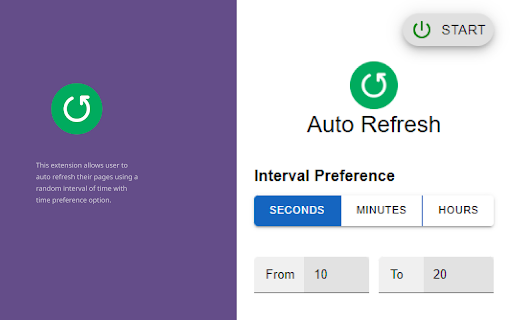

This extension allows user to auto refresh their pages using a random interval of time with time preference option. "Page Refresh" is a powerful browser extension that allows you to refresh web pages automatically at random intervals. This extension is perfect for busy professionals and anyone who needs to keep an eye on changing information without manually refreshing the page every few minutes. With tab refresh, you can set the interval between page refreshes to a random value between a minimum and maximum range of your choice. This randomization ensures that the refreshes occur at irregular intervals, preventing any pattern from forming that could be detected by anti-bot systems. This extension is incredibly easy to use, with a simple interface that allows you to specify the interval range, choose the tabs to refresh, and start the refresh cycle with a single click. "Page Refresh" is also highly customizable, allowing you to configure settings such as interval preference. Whether you are monitoring a stock ticker, watching a live stream, or simply need to keep tabs on any dynamic web page, "Page Refresh" is the perfect tool for you. Download it now and experience the convenience and power of automatic page refreshes with a random interval.

Auto Refresh
Automatically refreshes the page after a specified interval. Introducing the Auto-Refresh Chrome Extension: a versatile, user-friendly tool designed to streamline your browsing experience by automatically refreshing web pages at custom intervals. This extension goes above and beyond by incorporating advanced features like pausing auto-refresh during inactivity to save resources, monitoring web pages for changes, and notifying you with both sound and visual indicators when updates occur. With its sleek design and intuitive interface, Auto-Refresh Plus is the ideal extension for users who need an efficient and powerful solution for staying up-to-date with the latest content on their favorite websites

Page Auto Refresh
Auto refresh web pages with multiple smart timers Page Auto Refresh is an tool that allows you to refresh the page automatically 🌀 The main features are: 👉 Set up several refresh timers for different pages; 👉 No slowdowns of your device; 👉 Page Auto Refresh is compatible with any website. To avoid unexpected behavior the timers will be cleared if you restart the browser. Page Auto Refresh is easy to use, so you will immediately master and start using it 🔥 Download now and enjoy!

Auto Refresh Page - Reload Pages Automatically & Page Monitor Easily
Auto refresh pages, monitor pages, and set custom time intervals for seamless auto tab refresh and updates Auto Refresh Page Chrome extension allows you to effortlessly reload the current tab or multiple tabs at customizable time intervals. Ideal for monitoring updates, detecting keywords, or automating reloads, this extension simplifies your web browsing experience. Key Features: - Custom Intervals: Choose from predefined options or set custom time intervals (in seconds, minutes, or hours). - Auto Refresh Tabs: Automatically reload the current tab or all tabs matching the URL. - Customizable Settings: Save different refresh preferences for multiple pages or tabs. - Stop After X Refreshes: Set a limit for how many times the page should refresh. - Hard Refresh Option: Reload pages with cache and cookies cleared to ensure fresh content. - Visual Countdown: Track the time until the next refresh directly on the page. - Click to Stop: Instantly stop refreshing by clicking anywhere on the webpage. - Random Timer: Set random refresh intervals for page refresh. - Notifications & Sound Alerts: Receive alerts with sound and pop-up notifications. - Manage All Pages: View and control auto refresh settings across multiple tabs. - File Protocol Support: Refresh local pages that start with the file:/// protocol. - Auto Start On Browser : automatically open url when browser is started. How to Use Auto Refresh Page: - Open the Website: Visit the website you want to auto-refresh in your Chrome browser. - Open the Extension: Click on the Auto Refresh Page extension icon in your browser's toolbar to open the extension's settings. - Set Refresh Options: Choose your preferred refresh interval or manually set a custom time interval (seconds, minutes, or hours) based on your needs. - Save Settings: After selecting the refresh interval, click Save. The extension will automatically start refreshing the current tab according to the settings you applied. - Stop Refreshing: If you wish to stop the refresh, click anywhere on the webpage, and the automatic refresh will stop immediately. Alternatively, you can adjust the settings within the extension to stop after a set number of refreshes. Whats New : - Added option to allow repeated click - Added option to start URL when browser opened - Added option to edit preset - Fixed sound issue in windows 7 - Added random timer - Added Text detection - Added Notification and Sound option - Allowed url start with file:/// protocol - Fixed setting save issue - Added Minimum refresh time of 2 second. - Added import and export functionality. - Added start and stop checkbox in the time interval section. - Start Counter immediately as soon as URL start loading - Fixed issue of Start and Stop stored data removed - Fixed timer freez issue - Fixed PC slow down issue Notes: - Does not work on Chrome internal pages (e.g., chrome:// or the Chrome Web Store). - Minimum refresh interval is 2 seconds for optimal performance. Download Auto Refresh Page today and start refreshing page. For support, contact us – we're here to help. Don’t forget to leave a review and share your feedback!

Auto Page Refresh
This extension enables users to auto page refresh after regular and random intervals with time and value preference change option. Auto Page Refresh is a Chrome extension that allows you to automatically refresh web pages at a fixed or random time interval. With this extension, you can easily fix any issues with outdated content and keep up-to-date with the latest information. This extension provides a simple and easy-to-use interface to auto refresh, allowing you to set the time interval for refreshing the page. You can choose to auto reload the page at fixed intervals, such as every 10 seconds or every 30 minutes, or set the time interval randomly to keep the content fresh and relevant. In addition, auto page reload provides an option to fix the page refresh rate on a specific time period, which can be helpful for websites that have a fixed update schedule. With this feature, you can ensure that you are always up-to-date with the latest content without having to manually refresh the page. Overall, tab refresh or tab reload is a convenient and useful tool for anyone who needs to keep track of real-time information on a web page and reload tab. It is a must-have extension for users who frequently monitor news sites, stock markets, social media, and other websites that require constant updates.
