
dlglmcikdpnfngglhdpmgpcodjbpjjlb
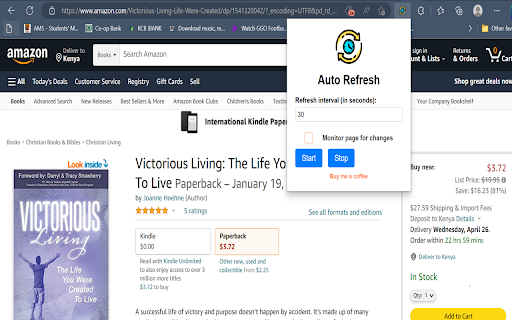
Automatically refreshes the page after a specified interval. Introducing the Auto-Refresh Chrome Extension: a versatile, user-friendly tool designed to streamline your browsing experience by automatically refreshing web pages at custom intervals. This extension goes above and beyond by incorporating advanced features like pausing auto-refresh during inactivity to save resources, monitoring web pages for changes, and notifying you with both sound and visual indicators when updates occur. With its sleek design and intuitive interface, Auto-Refresh Plus is the ideal extension for users who need an efficient and powerful solution for staying up-to-date with the latest content on their favorite websites

Swift Auto Refresh
Stay Ahead with Swift Auto Refresh: Effortless Page Refreshing at Your Fingertips! Are you tired of manually refreshing multiple web pages or constantly hitting that refresh button? Say goodbye to the hassle and stay ahead of the game with Swift Auto Refresh, the ultimate browser extension designed to streamline your browsing experience like never before! 1. Refresh Multiple Tabs on Periodically: Swift Auto Refresh empowers you to effortlessly refresh multiple tabs simultaneously. Whether you're monitoring stock prices, tracking live scores, or staying updated with breaking news, Swift Auto Refresh ensures you're always up to speed with the latest information. 2. Set Timers with Second Precision: With Swift Auto Refresh, you're in complete control of how frequently your pages refresh. Set precise timers down to the second, ensuring you never miss a critical update or an important event. 3. Super Convenient: Our extension is designed with simplicity and convenience in mind. Easily enable or disable the auto-refresh feature with just a single click. No complicated configurations or technical expertise required. 4. Prevent Pages from Displaying Alerts on Leaving: Tired of those annoying pop-up alerts when you try to navigate away from a webpage? Swift Auto Refresh has got you covered. Say goodbye to those disruptive messages and enjoy a smooth browsing experience without any interruptions. Stay one step ahead and make the most of your browsing sessions with Swift Auto Refresh. Whether you're a busy professional, a passionate gamer, or a dedicated news junkie, our extension will save you time, effort, and frustration. Download Swift Auto Refresh today and experience the freedom of effortless page refreshing right at your fingertips. It's time to take control of your browsing experience like never before!

Auto Refresh Page - Reload Pages Automatically & Page Monitor Easily
Auto refresh pages, monitor pages, and set custom time intervals for seamless auto tab refresh and updates Auto Refresh Page Chrome extension allows you to effortlessly reload the current tab or multiple tabs at customizable time intervals. Ideal for monitoring updates, detecting keywords, or automating reloads, this extension simplifies your web browsing experience. Key Features: - Custom Intervals: Choose from predefined options or set custom time intervals (in seconds, minutes, or hours). - Auto Refresh Tabs: Automatically reload the current tab or all tabs matching the URL. - Customizable Settings: Save different refresh preferences for multiple pages or tabs. - Stop After X Refreshes: Set a limit for how many times the page should refresh. - Hard Refresh Option: Reload pages with cache and cookies cleared to ensure fresh content. - Visual Countdown: Track the time until the next refresh directly on the page. - Click to Stop: Instantly stop refreshing by clicking anywhere on the webpage. - Random Timer: Set random refresh intervals for page refresh. - Notifications & Sound Alerts: Receive alerts with sound and pop-up notifications. - Manage All Pages: View and control auto refresh settings across multiple tabs. - File Protocol Support: Refresh local pages that start with the file:/// protocol. - Auto Start On Browser : automatically open url when browser is started. How to Use Auto Refresh Page: - Open the Website: Visit the website you want to auto-refresh in your Chrome browser. - Open the Extension: Click on the Auto Refresh Page extension icon in your browser's toolbar to open the extension's settings. - Set Refresh Options: Choose your preferred refresh interval or manually set a custom time interval (seconds, minutes, or hours) based on your needs. - Save Settings: After selecting the refresh interval, click Save. The extension will automatically start refreshing the current tab according to the settings you applied. - Stop Refreshing: If you wish to stop the refresh, click anywhere on the webpage, and the automatic refresh will stop immediately. Alternatively, you can adjust the settings within the extension to stop after a set number of refreshes. Whats New : - Added option to allow repeated click - Added option to start URL when browser opened - Added option to edit preset - Fixed sound issue in windows 7 - Added random timer - Added Text detection - Added Notification and Sound option - Allowed url start with file:/// protocol - Fixed setting save issue - Added Minimum refresh time of 2 second. - Added import and export functionality. - Added start and stop checkbox in the time interval section. - Start Counter immediately as soon as URL start loading - Fixed issue of Start and Stop stored data removed - Fixed timer freez issue - Fixed PC slow down issue Notes: - Does not work on Chrome internal pages (e.g., chrome:// or the Chrome Web Store). - Minimum refresh interval is 2 seconds for optimal performance. Download Auto Refresh Page today and start refreshing page. For support, contact us – we're here to help. Don’t forget to leave a review and share your feedback!

Auto Page Refresh
Tab auto refresh. Refresh pages automatically. Auto refresh and page monitor with specified time intervals fixed or random . Finally a page refresh that works. Reload any page with just a few clicks. Page refresh works on any website. Auto-refresh (auto-reload) your idle pages on a selected interval. Are there times when you want a page(tab) in your browser to auto-refresh? Do want your page/tab content to be always updated. Now that is easy - Page-refresh will reload your pages and tabs for you. It is very easy and super simple - just set the time interval that you want to auto refresh your pages or tabs and the Page-refresh extension will auto reload the pages. The best thing about this page refresh extension is that there is no setup required - it is easy and simple to use, install it and let your idle pages be auto reloaded. Just choose the time you want Page-refresh will do its magic. If what you want an extension that automatically reloads and refreshes web pages in the simplest way, this is what you need.

PagePatrol
Refreshes any page automatically until it fully loads, then alerts you. Set a URL, pick a delay, and let PagePatrol wait for you. Tired of manually refreshing a page over and over waiting for it to load? PagePatrol does it for you automatically. Simply enter the URL you want to monitor, set how many seconds to wait between retries, and hit Start. PagePatrol will keep refreshing the page until it fully loads, then instantly alert you with a browser notification and a pop-up so you don't miss it. Perfect for high-traffic websites, limited registration portals, ticket releases, or any page that goes down under heavy load. - After installing PagePatrol, click the puzzle piece icon near your address bar in Chrome - Find PagePatrol in the list and click the pin icon to keep it visible in your toolbar - Click the PagePatrol icon in your toolbar to open it - Enter the URL of the page you want to monitor - Set your preferred retry delay in seconds - Click Start, PagePatrol will open the page in a new tab and keep refreshing it until it loads - Once the page is ready, you'll receive a notification and an alert inside the tab - You can click Stop at any time to cancel Works on any website Configurable retry delay Stops automatically when the page loads or when you close the tab Clean, minimal interface
