
ffjnbklimilhgmddcememchlfnapdlda


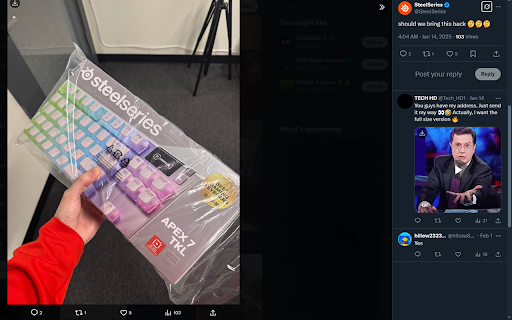

Instantly download and save images or photos from X/Twitter with a single click. X/Twitter Photo Downloader is an ultra-fast and easy-to-use Chrome extension designed for anyone who wants to quickly save images from X or Twitter. With its minimalistic design, users can download photos, images from tweets in just a couple of clicks. The extension prioritizes speed and simplicity, offering a seamless and efficient way download. Features: - Download Photo from X/Twitter home, profile, media, post page - Download Video Thumbnail - Provide a new file naming format, normally format as "filename.jpg" our extension "profile_filename.jpg" - Press "Shift + W" to download image under your mouse cursor Changelog: 1.0.8 - Add a download shortcut key, hover over an image and press "Shift + W" to download it 1.0.7 - Fixed failure parsing download url from video thumbnail on home, profile page 1.0.6 - Fixed wrong profile name format on search and explore page

Image downloader - Imageye
Find and download all images on a web page with Image downloader. With this Image Downloader, you can find, browse, convert and download all the images present on a web page. Additionally, you can: - Filter based on pixel width and height - Filter based on URL - Bulk download all images at once - Select which images you want to download - Check the size of each image - Copy the URL of the original image - Choose between various layout options - Support all major websites (Instagram, Facebook, Twitter, ...) - Perform a reverse image search - Convert .webp to .jpg - Convert any image type to webp, jpg or png (If you are a web dev and you need to convert all the images of a webpage you can now do it in one click) - Side Panel - Sort by Position in page - Capture selection (beta) Imageye - Image Downloader is a tool that helps you find the images published on a web page. The images may be protected by copyright and you should always assume that they are. Before reusing an image, make sure you check its license and the specific terms of reuse. Do not use any image, illustration or photograph without researching its copyright status first.

Media Harvest : X (twitter) Media Downloader
Download videos and images from twitter or TweetDeck with only one click. With this add-on, you can download videos and images from twitter or TweetDeck with only one click without any third-party service. ** It will cause race condition if you installed other download management extension. ** This extension provides, + Custom filename + Auto reveal sensitive content + Keyboard shortcut + Download video thumbnail This extension is not a web crawler. This extension doesn't provides, + Tweet crawling + Batch download + File compression

Twitter Downloader - Twitter Video Downloader
Download Twitter videos effortlessly with Twitter Downloader. Save your favorite clips, moments, and content in just a few clicks. Twitter Downloader - Twitter Video Download: Easily Save Your Memorable Moments This powerful tool allows you to easily download any video from Twitter, whether it's a funny clip, a memorable moment, or educational material, all with one click and save it locally for viewing anytime, anywhere. Through our plugin, you can freely save various content for personal or academic use. We recommend that users do not download copyrighted content without permission. ☑️ One-Click Download, Convenient and Fast: No complicated operations, just click the "Download" icon in the bottom right corner of the video to quickly save the video. ☑️ Support for Multiple Formats:Supports downloading videos in various formats such as MP4, WebM, etc., to meet your different needs. ☑️ High-Definition Quality, Original Taste: The downloaded videos retain the original quality, allowing you to enjoy the best viewing experience. ☑️ Safe and Reliable, Privacy Guaranteed: We are committed to protecting your privacy, all download operations are completed locally, and your personal information will not be leaked. ☑️ No Password or API Required: Simplifies the user experience, no additional information needs to be entered to start downloading. ☑️ 24/7 Support: Provides technical support 24/7 to solve your usage issues. 1. Open the Twitter website or app, find the video you want to download. 2. Click the "Download" icon in the bottom right corner of the video. 3. Select the save location, and the download will start. 📝Disclaimer: This plugin is independently developed and is not associated with the official Twitter app or website. Please ensure compliance with relevant laws and regulations before use.

Plucker XBD - X(Twitter) Media One-click Downloader
Download and organize X (Twitter) images & videos in one seamless workflow ✨ Plucker XBD enhances your X browsing experience by helping you quickly collect, preview, and manage media from any page — all in one place. 🗂 Smart file organization Customize file names and folder structures to keep your media clean and easy to manage. 🧠 Duplicate detection Automatically skip media you’ve already saved to avoid clutter. 👁 Media preview panel Instantly view images and videos from the current page in a convenient side panel. All features are free to use. Try Plucker XBD and streamline the way you manage X media 🚀 ⚠️ Disclaimer Plucker XBD is an independent tool and is not affiliated with or endorsed by X (Twitter). This extension helps users access and organize publicly available media. Please respect applicable content rights and platform terms when using this tool.
