
ffflfildjpjogehldmamcgogjefphodn
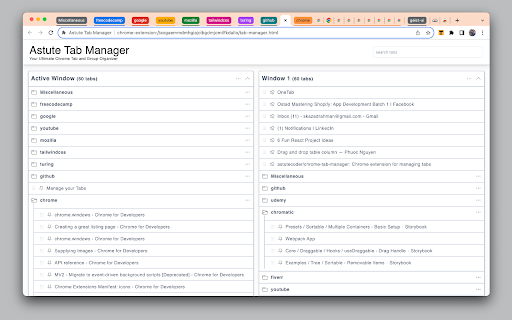
Your Ultimate Chrome Tab and Group Organizer **Introducing Astute Tab Manager: Your Go-To Chrome Tab and Group Organizer** Are your browser windows cluttered with an overwhelming number of tabs? Do you find yourself struggling to locate the right tab or group for your tasks? Astute Tab Manager is here to revolutionize your browsing experience. 1. **Efficient Tab and Group Management:** Astute Tab Manager provides a comprehensive solution for organizing your tabs and tab groups on a per-window basis, ensuring a clean, stress-free browsing environment. 2. **Group and Ungroup Tabs:** Create and manage tab groups effortlessly, and ungroup them when you're done to maintain a clear workspace. 3. **Customize Group Names:** Personalize your tab groups with custom names for quick identification and better organization. 4. **Close Groups and Tabs:** Streamline your browsing experience by closing entire tab groups or individual tabs with a single click. 5. **Eliminate Duplicate Tabs:** Astute Tab Manager intelligently identifies and removes duplicate tabs, helping you maintain a tidy browser workspace. 6. **Seamless Tab and Group Transfers:** Drag and drop tabs or entire tab groups between different browser windows to optimize your workflow. 7. **Intuitive Drag-and-Drop Functionality:** Swiftly reorganize your tabs by dragging and dropping them from the tab list to your browser window or tab groups. 8. **Pin and Unpin Tabs:** Keep important tabs easily accessible by pinning them, and unpin them when they're no longer needed. 9. **One-Click Tab Navigation:** Instantly switch to a tab by clicking its name in the list, boosting your productivity. 10. **Effortless Tab Search:** Locate any tab in seconds with our search feature, eliminating the need for time-consuming scrolling. With Astute Tab Manager, you'll bid farewell to tab chaos and embrace a more organized and efficient browsing experience. Regain control over your tabs and enhance your productivity. Download Astute Tab Manager today and enjoy a cleaner, more focused browsing experience.

rami - Tab Organizer for Chrome
A simple cleanup routine to close and organize the too many open tabs. Imagine a messy browser window, congested with tabs. rami offers a simple routine for cleaning up such windows: - Launch rami in the messy window. - When launched, rami loads a “tab container” for each open tab in the window. - Start at the first container and individually consider each tab: - Hover the container to view the tab, quickly identifying it. - Close the tab if you don’t need it, - Set aside the tab if you are hesitant to close, - Leave the tab open if you are currently working on it. - You are done cleaning up the window once you have made the - set-aside|discard|keep - decision for every tab in it. - - - - - - - - - - - - - - - - - - - - - - - - - Buttons to set aside and close are inside the containers, easy to reach, making the cleanup process faster. - rami is dynamic - any changes within the rami window are immediately reflected in the browser window and vice versa. rami assigns a storage to each open window. When you set aside a tab, it is automatically placed in the storage of its parent window. This allows for one-click set-aside, as you don’t have to decide where to store the tabs. You simply set aside a tab, knowing exactly where it will be stored. Retrieving set-aside tabs from storage is very easy: - All storages are only two clicks away, accessible from the rami window. - Conveniently, you can preview the set-aside tabs before returning them to their parent windows. - From within the rami window: - Conduct a convenient drag and drop of tabs within and across windows. - Bring any open window in focus to clean it up or access its storage. - Context menu set-aside - right-click a tab and select “Set Aside”.

Tabber - Tab Organizer
Simplify your browsing by grouping unused tabs into organized groups Drowning in tabs? Free your browser with Tabber. Save, organize, and group unused tabs without keeping them open. Reclaim your focus and speed up your browser — without losing anything important. 🔹 Virtual Workspace for Your Tabs Tabber looks and works like a virtual-browser just for your saved tabs. It’s intuitive and fast. 🔹 AI-Powered Tab Grouping Too many tabs to sort manually? Let Tabber group them by topic using built-in AI — instantly and effortlessly. ⭐ Smart Tab Grouping Automatically group tabs by content or domain — or let AI detect topics for you. 🖼️ Tab Previews Visual thumbnails help you find what you need faster. ☁️ Sync & Backup Access your saved tabs on any device. Revert to previous backups if needed. 🎨 Custom Themes Adjust interface colors and set custom backgrounds. ⚡Sites features Some sites have extra features, like letting the extension fetch YouTube video data to save your progress. Our commitment is to deliver exceptional software without compromising your privacy. Cloud synchronization is performed only with your consent and is completely optional for the extension to work. We securely store your information in the cloud, ensuring that your work is both backed up and easily accessible from any location. Your data is exclusively yours, and we retain it solely to enhance your user experience. Tabber adheres to the stringent SOC 2 Type II standards, undergoes annual third-party penetration tests, and employs top-tier 256-bit AES encryption and Transport Layer Security (HTTPS) protocols to thwart any unauthorized attempts to access your Tabber data. Feel free to reach out to our support team at tabber@neulen.dev, and we'll respond promptly to address your inquiries. By installing the Tabber extension, you are in agreement with the Terms of Use (tabber.top/terms) and Privacy Policy (tabber.top/privacy) outlined by Tabber.

Blixem Tab Manager
Organize, save & share your tabs for easy collaboration with Blixem. Blixem helps you manage your tabs and windows efficiently, reducing distractions and improving performance. Homepage: Your new tab screen shows tabs vertically, gives quick access to favorite sites, and lets you launch Workspaces with one click. Customize with widgets, colors, and backgrounds. Workspaces: Save tabs into Workspaces for easy access, sharing, and collaboration. Customize Workspaces and share them with a few clicks. Collaborate: Share Workspaces by granting view or edit permissions. Teams can add content, comment, and invite others with a link or email. Collaborators don't need the extension installed. Windows: See all open tabs across all Chrome windows from one page. Rearrange, close, or add tabs to Workspaces. Pause tabs and windows to speed up your computer. Widgets: Add widgets like recently closed tabs, frequently visited sites, and top Workspaces to your homepage. Work-Personal Separation: Separate work and personal tabs using Categories. Hide work tabs when off duty and personal tabs during work hours. Blixem Tab Manager helps you control and organize your online life.

Super Tab Manager
Lightweight, performant tab manager that declutter your messy tabs and improve your productivity by 200%. Also respect your privacy. 🏆 Features - Group Tabs By Domains: instantly tidy your messy tabs by grouping them into Domains. - Close Duplicated: clean up your tabs by removing unnecessary duplicates. - Close NSFW: remove unsafe tabs from your browser, saves you from trouble. - Close Social: remove all social media tabs from your browser, allows you to focus on your work. - List/Search tabs: find your lost tab by typing its title, then bookmark or close it. - Memory Tracking: show you how much memory you have left in your system. - ⭐NEW: Pin tab - ⭐NEW: Open current tab in incognito - ⭐NEW: Activate Picture-in-Picture mode for media (music/video). 📱 UI - Dark and Light mode based on user's system settings. - Sleek, minimal design.
