
ffekmfclcdnahgaeagcmdcnbgkcjhfld
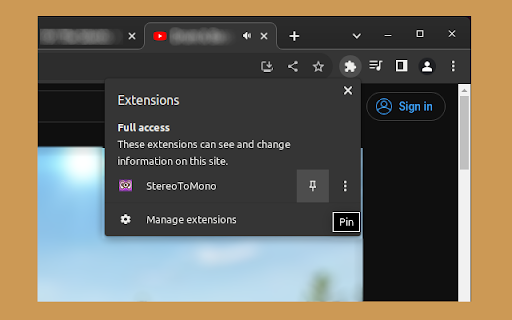

This extension monofies the currently playing video or audio source with a single click on the extension button. The StereoToMono extension is useful if you want to listen to the video or audio you are currently watching in mono. It combines the left speaker's content with the right speaker's and vice versa, so you effectively hear the same sound from both speakers. This can be helpful when the stereo image in the video is unbalanced, heavily leaning to the right or left, suffers from phase correlation issues, or you simply want to hear the entire audio using only one speaker. It works on both video and audio elements on pages that support this feature. The extension is activated by clicking the left mouse button on its icon. For a full sound reset after adjusting the volume with the extension, it is recommended to reload the page. Known issues: - On some pages, it is not possible to adjust the stereo image of the played elements. This is due to how the specific page is designed. - On some pages, when clicking on the extension button, the browser may mute the sound. This is due to the security configuration of the specific page or the server it is hosted on and unfortunately cannot be detected from the extension's point of view. If you find this extension useful, you may consider supporting the author with a donation of any amount. Check the menu by right-clicking the extension button.

Audio Compressor
There are presets for different levels of compression. You can customize the default settings or the settings for a specific site or page. There are some sites it doesn't work with, cross-origin browser security blocks scripts from modifying audio/video from a different host. As far as I know there's no way around this. This works by using the Web Audio API to get the audio context for a page, and inserting a DynamicsCompressorNode.

IQ Tab - Custom New Tab
Customize your Google Chrome new tab page background Your personal New Tab. Custom folders, custom bookmarks for work and for web surfing! Easy switch between folders with different sets of your important bookmarks, so you can create new folder for your new opportunity, for example if you plan some jorney or travel you can create a folder and put in it many bookmarks associated with this jorney. Also you can use it like regular new tab with few most often used web links. By clicking "Add to chrome" you accept and agree to installing "IQ Tab - Custom New Tab" extension and setting Chrome New Tab to that provided by the service and the Terms of Use and Privacy Policy. The extension will update your search settings and will change your search engine to be powered by Bing.

Controls for Instagram Videos
This tiny and efficient extension adds standard video playback controls to Instagram™ videos. Normally, all you can do with an Instagram™ video is play or pause it, but this extension will expose the native HTML 5 video player which has a seek bar (aka video scrubber), a volume control, a play/pause button, Picture-In-Picture (floating video) button, fullscreen video button, and on *some* videos it will also display a download button! The extension automatically runs and works on all web pages that embed Instagram™ videos! How to use it: 1) Load any web page that contains an Instagram video 2) Click the video to make it play 3) That's it - the extension will automatically detect the video and will reveal the control buttons. Options: -Control volume and playback speed via hotkey. -Remember your volume and playback speed for future videos. See the extension config page via right-clicking the extension icon in your browser bar, then select "Options". Or, just navigate to chrome://extensions/ Notes: - After you install the extension, make sure to reload the page for any browser tabs that were opened before installing the extension. The extension will not run in those tabs until you do so. - The download video button doesn't work on many videos anymore due to recent instagram changes, but it does still work on *some*. - On pages where instagram auto plays videos as you scroll, such as on your home page feed, make sure to play/pause the video by clicking in the center of the video, instead of using the button at the lower left. Otherwise, when scrolling, the video may not stay paused. Wondering why the extension is broken so much lately? Read https://rehfeld.us/browser-extensions/controls-for-instagram/instagram-changes Issues currently being worked on: -Remember volume and playback speed not working in some cases. -The volume mute/buttons on the video vs the Instagram GUI aren't always in sync. -On stories, you must use the instagram play/pause button because the button on the video doesn't work. Legal: Instagram™ is a registered trademark. This extension was developed independently of Instagram, by someone who is not related or affiliated with Instagram, without any help or endorsement from them. --------- Changelog --------- Feb 5th, 2023 V1.33 - Fix for not being able to click controls on some videos on home feed. Also make background shade which covers most of the video on reels pages less visually disruptive. Feb 2nd, 2023 V1.32 - Another potential fix for some users not seeing controls on some videos. Also, add support for reels. Nov 24th, 2022 V1.30 - More reliably adjust video height on story videos. Also, potential fix for some users not seeing controls on some videos. Nov 18th, 2022 V1.29 - Fix video controls not being easily clickable for certain videos. Also, new features: configurable hotkeys for volume and video speed (right the extension icon > options). Jun 22nd, 2022 V1.28 - Upgrade to manifest v3. This is a technical change, and should not affect any functionality. Jun 17th, 2022 V1.27 - Make videos stay paused when scrolling on home page if you pause the video by clicking in the center of the video (pausing via the tiny pause button in the lower left will not work). Also, fix bug preventing users with a non-english browser language from using core features. Jun 2nd, 2022 V1.25 - Adapt to recent instagram updates, fixing sudden lack of video controls. Also, resize the video upwards a bit on stories so the video controls arent covered by instagram comment/like buttons. Aug 17th, 2020 V1.23 - Potential Bugfix for disappearing videos/images on some pages. Aug 5th, 2020 V1.21 - Bugfix for disappearing videos on some pages. Jul 18th, 2020 V1.19 - On some Story videos, resize the video a bit so the "Send Message" text box doesn't overlay the video controls. 2nd attempt. May 11th, 2020 V1.18 - Undo previous change to Story videos, which affected some non-story videos and broke them. May 9th, 2020 V1.17 - On some stories, move the video a bit so the "Send Message" text box doesn't overlay the video controls. Oct 30, 2019 V1.14 - Add ability to set video playback speed. Also, enable the "remember volume" feature by default. Sept 29, 2019 V1.13 - Add ability to automatically remember the volume of videos. Jun 8, 2019 V1.11 - Update to react to Instagram changes, fixing support for stories page. V1.3 - Renamed Extension. V1.1 - Improve compatibility to work on more sites, including instagram.com website and other, non instagram.com sites.

Equalizer Plus
Unleash the Power of Personalized Audio in Chrome Transform your Chrome audio with Equalizer Plus — a powerful, real‑time sound control tool built for clarity and precision. Customize your listening experience across any tab with flexible presets and advanced controls. 🔥 Key Features 🔥: • High‑quality equalizer with popular presets for quick tuning • Volume dynamics compressor for balanced, punchy sound • Mono/Stereo toggle for a tailored listening experience • Volume booster up to 400% • Custom presets: save and recall your own settings instantly • Themes: light, dark, and random looks • Startup preset: save your current settings and load them automatically when you open the extension • Pan dial for precise stereo balance or true mono • Unlimited instances across tabs • Real‑time audio processing with instant results • Works with all online audio: music, video, calls, and more
