
feopehddfpeghlkgflgaaphbgjgflnli


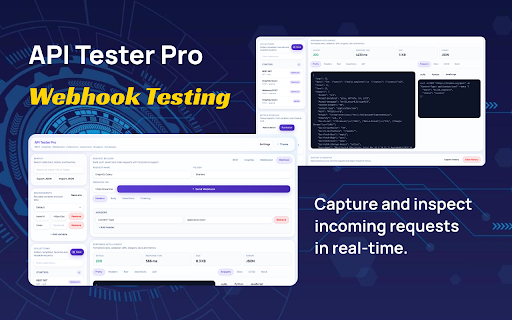
Premium API testing workspace for REST, GraphQL and WebSocket workflows. API Tester Pro is a powerful and lightweight browser extension built for developers to test and debug APIs directly from their browser. It supports REST, GraphQL, and WebSocket workflows in a single interface, eliminating the need for multiple tools. Users can create and send requests, analyze responses, manage headers, and reuse saved configurations for faster development. REST API testing with full request customization GraphQL query and mutation support WebSocket connection testing Save and manage API configurations locally Clipboard support for quick data handling Clean and developer-friendly interface API Tester Pro is designed for simplicity, performance, and efficiency, making it ideal for frontend developers, backend developers, and testers.

Quick Web Scraper - One-click Web Scraper
A free web scraper for instant results. Scrape any website with one click — no coding required. Quick Web Scraper is a lightweight and easy-to-use Chrome extension that allows you to extract structured data from any webpage instantly — with just one click. It is designed for users who want fast, clean, and efficient data extraction without any coding knowledge. Whether you are a student, researcher, marketer, or developer, this tool helps you collect useful webpage data in seconds and export it for further use. 🔹 Key Features: • One-click data scraping from any active webpage • Extract visible content such as text, links, and structured elements • Clean and user-friendly preview interface • Download scraped data in structured formats (JSON/CSV) • Lightweight and fast performance • No coding or technical setup required 🔹 How It Works: 1. Open any webpage you want to scrape 2. Click on the extension icon 3. Instantly extract and preview the data 4. Download the data in your preferred format 🔹 Use Cases: • Market research and competitor analysis • Data collection for projects and assignments • Lead generation and content extraction • Quick insights from webpages 🔹 Privacy & Security: Quick Web Scraper respects your privacy. The extension only accesses the currently active tab when you trigger it. No personal data is collected, stored, or transmitted to external servers. All processing happens locally in your browser. 🔹 Permissions: The extension requires minimal permissions such as activeTab, scripting, storage, and downloads to function properly. These are used only to extract data from the current page, store user preferences locally, and allow file downloads. 🔹 Why Choose Quick Web Scraper? • Simple and beginner-friendly • Fast and efficient scraping • No hidden tracking or data collection • Works on most websites Start extracting valuable data in seconds with Quick Web Scraper — your one-click solution for web scraping.

Age Calculator
Calculate your exact age instantly. Age Calculator is a simple and easy-to-use Chrome extension that helps you calculate your exact age instantly. Just enter your date of birth, and the extension will accurately calculate your age in years, months, and days. It is perfect for students, professionals, job applications, government forms, and anyone who needs quick age calculations without confusion. Key Features: • Calculate exact age in years, months, and days • Fast and accurate results • Clean and user-friendly interface • No login or signup required • Works completely offline • Lightweight and secure extension Why install Age Calculator? Many official forms, exams, and applications require precise age details. This extension saves time and removes manual calculation errors, giving you instant and reliable results directly in your browser. Your data stays on your device. We do not collect, store, or share any personal information. Install Age Calculator today and get accurate age results in seconds.

DataFlow Converter
Convert CSV, JSON, and TSV files with advanced filtering, sorting, and formatting — all offline. DataFlow Converter is a powerful browser extension that allows you to convert CSV, JSON, and TSV files directly within your browser — fast, secure, and completely offline. Built with a clean step-by-step interface, the extension lets you upload a file, configure conversion options, and instantly generate results without relying on any external services. • Custom delimiter support (comma, semicolon, pipe, tab, or custom) • JSON formatting options (2 spaces, 4 spaces, minified) • Header detection and column handling • Automatic data type detection (numbers, booleans, nulls) • Remove duplicate rows • Filter rows using conditions (contains, equals, starts with, greater than, less than) • Sort data by any column (ascending or descending) Save your preferred conversion settings and reuse them anytime. Templates store all configuration options including filters and sorting. • Uses Web Workers for background processing • Handles large files efficiently without blocking the UI • Real-time progress indicator • Drag & drop file upload • Step-by-step workflow (Upload → Configure → Result) • Instant preview of converted data • Copy to clipboard with one click • Download converted files instantly • 100% offline — no internet required • No data collection or tracking • No external API calls • All processing happens locally in your browser This extension is ideal for developers, data analysts, and anyone who frequently works with structured data formats.

Extension Manager Pro
A lightweight dashboard to monitor, organize, secure, and control installed Chrome extensions. Extension Manager Pro – Smart Control for Your Chrome Extensions Extension Manager Pro is a lightweight and efficient Chrome extension designed to help you manage all your installed extensions from a single, easy-to-use dashboard. Instead of navigating through Chrome’s default extension page, you can quickly view, enable, disable, and organize extensions in just a few clicks. 🔹 Key Features: • View all installed extensions in one place • Enable or disable extensions instantly • Clean and user-friendly dashboard interface • Organize extensions for better workflow • Lightweight and fast performance 🔹 Why Use Extension Manager Pro? Managing multiple extensions can slow down your browser and reduce productivity. This tool helps you take full control by allowing you to quickly toggle extensions based on your needs. 🔹 Privacy & Security: Your privacy is fully respected. This extension does not collect, store, or transmit any personal or browsing data. All operations are performed locally within your browser. 🔹 Permissions: • management – to view and control installed extensions • storage – to save user preferences locally 🔹 Who Is It For? • Developers managing multiple tools • Power users with many extensions • Anyone who wants a cleaner and faster browsing experience Take control of your browser with Extension Manager Pro — simple, fast, and efficient.
