
cbgfnanifjmhogpoampfpfpfekpcejpl

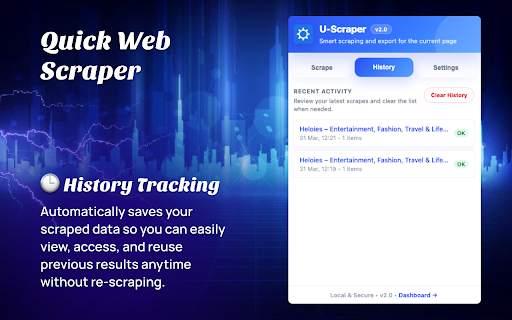


A free web scraper for instant results. Scrape any website with one click — no coding required. Quick Web Scraper is a lightweight and easy-to-use Chrome extension that allows you to extract structured data from any webpage instantly — with just one click. It is designed for users who want fast, clean, and efficient data extraction without any coding knowledge. Whether you are a student, researcher, marketer, or developer, this tool helps you collect useful webpage data in seconds and export it for further use. 🔹 Key Features: • One-click data scraping from any active webpage • Extract visible content such as text, links, and structured elements • Clean and user-friendly preview interface • Download scraped data in structured formats (JSON/CSV) • Lightweight and fast performance • No coding or technical setup required 🔹 How It Works: 1. Open any webpage you want to scrape 2. Click on the extension icon 3. Instantly extract and preview the data 4. Download the data in your preferred format 🔹 Use Cases: • Market research and competitor analysis • Data collection for projects and assignments • Lead generation and content extraction • Quick insights from webpages 🔹 Privacy & Security: Quick Web Scraper respects your privacy. The extension only accesses the currently active tab when you trigger it. No personal data is collected, stored, or transmitted to external servers. All processing happens locally in your browser. 🔹 Permissions: The extension requires minimal permissions such as activeTab, scripting, storage, and downloads to function properly. These are used only to extract data from the current page, store user preferences locally, and allow file downloads. 🔹 Why Choose Quick Web Scraper? • Simple and beginner-friendly • Fast and efficient scraping • No hidden tracking or data collection • Works on most websites Start extracting valuable data in seconds with Quick Web Scraper — your one-click solution for web scraping.

Feature ROI Pro
AI-Powered ROI Calculator with Scenario Modeling & Advanced Analytics This extension provides a simple and efficient ROI (Return on Investment) calculator directly within the browser. Users can quickly calculate returns based on their investment amount, duration, and expected profit without needing external tools or websites. The interface is lightweight, fast, and easy to use, making it suitable for quick financial calculations. All inputs and results are processed locally within the browser, ensuring privacy and performance. The extension does not collect, store, or share any personal or financial data and uses only minimal permissions required for its functionality.

DataFlow Converter
Convert CSV, JSON, and TSV files with advanced filtering, sorting, and formatting — all offline. DataFlow Converter is a powerful browser extension that allows you to convert CSV, JSON, and TSV files directly within your browser — fast, secure, and completely offline. Built with a clean step-by-step interface, the extension lets you upload a file, configure conversion options, and instantly generate results without relying on any external services. • Custom delimiter support (comma, semicolon, pipe, tab, or custom) • JSON formatting options (2 spaces, 4 spaces, minified) • Header detection and column handling • Automatic data type detection (numbers, booleans, nulls) • Remove duplicate rows • Filter rows using conditions (contains, equals, starts with, greater than, less than) • Sort data by any column (ascending or descending) Save your preferred conversion settings and reuse them anytime. Templates store all configuration options including filters and sorting. • Uses Web Workers for background processing • Handles large files efficiently without blocking the UI • Real-time progress indicator • Drag & drop file upload • Step-by-step workflow (Upload → Configure → Result) • Instant preview of converted data • Copy to clipboard with one click • Download converted files instantly • 100% offline — no internet required • No data collection or tracking • No external API calls • All processing happens locally in your browser This extension is ideal for developers, data analysts, and anyone who frequently works with structured data formats.

URL Shortener
URL Shortener lets you quickly convert long URLs into short, shareable links directly from your browser toolbar. Simply paste your long URL, click “Shorten URL,” and instantly get a compact link ready to copy and share. ✨ Features: • Convert long URLs into short links using T.ly • One-click copy to clipboard • Save your API key securely in extension settings • View recent shortened links history • Clean and lightweight interface • No ads, no tracking ⚙️ How It Works: 1. Get a free API key from https://t.ly 2. Open extension settings and enter your API key 3. Paste a long URL into the extension 4. Click “Shorten URL” 5. Copy and share your shortened link 🔒 Privacy & Security: This extension stores your API key and link history locally in your browser using Chrome storage. No personal data is collected, tracked, or transmitted to any third party. The extension only communicates with the official T.ly API to generate short links. 🎯 Perfect For: • Resume and portfolio links • Social media sharing • Students submitting project links • Professionals sharing long URLs • Anyone who wants cleaner, shorter links Fast, simple, and secure URL shortening right from your browser.

ConvertAll
ConvertAll is a fast, lightweight, and reliable all-in-one unit conversion tool designed to work directly inside your browser. It allows users to convert commonly used measurements instantly without relying on external websites or online calculators. The extension opens from the browser toolbar and provides a clean, focused interface where conversions happen in real time. As soon as a value is entered or a unit is changed, the result is calculated immediately, helping users save time during everyday tasks. ConvertAll is suitable for students, professionals, developers, engineers, analysts, and anyone who frequently works with measurements. It eliminates the need to search for different converters by combining multiple conversion categories into a single, easy-to-use tool.
