
fehglbncgohdleanopiddiobdgabjpbn
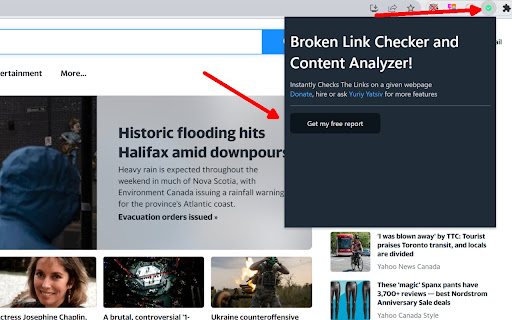
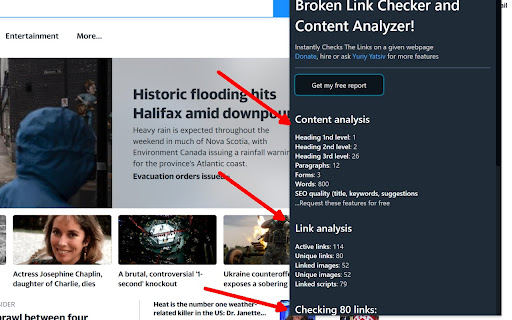
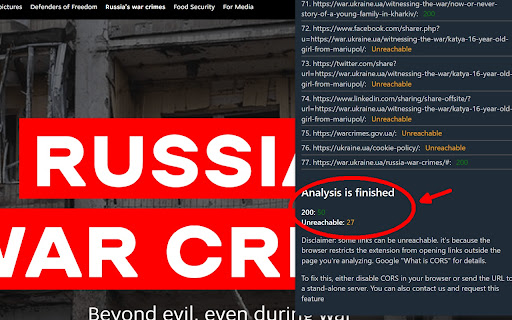
BrogenLing is a Chrome extension that scans your webpages for broken links and gives you a report Are you a web designer, developer, or content editor? Say hello to your new best friend, BrogeLing! This Chrome extension has your back when it comes to making sure your webpage's links are in tip-top shape. Picture this: You're working hard on your webpage, and it's got loads of links. The last thing you want is to miss a broken link or 404 error that could turn off your visitors. That's where BrogeLing swoops in to save the day! With a click of a button, BrogeLing scours through a webpage like a savvy detective, searching high and low for any sneaky broken links. It doesn't stop there - it also checks all those external links to ensure they're behaving properly. The best part? Within minutes, BrogeLing serves you a comprehensive report right there on your screen. No extra fuss, no additional programs needed. It's like having a link-checking superhero right at your fingertips! Rest easy, knowing that BrogeLing has marked the broken links for you. Easily copy them to your clipboard and tackle them head-on. Your website's performance and SEO rankings will thank you. Level up your website game with BrogeLing - the ultimate guardian angel for web creators like you! Features: 📌 Unique URLs: Discover all unique image and script URLs, ensuring better optimization. 📌 Link Status Check: Quickly identify active links and their HTTP status codes. 📌 Content Analysis: Count headings, paragraphs, forms, images, and scripts on any web page. 📌 User-Friendly: Simple interface, easy-to-understand data, and instant results. Use Cases: 🔍 Web Developers: Optimize your website's structure, fix broken links, and enhance user experience. 🔍 SEO Specialists: Analyze on-page content, improve link health, and boost search engine rankings. 🔍 Content Managers: Ensure consistent content layout, check image and script references, and reduce load times. 🔍 Marketing Teams: Validate ad placements, track conversions, and fine-tune website performance. Disclaimer: if you see some links in the reports that are unreachable, it's because your browser restricts the extension from opening links outside the page you're analyzing. Google "Cross origin resource sharing" for details. To fix this, either disable CORS in your browser or send the URL to a stand-alone server. You can also contact us, request this feature and speed up the extension improvement

Broken Link Checker
Helps you to automatically detect broken links on websites you visit. "Broken Link Checker" can detect broken audio, video, iframe, image and anchor tag links on any website you visit. Users can add their own rules with customized settings for detecting broken links. When a user navigates to a specific hostname, the rules defined in "Broken Link Checker" are executed in background allowing automatic detection of broken links as they navigate around a specific hostname. This tool is helpful if you are doing a SEO audit of a website and want to know if there are any broken links on the page. This tools helps you to detect and eliminate broken links. Nested shadow elements and nested iframe elements are not fully supported by this tool. This tool also does not support shadow root opened with the closed mode. Checking broken tags inside iframe elements is supported but rule of parent document is applied while checking errors to child frame instead of applying rule for the hostname of the child frame. At the moment, following html tags are supported: - - - - - - Allows a user to whitelist specific URL schemes from getting checked to avoid false positives. - Exclude specific URLs from getting checked. - Provides a user with various rate limiting options to avoid sending too many requests at a time. - A user can exclude specific URLs from getting checked. - This tool provides an option to rate limit number of requests sent by the web browser by allowing user to specify a custom delay time between consecutive requests. - This tool will run in background whenever the page is updated, allowing a user to automatically check various elements displayed on the page. - This tool provides information about broken or missing attribute values such as alternate text. - This tool can validate mime type of URL specified in the image tag is a valid image or not, this can help to make sure that URL specified in the image is a valid image. - Limitations of this tool - Sending too many get requests for validating linked resource can get a user’s IP address to get blacklisted or rate limited by the server. - Most external URLs can’t be verified to be correct or not because some servers are configured to disallow cross origin requests and also because of CORB protection Hostname: This input parameter is used for identifying the hostname for which a rule will be applied. Whitelisted schemes: This input parameter allows a user to select schemes that must be whitelisted. Whitelisted schemes will not result in an error while checking for broken tags. Excluded URLs: This input parameter allows a user to specify what URLs must be excluded from getting checked. Excluded URLs will be skipped from getting checked by the tool regardless of whether they are valid or not. Rate limiting: This option allows a user to specify a time interval between two consecutive HTTP requests while an element is checked. Using this option a user can control the number of HTTP requests sent per minute. - Click on “Broken Link Checker” extension icon, after that a popup page will be opened. - Click on “Enabled / Disabled” button of detection rule. - Click on “Apply changes and reload” button to apply changes. - Click on “Broken Link Checker” extension icon, after that a popup page will be opened. - Click on “Delete” button of detection rule. - Click on “Apply changes and reload” button to apply changes. - Click on “Broken Link Checker” extension icon, - Click on “Edit” button of detection rule. - Now you can edit any configuration related to selected rule. - Click on “Update” button. - Click on “Apply changes and reload” button to apply changes. - Click on “Broken Link Checker” extension icon, after that a popup page will be opened. - Click on “Add a new detection rule” button. - This will open a new dialog box. - Enter a custom hostname. - Select custom URL schemes to be white-listed. - Enter URLs to be exclude from getting checked. - Select highlighting options. - Select rate limiting options to avoid sending too many requests at a time. - After required settings are selected, click on “Add” button. - Click on “Apply changes and reload” button to apply changes. ## Please contact us if you found a bug or want a custom feature to be added in the software. This software is free for non-commercial use however a license must be purchased for commercial use. This software will ask you to purchase a license if commercial use is detected. Privacy notice: This software neither collects nor transmits any personally identifiable information. This software does not track your browsing behaviour. Information necessary for functioning of this software is stored on the devices of the end user, our servers do not have access to this information. For more information please read our privacy policy and terms of service.

Talkk
Speak Freely in Every Corner of the Web Talkk powers conversations where it matters. Use Talkk to post comments, ask questions, and host events on any website. Done with posting on one site? Talkk shows recommendations from Bing and DuckDuckGo so you can quickly jump to any related websites. Want to connect with people in your social circles? Sign in with a Facebook or Twitter/X account to follow friends from these platforms on Talkk. FAQ Can I really post to any website? Absolutely. Can a website block me or delete my post? No, all posts are hosted and managed by Talkk without 3rd party interference. Can I truly speak freely? Yes, but some common-sense rules do apply. See our terms for details. BONUS When AIs compete, you win. Get instant responses from DeepSeek, ChatGPT, Gemini (Google), and Llama (Facebook) on any questions you post via Talkk.

Tanuki Utilities
Provide useful utilities for GitLab users. * Change the GitLab favicon to a project icon; you can easily distinguish many GitLab tabs. * Move "Copy reference" button on top bar; the button is always shown for your easy access. This extension tries to change favicons in the **all** sites by default. You can specify which GitLab site (e.g. gitlab.com or your self-hosted site) you would like to change favicons. #### Change the GitLab favicon to a project icon

chickadeasy
Add to Chrome and open extension to sign up for your 30 day Free Trial! ✶ We Get You! ✶ We know exactly what your day entails. We're affiliate marketers too! It can be a grueling, time consuming, all-encompassing job. It's our goal to lighten the load and give us all some more time for the FUN STUFF! ➤▶︎What is Chickadeasy? It's a paid Chrome browser extension that uses the information on an Amazon or Walmart product page to create an affiliate post using links from Amazon Affiliate, Walmart Creator, Mavely, or Shop Your Likes. You can also use a chickadeasy template to deep link any of those with Amazon or Walmart using Genius Links, Mavely, URL Genius, PostTap or Joylink. You customize templates in the format that you want, so you can post with the click of a key. You'll create posts in less than half the time, allowing you free time that you never thought you'd have! Chickadeasy includes the ability to clear unnecessary tracking parameters from Amazon and Walmart URLs so you know you're starting with a clean slate every time. Chickadeasy is a paid extension. Learn more and sign up for a 30 day free trial at Chickadeasy.com ➤▶︎Where can I use it? We designed it with social media in mind, but the format building is flexible enough that you could use it for almost anything! Just make sure to check the TOS of your affiliate connections to make sure you're following their rules. ➤▶︎Multiple Post Formats You choose how many post formats you need so you can customize the extension for your business. From one to Infinity! ➤▶︎Format posts in seconds The Chickadeasy extension lets you auto-create your post with a click on the extension icon (a chickadee of course!), or by assigning a key-stroke combination. Either way you chose, your posts are at your literal fingertips! ➤▶︎Multiple Amazon Tracking IDs and Deep Link Services The Chickadeasy extension allows you to use your Amazon affiliate links, and also deep link through Genius Link, URL Genius, Mavely, PostTap, and JoyLink. Individual tracking IDs are available based on the features of each link service. ➤▶︎Walmart Affiliate links can be created through Walmart Creator, Mavely, and Shop Your Likes. ➤▶︎More time in your day Posts take half the time (or less!). Formatting is automatic. Price drops can be posted immediately. If you have codes or coupons, they just need to be added in the post field before hitting "send". ➤▶︎All information is Secure The Chickadeasy extension does not have access to your accounts. It gets its information directly from the product page. ➤▶︎Live more or Post more? What will you do with all that extra time? Play more? Post more? A little bit of both? The choice is yours!
