
fdakeeindhklmojjbfjhgmpodngnpcfk

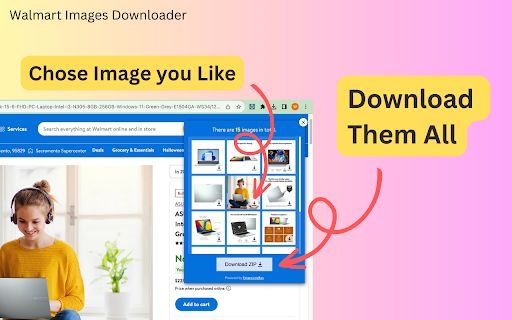
Scrape and download high-resolution images of Walmart product listings in bulk or one by one from any listing with just a click. Stop wasting time saving product images one by one. With just one click, our new tool allows you to instantly get all the high-resolution photos you need. Whether you need imagery for your website, print projects, or just inspiration, this extension delivers. Bulk download all product images in seconds, regardless of your use case. Create catalogs, design print ads, build product galleries, or simply archive images for future reference. Our handy browser extension eliminates the hassle of hunting down photos for your product. Install now to save time and effort. With a single click, get all the high-quality product shots you want. Start scraping and saving instantly! - One-click to get all images for any Walmart product listing - Bulk saving of images in seconds - no more saving one by one - Access to high-resolution source files - perfect for print and web use - Secure and confidential - all data stays on your device - Easy install browser extension - Start immediately Stop struggling to gather product images from the Web. Our intelligent tool makes it simple to get all the photos you need with just one click. Install now and streamline your image-scraping process! How to download all the listing images from a given product? Scraping and saving product pics can be done quickly with our tool, without any need for coding. Simply follow these steps: - Open any product on Walmart.com. - Click the “download icon” on the top right of the product listings images. - All the product pics should be displayed on the popup window. You can save them one by one individually or as a bundled zip file. Data Privacy Your data stays on your device and is not stored or transmitted to our servers. We prioritize keeping your information secure and confidential. Walmart™ is registered trademarks of Wal-Mart Stores, Inc. in the United States and/or other countries. This independent project was developed by ExtensionBox and has no relationship with Wal-Mart Stores, Inc.

WalmartHunt-Walmart Dropshipping Tools
Walmart dropshipping product research tool and improve listing page for Walmart sellers and brands. WalmartHunt-Free Walmart Dropshipping Tools! WalmartHunt is a Walmart dropshipping product research tool for Walmart sellers and brands. * Instant View Product Data in Listing Page, Compare Products in one page * As a Walmart search extension for Chrome, it helps Walmart sellers better conduct Walmart product research by displaying product information in Walmart listings. With WalmartHunt extension, Walmart sellers can make Walmart tracking and analysis easier. It is one of the best Walmart seller tools. Operating Procedures 1. Adding WalmartHunt to your Chrome browser 2. Viewing the Walmart products catalog or searching any keywords 3. Now, you could evaluate product opportunities (It is worth noting that the store product information does not support viewing, the feature is coming) FAQ -Q:How does WalmartHunt Chrome extension work? -A:Quickly view the core indicators of the product at the bottom of the products on the list page. Indicators include seller information, logistics provider, arrival time, return policy, popular keywords, brand, praise rate, and number of sellers. -Q:How does WalmartHunt Chrome extension operated? -A:Simple and easy to operate embedded interface - synchronously capture and calculate data when browsing Walmart Product List page, with a delay of

Amazon Images Downloader
Scrape and download high-resolution images of Amazon product listings in bulk or one by one from any listing with just a click. Scrape and download product imagery from Amazon listings. With our intelligent tool, you can instantly access all the photos you need - with just one click. Bulk downloads all images for any product in seconds, without saving them one by one. Whether you need print-ready assets for catalogs, website imagery, or product shot inspiration, we deliver the high-res source files you want. Plus, all your data stays secure and confidential on your own device. 5 Reasons to Use Our Extension: - One-click downloading of all images for any AMZ product listing - Lightning-fast bulk saving of images - no more saving one at a time - Complete data privacy - nothing stored or transmitted - Quick and easy browser extension installation - Start immediately Our Solution Helps You: - Stop wasting time trying to gather product images across the web - Create catalogs, print ads, and galleries without image-hunting - Simply archive shots for future reference - Streamline your workflow and image-scraping process Scraping and saving listing images is quick and straightforward: 1. Open any product page on Amazon.com 2. Click the download icon on the left top of the images 3. Save all images individually or as a zip bundle Tired of piecemeal product images together? Our intelligent one-click tool makes gathering photos simple. Install now to access all the high-quality shots you need instantly. Data Privacy Your data stays on your device and is not stored or transmitted to our servers. We prioritize keeping your information secure and confidential. In-App Purchases Our Extension is a freemium product with a nominal subscription fee. With a paid subscription, you can download all images as a zip file and receive premium support. The exact cost is displayed in the extension's interface, ensuring transparency and ease of understanding. Disclaimer Amazon and all related marks are trademarks of Amazon.com, Inc. or its affiliates. ExtensionBox developed this independent project and has no relationship with Amazon Inc.

GRABLEY - Product Search Tools
GRABLEY - The Best Tools for every seller on Amazon, eBay 😎 ⌨️ HOTKEYS ✔️ Alt+X (Mac: Option+X): Copy and Paste the address ✔️ Alt+1 (Mac: Option+1): Enable/Disable - "Hide - prime items" ✔️ Alt+2 (Mac: Option+2): Enable/Disable - "Hide - Sold by Amazon" ⚙️ MAIN FEATURES: ✮ For Amazon ✮ ✔️ Hide Prime item on Amazon ✔️ Hide item Sold by Amazon ✔️ Hide item with variation ✔️ Only CURRENTLY UNAVAILABLE - but please check option "Include Out of Stock" on the left side Amazon filter column ✔️ Hide Advertising on Amazon ✔️ Fast Button SEARCH on Ebay - you can search the same items by click ✔️ Fast Button SEARCH on Walmart - you can search the same items by click ✔️ Show ASIN on the search page ✔️ Show status BuyBox ✔️ Show Best Sellers Rank (BSR) on the search page ✔️ Filter for BSR ✔️ Show Brand ✔️ Copy Address from Amazon, Walmart and paste into eBay, Walmart, Aliexpress or Amazon (HOTKEY: Alt+X) ✔️ Cross-browser Copying - You can press copy in one browser and paste in another (Great option who works from different computers) ✔️ Copy address to clipboard from Excel (standard Amazon export file with orders) and paste into eBay, Walmart, Aliexpress, Amazon ✔️ Price Filter on the seller storfront page and search page ✔️ Reviews Filter on the seller storfront page and search page ✔️ Show quantity on the seller list ✮ For EBAY ✮ ✔️ Fast Filter Button (Check New, Buy It Now, North America in one click) ✔️ Fast Button FIND on Amazon ✔️ Hide NoSold Item on Ebay ✔️ Show Pricing Margin Table - you can set Amazon fee and get price table (Example: you setup fee in Grabley = 15, if product cost on eBay = $100, your Amazon price will be 117.64$, because 117,64$ - 15% = 100$) ✔️ Paste Address from Amazon Order (Alt+X) ✔️ Paste Seller Message ✔️ Paste Seller Phone - if you setup your custom phone - it will pasted ✮ For Walmart ✮ ✔️ Paste address from Amazon order ✔️ Copy address from order ✮ For Aliexpress ✮ ✔️ Paste address from Amazon order

THunt Image Downloader
Free product image & video downloader for THunt sellers! THunt Product Image Downloader is easy to use, so you don't need special skills to use it quickly. Download all product images and videos from THunt product detail pages with just one click. Use THunt Product Image Downloader to batch download all product images with just one click. THunt product image downloader function introduction: ✔️ Supports all THunt product images ✔️ View all pictures and videos of selected items ✔️Batch download all pictures at once how to use? - Install THunt Product Image Downloader extension. - Enter the THunt website. - Select the product for which you want to download pictures or videos. - Find the image downloader icon on the right side of the product details page. - In the pop-up window on the right, you can view all product pictures or videos. - Click the "Package Download" button to download all product images and videos in one click. Now you can download all the THunt merchandise images you may need. After installing this powerful image downloader extension, your work efficiency will be significantly improved. Don't wait, install this extension and save your time. Don’t forget to share this simple and useful product image download extension with your friends.
