
ggfhamjeclabnmkdooogdjibkiffdpec

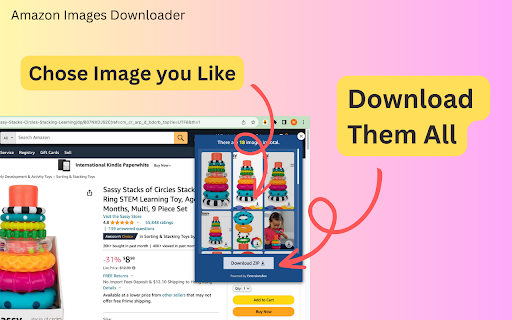
Scrape and download high-resolution images of Amazon product listings in bulk or one by one from any listing with just a click. Scrape and download product imagery from Amazon listings. With our intelligent tool, you can instantly access all the photos you need - with just one click. Bulk downloads all images for any product in seconds, without saving them one by one. Whether you need print-ready assets for catalogs, website imagery, or product shot inspiration, we deliver the high-res source files you want. Plus, all your data stays secure and confidential on your own device. 5 Reasons to Use Our Extension: - One-click downloading of all images for any AMZ product listing - Lightning-fast bulk saving of images - no more saving one at a time - Complete data privacy - nothing stored or transmitted - Quick and easy browser extension installation - Start immediately Our Solution Helps You: - Stop wasting time trying to gather product images across the web - Create catalogs, print ads, and galleries without image-hunting - Simply archive shots for future reference - Streamline your workflow and image-scraping process Scraping and saving listing images is quick and straightforward: 1. Open any product page on Amazon.com 2. Click the download icon on the left top of the images 3. Save all images individually or as a zip bundle Tired of piecemeal product images together? Our intelligent one-click tool makes gathering photos simple. Install now to access all the high-quality shots you need instantly. Data Privacy Your data stays on your device and is not stored or transmitted to our servers. We prioritize keeping your information secure and confidential. In-App Purchases Our Extension is a freemium product with a nominal subscription fee. With a paid subscription, you can download all images as a zip file and receive premium support. The exact cost is displayed in the extension's interface, ensuring transparency and ease of understanding. Disclaimer Amazon and all related marks are trademarks of Amazon.com, Inc. or its affiliates. ExtensionBox developed this independent project and has no relationship with Amazon Inc.

Image Downloader - Save pictures
Find, choose and download images you need from any web pages or select all to bulk image download at once. Image Downloader - Save pictures for Chrome is a tool that helps you find the images published on a web page. The images may be protected by copyright and you should always assume that they are. It's a free tool that works without registrations and sign ups. Just make a few clicks and here you go! Images will be saved to your PC in seconds. A powerful Extension that gives you fast and convenient access to all images on any web page. Just click and download image on popular web sites such us Instagram, Facebook, Pinterest and also on others sites, simple as that! Image Downloader easy to use with responsive and intuitive design, so you don't need a special skills to use it properly. Just a single click to download all the images and colors available of any webpage. You can now with this Image downloader click on a single image to download or click on the - Select All - button to select and download all images at once. Alternatively, you can select a single image to download. With a bulk image saver, it becomes possible to download all website images simultaneously with simple clicks. What do you get by installing this Chrome Extension: ✔️ Filter based on pixel width and height ✔️ Download location (create folder directly to your images) ✔️ Display images in two columns ✔️ Filter based on url ✔️ Bulk download all images in once ✔️ Select what images you want to download ✔️ Check the size of each image ✔️Copy the url of the original image ✔️ Supporting all principal websites Now you can download all the images you might ever need. Every image format can be downloaded by this Picture Downloader extension. Our new application doesn't weigh a lot but simply does the job. Don't wait and install brand new extension and you'll get something special. Simple bulk image download extension, filter by resolution and file type, download photos from multiple tabs in one click. After installing this powerful Photo Downloader extension you will see a great improvement. You won't find a better tool to simplify the process than application. Privacy Policy You can read our privacy policy here: https://imagenloader.com/privacy-policy.html Website For more information about the extension, visit: https://imagenloader.com Before reusing an image, make sure you check its license and the specific terms of reuse. Do not use any image, illustration or photograph without researching its copyright status first.

Amazon Product Video Downloader - Images bulk download
Batch download Amazon product videos and images. bulk downloader Download all product videos and images from Amazon with just one click! 🚀 Tailored specifically for sellers, marketers, and researchers who require fast, private, and reliable media download services. This specialized tool enables the bulk download of e-commerce images and videos—including product variations and review videos. 📦 Download All Media Download all product videos and images from an Amazon product page Choose to download individually or one-click batch download 📊 Download Progress Tracking Real-time progress display during downloads Files are neatly organized in a clear folder structure: ASIN / Variant / for easy management 🗂️ 🌍 Global Amazon Support Works with Amazon marketplaces worldwide No matter which country’s Amazon site you use, we’ve got you covered 💬 Support & Help Need help or have questions? Open the Side Panel → click “Contact Us” → join our Telegram support group for direct assistance 🤝 💰 Pricing 🆓 Free Plan Enjoy 20+ batch downloads for free trial ⭐ Subscription Plan Unlimited downloads 🚀 Download speed depends only on your connection to Amazon ❌ No server-side queues ❌ No throttling 🔒 Privacy First Your privacy matters. ✅ All downloads happen locally in your browser ❌ No servers involved ❌ No data collection 🔐 100% private & secure ⚠️ Disclaimer 亚马逊商品视频、商品图片批量下载 This extension does not grant or manage usage rights for downloaded content Users are responsible for complying with Amazon’s terms and applicable laws

Amazon Image Search Tool
AliPrice Search by Image allows you to easily find the source goods on e-commerce websites. Key Features: 1. Search by Image, reverse image search - The most comprehensive image search tool on the web, supporting e-commerce platforms like Amazon, AliExpress, Alibaba, and Taobao. For more platforms, please visit the AliPrice official website: https://www.aliprice.com - Image Search Methods: Click the AliPrice icon above the product image; right-click and select Screenshot Search; upload a local image to search. - Image Zoom: On the product list page, hover your mouse over an image to zoom in. 2. Utility Toolbar - Download Images: Batch download product images and videos from Taobao, Amazon, Pinduoduo, and other sites; export image links; translate text on images; and enlarge images in HD. - Copy Links: One-click copy of product links from Alibaba, Taobao, etc. When copying long links, the selected product SKU is included, and it will automatically display when you open the link again. - Copy Titles: Copy product titles and use translated titles to search for similar products on Taobao. - Shipping Fee Checker: Instantly check shipping costs for different regions. - Export All Store Products: Export all items from a store into an Excel file. - SKU Viewer & Price Calculator: View all SKU details of AliExpress products with one click. 3. Price History and Order History - View the price history of products on platforms like AliExpress, and Amazon for free, helping users distinguish genuine discounts from fake ones. Users can add products to their favorites and receive notifications when prices drop. - Trends: View the one-year price and order history of products on platforms like Amazon. 4. Translation - Aliwangwang Translation: Translate conversations with sellers in both the source and target languages for seamless communication. - Web Translation: Right-click to translate an entire webpage. - Screenshot Translation: Right-click to take a screenshot and translate the text within it. 5. Product Related - Advanced Search: Includes features like comparing similar products, filtering and sorting, and exporting data to Excel, helping users more accurately find the products they need. - Product Information PRO: Display extra details on product listings such as shipping cost, order price, minimum order quantity, annual sales, listing time, and store opening date. 6. Review Relevance - Review Analysis: Analyzes the country distribution of reviewers on AliExpress product details. - Download Reviews: Download product reviews and images from Amazon and AliExpress. 7. Currency Converter - Displays prices on Taobao converted to dozens of foreign currencies, including US dollars and Korean won. - Displays prices in RMB on websites like Temu, Amazon, and Alibaba International. 8. Logistics Monitoring - View parcel tracking details directly on the order list pages of Taobao. 9. Copy Search Suggestions - Copy suggested and related keywords from Amazon and other platforms’ search boxes. 10. Export Shopping Cart - Export products from your Taobao shopping cart to an Excel file. 11. Browsing History - View your browsing history on, Taobao, AliExpress, and other websites in the lower-left toolbar. 12. Highlight Ad Tags - Highlight “AD” tags to clearly distinguish sponsored products. 13. Minimize Plugin - Collapse or expand the plugin window in the lower-left corner. By installing the AliPrice plugin, you agree to the AliPrice Terms of Service and consent to the plugin redirecting you to advertising links, including those on platforms like Ali: https://www.aliprice.com/information/index?page=term_of_use If you have any questions or suggestions, please feel free to contact us. https://www.aliprice.com/information/index?page=contact

Website image downloader
Use website image downloader - fast and simple Chrome extension to download images from websites. Save pictures from sites online. 🖱️ Website Image Downloader is a simple Chrome extension that helps you find and download images from the current webpage — quickly and with less friction. 🖼️ Open the extension, scan the current page, and view the images it detects. Then download the specific pic you want — one at a time, with a clean and focused workflow. ❌ No bulk downloads. No bloated toolset. ☝️ Just a practical way to inspect page images and save the ones you need. Use this tool when you want to: 1️⃣ Find images on the current page without digging through source code 2️⃣ Download one pic at a time with more control 3️⃣ Avoid overloaded extensions with too many features 4️⃣ Use a minimal pic-saving utility 5️⃣ Stay focused on the exact visual you want to save Perfect for: • Designers gathering visual references • Content creators saving illustrations • Social media managers collecting posts • E-commerce teams reviewing product photos • Students and researchers collecting data graphs • Anyone needing a clean and simple image download helper for online visuals ❌ No copying image URLs manually. No digging through HTML. 💡 Scan the page, review the detected images, and save what you need. 1️⃣ Scan the current page for downloadable images 2️⃣ Download specific images one by one 3️⃣ Cleaner, more controlled workflow 4️⃣ Minimal popup interface 5️⃣ Built for speed and simplicity 6️⃣ Useful across many different websites Whether you’re working or just browsing for inspiration, this tool helps you review page images and save the right ones without overcomplicating the process. • Save inspirational photos while researching • Save diagrams and charts from reports or publications • Grab product pictures for planning or presentations • Archive visual ideas, moodboards, or concepts • Work faster on content creation, design, and sourcing • Build curated image collections for strategy or moodboards • Capture specific visuals from long-form web articles or reports Whether you're browsing portfolios, news sites, or educational platforms — this extension helps you find images on the page and download them with less friction. You get: 🎮 Control 🪄 Simplicity 🚀 Speed 🎯 Focus Compatible with: ➤ Portfolio websites ➤ News and media hubs ➤ E-commerce platforms ➤ Educational and research portals ➤ Art, design, and photography blogs ⏱️ Built as a focused utility, this Chrome helper avoids over-engineering and sticks to what matters: scan the page, find images, save what you need. Use this extension daily for: 1️⃣ Content strategy and marketing work 2️⃣ Design curation and visual planning 3️⃣ Product image sourcing 4️⃣ Team presentations and reports 5️⃣ Building your personal creative archive 6️⃣ Supporting online learning and visual study workflows 🖼️ Wherever you go online, this extension helps you detect images on the current page and save the ones you need — from product catalogs to blog posts, from inspiration boards to online articles. 🔹 How does it work? This Chrome extension scans the current webpage, detects available images, and lets you download them from a simple popup interface. Just open the extension, review the detected images, and save the one you want. 🔹 What makes this tool better than others? ✨ Simplicity. It focuses on one job: helping you find and download individual images from the current page without a cluttered workflow. ⚖️ If the image is accessible in the page and not restricted by site-level protections or browser security rules, it may be downloadable. Results can vary by website. 🔹 Does it interfere with website design? The extension is designed to work through a lightweight popup-based workflow rather than constantly placing controls over page content. 🔹 Will it save the original resolution? The extension attempts to detect the best available image source on the page, but final quality depends on how the website provides the image. 🔹 How is this different from bulk image downloaders? 🧼 This is not a batch tool. It is focused on helping you scan the current page and download specific images one by one. That makes it better suited for users who want more control over what they save. 🔹 Is there a limit on usage? 🕓 No built-in usage limits. You can scan pages and download images as needed. 🔹 Can I use it offline? 🌍 No — this extension works with live webpage content, so you need an internet connection and an open website page to scan images. 🔹 How do I install it? 🧩 Install it from the Chrome Web Store, then open the extension on any webpage and scan the page to find downloadable images. 🔹 Can I turn it off on certain sites? ⚙️ You can control extension access through Chrome’s extension settings and site permissions, depending on how you prefer to use it....
