
fcmmlggidnoohlfgnilogbdccbmfkppl
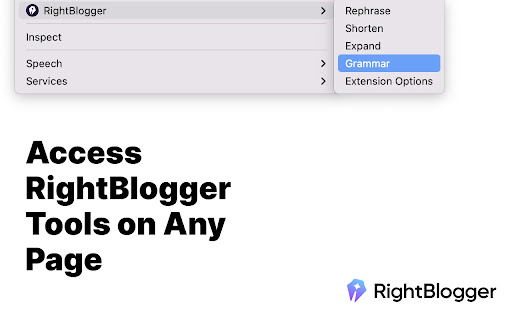
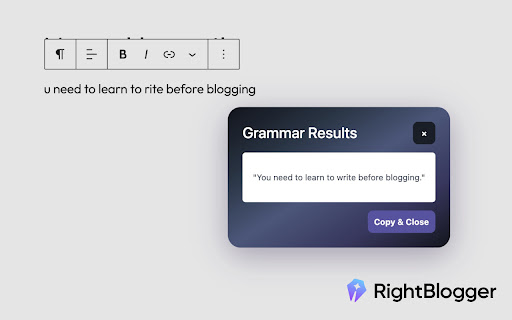

AI-Powered Content Creation Tools for Bloggers. Struggling with writer's block or SEO analysis? RightBlogger's Chrome extension offers essential blogging tools in your browser, helping you create and optimize content quickly with instant SEO overview and AI tools. Instantly enhance your content creation workflow: - AI Writing Tools: Generate ideas, fix grammar, rewrite, shorten, or expand text directly on any webpage. - On-Page SEO Analysis: Get a quick overview of any page's Title, Meta Description, Canonical URL, Robots status, and Open Graph data. - Headings Analysis: View all H1-H6 tags in a visual hierarchy with one-click copy. - Link Analysis: See all page links with internal/external labels, rel attributes (nofollow, sponsored, ugc), and filter by type. - Image Audit: Find every image on a page with alt text status — instantly spot missing alt tags. - Schema Viewer: Inspect structured data (JSON-LD) with collapsible nested properties. - CSV Export: Copy or export links, images, and headings as CSV for use in spreadsheets. - SERP Metrics: View keyword difficulty, search volume, and CPC directly on Google search results. - Quick Summaries: Condense web pages or YouTube videos into key points with a single click. Stop switching tabs and start creating smarter. RightBlogger brings essential blogging and SEO tools right into your browser.

mdblogger
Markdown editor for blogger 'mdblogger' is a markdown editor for google blogger. This extension insert a markdown editor to the blogger post edit page to let you use markdown editor. Nowadays a markdown editor is more preferred as a writer can focus on their writing instead of styling their writing. With mdblogger, you can load and save markdown content as well. ## 💪 Support this extension: - Github sponsor page: https://github.com/sponsors/opdev1004 - ko-fi: https://ko-fi.com/opdev1004 ### Releasing v0.0.8 Fixed scroll problem for editor ### Releasing v0.0.7 Found Korean and other typing not working. So this version fixes that problem. Adjusted update speed to about 59 fps. From v0.0.6, now draft saving to the cloud is working, therefore posting your blog post would not require editing the original blogger's editor from now. ## 👨🏫 Things you must know: 1. If you have any ad block extensions/plugins, add `blogger.com` or `https://blogger.com` in the exception list from the ad block settings. 2. This may not be required anymore since draft saving is working -> After you are done writing, you must edit the blogger's editor once before finishing your post. Like `adding a space and remove it` or `change from compose view to html view`. Because the content is not going to be saved as a draft or updated or published until the blogger editor updates the post data that is hidden. It is difficult to find where the blogger editor store our post data. So until we find a way, this will be the way. Just give a small change to the blogger editor after you are done writing. 3. Pressing 'Ctrl' and 'q' will copy what is in the blogger editor(Left side) and paste to the markdown editor(Right side). Use this short cut('ctrl + q') for adding images. But you can also use the markdown editor's image uploading system. In that case the image will be stored as a data in your post. And your post can be a bit messy. For the videos, you have to use the blogger editor to add them. Markdown editor does not support videos and it will probably convert the video to a single image. 4. From all the links in the post, target and rel attributes are not going to work as markdown does not support. And it will always get removed as you write something. You can still try. I do not encourage doing it though. 5. This extension is an open source extension with MIT license. It is free for commercial and non-commercial use. 6. If you have a custom theme, it might cause some problems for some cases. Because they affect styling of the edit page. 7. In many other case, if this extension is not working, just try to refresh(F5) the edit page. This extension does not back-up your data. So make sure you back-up your unsaved data. Eg. drafting, or save markdown etc.

OnPageSEO.ai SEO Chrome Extension with Ai & Best SEO Tools
OnPageSEO.ai SEO Chrome Extension with Ai, Chosen by Best Rated SEO Companies! Optimize with the Best SEO Tools to elevate your… OnPageSEO.ai SEO Chrome Extension with Ai, Chosen by Best Rated SEO Companies! Optimize with the Best SEO Tools to elevate your website’s SEO. Install Now! Quick Breakdown of OnPageSEO.ai Features: 1. Instant SEO Analysis: One-click health score with AI recommendations for titles, meta descriptions, and content. 2. Visual Header Navigation: Jump to any H1-H6 header instantly—no scrolling needed. 3. Comprehensive Link Management: See all internal/external links with color-coded insights. 4. Smart Image Optimization: Convert images to WebP, analyze alt text, and spot improvements. 5. Intelligent Text Tools: Real-time character counter and instant text case transformation. 6. Keyword Density Export: Download a CSV to see any website’s keyword targets. 7. Google Search Console Integration: View top keywords per page and track performance. 8. Performance Over Time: Compare keyword trends (90 days vs. 30 days) via GSC data. 9. AI Recommendations: Get data-driven optimization tips for each page. 10. Time-Saving Impact: Cut SEO work from 2 days to a few hours—save 12-17 hours weekly! Why Choose OnPageSEO.ai? Think of OnPageSEO.ai as your personal SEO superhero, making optimization fast, fun, and effective. Trusted by Best Rated SEO Companies, it’s packed with the Best SEO Tools to transform your workflow. Here’s how each feature saves you time and boosts your rankings: 1. Instant SEO Analysis – Your On-Page Expert Click once to get a full health score for any page. The Ai suggests optimized titles, meta descriptions, and content tweaks that Google loves—plus, titles and meta descriptions can be quickly generated with Ai using SEO best practices and strong CTA—your shortcut to better rankings! 2. Visual Header Navigation – Teleport Through Content No more scrolling to find headers! See a map of all H1-H6 tags and click to jump to any section instantly. It’s like a GPS for your content structure. 3. Comprehensive Link Management – Be a Link Detective Get a clear view of all internal and external links, color-coded for easy understanding. Check anchor text and spot opportunities to improve your linking strategy in seconds. 4. Smart Image Optimization – Make Images SEO-Ready Drag and drop images to convert them to fast-loading WebP format. See alt text, file names, and get tips to optimize every image for better SEO and speed. 5. Intelligent Text Tools – Write Smarter, Faster A real-time character counter with color indicators ensures your titles and descriptions are the perfect length. Plus, instantly change text case (UPPER, lower, or Title) for polished content. 6. Keyword Density Export – Uncover Keyword Strategies Download a CSV file with keyword density data for any website. See what keywords they’re targeting and adjust your strategy to compete smarter. 7. Google Search Console Integration – Unlock Keyword Insights Connect to GSC to see the top keywords driving traffic to each page. Understand what’s working and where to focus your efforts for maximum impact. 8. Performance Over Time – Track Your Progress Use GSC data to monitor keyword performance trends over time. Compare the last 90 days to the last 30 days to spot improvements or areas needing attention. 9. AI Recommendations – Optimize with Precision Get personalized, data-driven suggestions for each page based on GSC insights. The AI analyzes your performance and recommends the best steps to boost rankings. 10. Save Time and Win Big! What used to take 2 full days now takes just a few hours. Optimize 15-20 pages weekly and save 12-17 hours—60% less time than traditional methods. That’s more time for your next big marketing move! Install OnPageSEO.ai SEO Extension now and join the best rated SEO companies in transforming your SEO game with the Best SEO Tools! 🚀

Thymeline
Add events to your timeline the easy way Keep track of everything important about your projects all in one place. Meet Thymeline, the free Chrome extension that will magically transform your project chaos into an organized masterpiece. Created for Project Managers. Here is how Thymeline saves you time. No APIs. No integrations. As simple as copy & paste. Easily copy relevant information from any of your existing tools or apps without any hassle. Once you download the chrome extension... Step 1: Visit any website. Step 2: Highlight any text. Step 3: Click on the Thymeline Chrome extension Step 4: Add to existing Thymelines. That’s it! Thymeline can handle as many projects as you’re juggling. Create as many Thymelines as you need! Multiple projects, multiple Thymelines, we can handle it. Keep track of it all in a simple interface. Share with others Share your Thymelines with others on your team with view or edit privileges, keeping everyone on the same page. Want to keep it private? You can do that too.

Linkster.ai
Transform your video experience: AI summaries, mood insights, & trending highlights in one plugin! Leveraging the latest in AI technology, this plugin provides a comprehensive suite of features designed to enhance the online video viewing experience. It enables users to instantly grasp the essence of video content and explore audience reactions in a nuanced way. Key Features - AI-Generated Video Summaries: This core feature provides users with concise, accurate summaries of video content, making it possible to quickly absorb the main points without watching the entire video. It supports a wide range of languages, catering to a global audience. - Sentiment Analysis of Comments: Beyond summarizing video content, the plugin offers an in-depth analysis of viewer comments, classifying them into positive or negative sentiments. This insight allows users to understand the general reception of the video, adding an extra layer of engagement. - Channel's Trending Videos: A unique feature that curates a list of a channel's most popular videos, facilitating effortless discovery of engaging content. This ensures users are always just a click away from the best that each channel has to offer. User Experience The plugin is designed for ease of use, integrating seamlessly into the user's browsing experience as a Chrome extension. It provides quick and easy access to its features, making video content more accessible and engaging. Privacy and Accessibility With a strong focus on privacy, the plugin ensures all user data and interactions are handled with the utmost care and confidentiality. It is available for free, with additional premium features unlocked through subscription plans designed to enhance the user experience.
