
mmdaohoahbhbjmlodlonnkdchdbhknmp
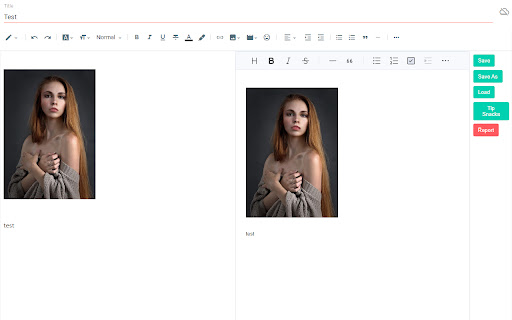
Markdown editor for blogger 'mdblogger' is a markdown editor for google blogger. This extension insert a markdown editor to the blogger post edit page to let you use markdown editor. Nowadays a markdown editor is more preferred as a writer can focus on their writing instead of styling their writing. With mdblogger, you can load and save markdown content as well. ## 💪 Support this extension: - Github sponsor page: https://github.com/sponsors/opdev1004 - ko-fi: https://ko-fi.com/opdev1004 ### Releasing v0.0.8 Fixed scroll problem for editor ### Releasing v0.0.7 Found Korean and other typing not working. So this version fixes that problem. Adjusted update speed to about 59 fps. From v0.0.6, now draft saving to the cloud is working, therefore posting your blog post would not require editing the original blogger's editor from now. ## 👨🏫 Things you must know: 1. If you have any ad block extensions/plugins, add `blogger.com` or `https://blogger.com` in the exception list from the ad block settings. 2. This may not be required anymore since draft saving is working -> After you are done writing, you must edit the blogger's editor once before finishing your post. Like `adding a space and remove it` or `change from compose view to html view`. Because the content is not going to be saved as a draft or updated or published until the blogger editor updates the post data that is hidden. It is difficult to find where the blogger editor store our post data. So until we find a way, this will be the way. Just give a small change to the blogger editor after you are done writing. 3. Pressing 'Ctrl' and 'q' will copy what is in the blogger editor(Left side) and paste to the markdown editor(Right side). Use this short cut('ctrl + q') for adding images. But you can also use the markdown editor's image uploading system. In that case the image will be stored as a data in your post. And your post can be a bit messy. For the videos, you have to use the blogger editor to add them. Markdown editor does not support videos and it will probably convert the video to a single image. 4. From all the links in the post, target and rel attributes are not going to work as markdown does not support. And it will always get removed as you write something. You can still try. I do not encourage doing it though. 5. This extension is an open source extension with MIT license. It is free for commercial and non-commercial use. 6. If you have a custom theme, it might cause some problems for some cases. Because they affect styling of the edit page. 7. In many other case, if this extension is not working, just try to refresh(F5) the edit page. This extension does not back-up your data. So make sure you back-up your unsaved data. Eg. drafting, or save markdown etc.

Faro
Save pages with highlighted taglines - Bookmark manager ⨯ web highlighter Chaos in your bookmarks? Can't find what you want? They end up gathering dust? Or you don't even try and end up with 100s of open tabs? Faro is made to fix that! It's the simplest way to save & keep track of pages. With it, even thousands of saves don't get overwhelming. When saving, you highlight a sentence to act as a tagline. It helps you remember what the page is about and why you saved it. If unsure - just save whatever sentence you're reading. All saves appear on your dashboard. They come most-recent-first by default, so you don't forget what you recently saved. You can pick up your reading where you left off - no need for a separate reading list. You can also pin & archive to further arrange it. Organize them with tags. Since you're reminded what you saved and why, you can do it later. It makes your saves much easier to manage than bookmarks. Faro supports nested tags (eg: recipes/vegan), so combines the best of tags and folders. Clicking a save takes you right back to your highlight - especially useful for longer articles. Also: ➣ export to bookmarks to keep them if you uninstall Faro ➣ copy links to highlights and share them or paste into Notion, Obsidian, etc. ℹ️ About your data: When installing you can read: "it can read and change all your data on all websites" The only information that ever gets uploaded (when signed in) when you use it to save: ➣ Open page address ➣ Saved highlight/quote - what's visible in the sidebar ➣ Timestamp ➣ Debug info e.g. errors The extension also keeps track the currently open tab for each window - to update the sidebar as you navigate - but doesn't save or upload that data.

ARGOS DOM
Xpath extraction extension for ARGOS STU (HTML Action) This extension works in conjunction with the HTML Action operation in ARGOS STU (the automation scenario development software of the ARGOS Low-code platform). It visualizes and facilitates acquisition of Xpath and other various browser related information for development of ARGOS Automation Scenarios.

Apiary - Web Highlighter & Annotator
Highlight and take notes directly on what you read online and instantly share them with friends and colleagues. Easily highlight and take notes on what you read online and then easily save them for later and share them with friends and colleagues in one click. Apiary is a free to try chrome extension based product that allows you to easily highlight and take notes on what you read online. After you have annotated something online it will be saved to your Apiary account where you can then organize in any way you like with our folder system. You can than easily share directly from the website where you took the notes or from your Apiary account later on with anyone you want. Just highlight and get a shareable link you can send to anyone with one click. When using Apiary on a website or email online you have two options. You can choose to just highlight some text or you can highlight and add a comment to that highlight. Allowing you to save and share you favorite parts and current thoughts while reading it with others. You can view your annotations live by clicking the chrome extension and having the Apiary sidebar appear showing all the highlights and notes you have made on that page. Or you can view them later in your Apiary account where we save all the contents of what you were reading and the highlights and notes you took. Allowing you to get the full context of whatever you were taking notes on. Annotate, save, and share what you read online instantly today. ----------------------------------------- Key Features: Web and Email Highlighting Take Notes On What You Read Online Apiary Account Access With Organization Systems Quick and Easy Shareable Notes Private Notes That Only You Can See Automatically Saving Notes ------------------------------------------- How To Use: In order to use the Apiary Chrome Extension you will need an account with Apiary. Please visit www.myapiary.io to create an account today. 1) Create An Account On Apiary (www.myapiary.io) 2) Download Chrome Extension 3) Sign Into Chrome Extension w/ Your Apiary Account 4) Select Text (Left Click & Drag) You Wish To Annotate 5) Click On Apiary Popup To Either Highlight Or Take Note On Selected Text 6) Delete An Annotation By Clicking On A Highlight And clicking Delete Icon 7) Share Your Notes For A Page By Clicking The Apiary Share Button On Bottom Left Corner Of Window 8) View A Note By Either Visiting Your Apiary Account Or By Clicking View On A Currently Annotated Web Page ------------------------------------ Pro Tips: 1) Make Sure You Are Logged Into Apiary Chrome Extension If You Are Having Issues Annotating 2) Organize Your Notes Into Folders On Apiary To Easily Find Notes Later 3) Share Your Notes With Friends By Clicking Share Button And Sending Link To Friends. --------------------------- Got Feedback? Please reach out to us at support@myapiary.io If you find bugs please let us know at https://forms.gle/rHvoLZwaXfVcbAMJ7. If you have a feature request please let us know at https://forms.gle/vguFD2Rxi2FCsSQi8. By installing the extension, you agree to Apiary's Terms of Service, Privacy Policy, and Community Guidelines (which can be found here: https://www.myapiary.io/term-services and https://www.myapiary.io/privacy-policy)

Talkk
Speak Freely in Every Corner of the Web Talkk powers conversations where it matters. Use Talkk to post comments, ask questions, and host events on any website. Done with posting on one site? Talkk shows recommendations from Bing and DuckDuckGo so you can quickly jump to any related websites. Want to connect with people in your social circles? Sign in with a Facebook or Twitter/X account to follow friends from these platforms on Talkk. FAQ Can I really post to any website? Absolutely. Can a website block me or delete my post? No, all posts are hosted and managed by Talkk without 3rd party interference. Can I truly speak freely? Yes, but some common-sense rules do apply. See our terms for details. BONUS When AIs compete, you win. Get instant responses from DeepSeek, ChatGPT, Gemini (Google), and Llama (Facebook) on any questions you post via Talkk.
