
fcmdelifjhbcemnjepepimpbmeemackg

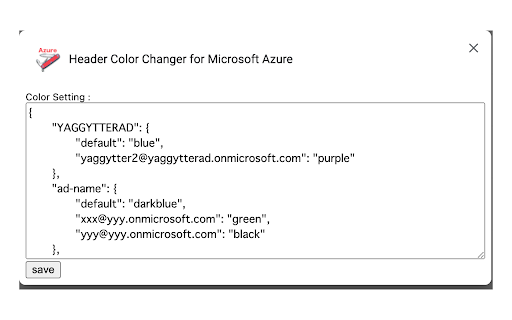
This extension is to ensure visibility and reduce mistakes for Azure users who handle multiple Azure ADs and Users. This extension is to ensure visibility and reduce mistakes for Azure users who handle multiple Azure ADs and Users. You can change header colors by each Azure AD tenants and each users using configurations. Source code is here https://github.com/yaggytter/extension-azure-header-color

Smartlink Health
Smartlink Health's software enables the real-time exchange of data between EHRs and other health IT systems, including: *Presentation of diagnosis gaps and care gaps within the clinical workflow *Insertion of clinical information into patient records *Extraction of patient information, such as orders, referrals, labs, appointments, demographics, and other data from the EHR

Apiary - Web Highlighter & Annotator
Highlight and take notes directly on what you read online and instantly share them with friends and colleagues. Easily highlight and take notes on what you read online and then easily save them for later and share them with friends and colleagues in one click. Apiary is a free to try chrome extension based product that allows you to easily highlight and take notes on what you read online. After you have annotated something online it will be saved to your Apiary account where you can then organize in any way you like with our folder system. You can than easily share directly from the website where you took the notes or from your Apiary account later on with anyone you want. Just highlight and get a shareable link you can send to anyone with one click. When using Apiary on a website or email online you have two options. You can choose to just highlight some text or you can highlight and add a comment to that highlight. Allowing you to save and share you favorite parts and current thoughts while reading it with others. You can view your annotations live by clicking the chrome extension and having the Apiary sidebar appear showing all the highlights and notes you have made on that page. Or you can view them later in your Apiary account where we save all the contents of what you were reading and the highlights and notes you took. Allowing you to get the full context of whatever you were taking notes on. Annotate, save, and share what you read online instantly today. ----------------------------------------- Key Features: Web and Email Highlighting Take Notes On What You Read Online Apiary Account Access With Organization Systems Quick and Easy Shareable Notes Private Notes That Only You Can See Automatically Saving Notes ------------------------------------------- How To Use: In order to use the Apiary Chrome Extension you will need an account with Apiary. Please visit www.myapiary.io to create an account today. 1) Create An Account On Apiary (www.myapiary.io) 2) Download Chrome Extension 3) Sign Into Chrome Extension w/ Your Apiary Account 4) Select Text (Left Click & Drag) You Wish To Annotate 5) Click On Apiary Popup To Either Highlight Or Take Note On Selected Text 6) Delete An Annotation By Clicking On A Highlight And clicking Delete Icon 7) Share Your Notes For A Page By Clicking The Apiary Share Button On Bottom Left Corner Of Window 8) View A Note By Either Visiting Your Apiary Account Or By Clicking View On A Currently Annotated Web Page ------------------------------------ Pro Tips: 1) Make Sure You Are Logged Into Apiary Chrome Extension If You Are Having Issues Annotating 2) Organize Your Notes Into Folders On Apiary To Easily Find Notes Later 3) Share Your Notes With Friends By Clicking Share Button And Sending Link To Friends. --------------------------- Got Feedback? Please reach out to us at support@myapiary.io If you find bugs please let us know at https://forms.gle/rHvoLZwaXfVcbAMJ7. If you have a feature request please let us know at https://forms.gle/vguFD2Rxi2FCsSQi8. By installing the extension, you agree to Apiary's Terms of Service, Privacy Policy, and Community Guidelines (which can be found here: https://www.myapiary.io/term-services and https://www.myapiary.io/privacy-policy)

Cookies Extension for Devtools
Cookies Extension to get the best of dev-tools experience. Edit decoded value in editor, control columns of table, filter by domain. Use this Cookies Extension to get the best of dev-tools experience 💻 Edit, create, delete cookies easily 🍪 It is designed to be consistent with the existing cookies panel of the dev-tools. BUT It has better features and smoother UX 😎 Advantages of the Cookies Extension: ✔️ Cookie value is decoded and easily editable with Cookie Editor! No more raw encoded value editing. Edit the value you really have. JSON is JSON and not something like %2C%0WTF. ✔️ Flexible columns width. Columns are so dense in the default panel... Here you choose the width you need. ✔️ Columns visibility control. Do you really need all the columns to be visible in this smaaaall table? I don't think so, at least I've never needed. So now you can hide useless columns. ✔️ Comprehensive hosts/domains tree. Sometimes you work with websites which have a huge pile of cookie from different domain. Wouldn't it be more effective to choose the domain/host you need? Yes, it would. I believe it can be a perfect tool in your everyday work and a beautiful complement to your dev-tools panels. This Cookie Extension doesn't send or share your cookies. Your privacy is sacred.

Jira Gantt
a solution to flatten all Jira tickets and allow a Gantt chart to plan and monitor the progress Jira Gantt supports to fetch and flatten all Jira cloud tickets (of Sprints or JQL) via read-only API access and allow users to manually create a gantt chart to plan the tickets locally. Additional, user can export/import the planning information to/from Google Sheet Applicable case: When you need to have a detail plan for each stories to optimize the performance of a specialized team. For example you have members dedicated for QA, Dev work but not have cross-functional team, thus for a User Story the team would plan the development work and testing work separately. Detail planning flow: Fetch Sprint backlog to this tools as a dashboard Export to Google Sheet for all members to input the panning dates Import the planning dates from Google Sheet The plan dates can be input directly using this tool via UI
