
kikhnobkckhjjocokglddiaaohdeedfh
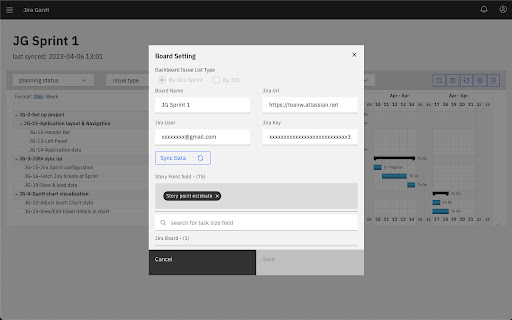
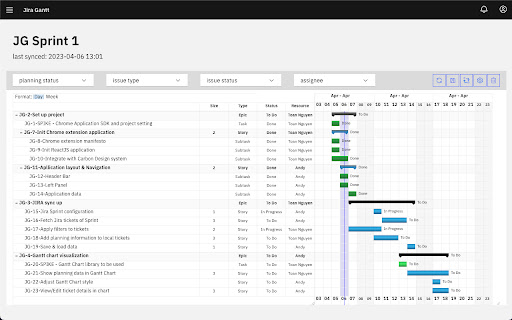
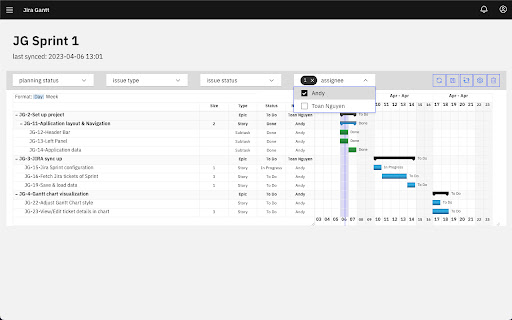

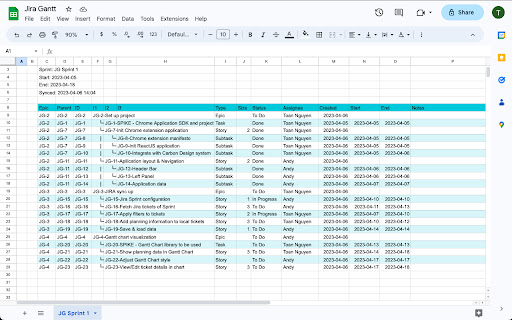
a solution to flatten all Jira tickets and allow a Gantt chart to plan and monitor the progress Jira Gantt supports to fetch and flatten all Jira cloud tickets (of Sprints or JQL) via read-only API access and allow users to manually create a gantt chart to plan the tickets locally. Additional, user can export/import the planning information to/from Google Sheet Applicable case: When you need to have a detail plan for each stories to optimize the performance of a specialized team. For example you have members dedicated for QA, Dev work but not have cross-functional team, thus for a User Story the team would plan the development work and testing work separately. Detail planning flow: Fetch Sprint backlog to this tools as a dashboard Export to Google Sheet for all members to input the panning dates Import the planning dates from Google Sheet The plan dates can be input directly using this tool via UI

Michael's Upgrade for TrakED
Upgraded features for TrakED in the THS. (This extension is not an official product of the THS or Intersystems TrakCare software.) Upgraded features for Trak ED in the LGH. Features: - Re-enable spell check in the triage page - Use the enter key when logging in - Handover sheet for ED Main Floor and EMU - ED Main Floor filters and persistent sort - Triage Summary print out - Filter and count results of an enquiry - Count patients currently breaching length of stay targets -- This extension is not an official product of the LGH or InterSystems Trak software.

Gantt Chart plugin: for GitLab
A chrome extension that help user transfer gitlab milestone to gantt chart The plugin will generate a gantt chart automatically in Gitlab Milestone page. The start date should be described in each milestone issue description with format: /start_date YYYY/MM/DD. The end date will each milestone issue's due date. Go to https://gitlab.com/k402xxxcenxxx/milestone-gantt-chart-demo/-/milestones to see the demo.

Apiary - Web Highlighter & Annotator
Highlight and take notes directly on what you read online and instantly share them with friends and colleagues. Easily highlight and take notes on what you read online and then easily save them for later and share them with friends and colleagues in one click. Apiary is a free to try chrome extension based product that allows you to easily highlight and take notes on what you read online. After you have annotated something online it will be saved to your Apiary account where you can then organize in any way you like with our folder system. You can than easily share directly from the website where you took the notes or from your Apiary account later on with anyone you want. Just highlight and get a shareable link you can send to anyone with one click. When using Apiary on a website or email online you have two options. You can choose to just highlight some text or you can highlight and add a comment to that highlight. Allowing you to save and share you favorite parts and current thoughts while reading it with others. You can view your annotations live by clicking the chrome extension and having the Apiary sidebar appear showing all the highlights and notes you have made on that page. Or you can view them later in your Apiary account where we save all the contents of what you were reading and the highlights and notes you took. Allowing you to get the full context of whatever you were taking notes on. Annotate, save, and share what you read online instantly today. ----------------------------------------- Key Features: Web and Email Highlighting Take Notes On What You Read Online Apiary Account Access With Organization Systems Quick and Easy Shareable Notes Private Notes That Only You Can See Automatically Saving Notes ------------------------------------------- How To Use: In order to use the Apiary Chrome Extension you will need an account with Apiary. Please visit www.myapiary.io to create an account today. 1) Create An Account On Apiary (www.myapiary.io) 2) Download Chrome Extension 3) Sign Into Chrome Extension w/ Your Apiary Account 4) Select Text (Left Click & Drag) You Wish To Annotate 5) Click On Apiary Popup To Either Highlight Or Take Note On Selected Text 6) Delete An Annotation By Clicking On A Highlight And clicking Delete Icon 7) Share Your Notes For A Page By Clicking The Apiary Share Button On Bottom Left Corner Of Window 8) View A Note By Either Visiting Your Apiary Account Or By Clicking View On A Currently Annotated Web Page ------------------------------------ Pro Tips: 1) Make Sure You Are Logged Into Apiary Chrome Extension If You Are Having Issues Annotating 2) Organize Your Notes Into Folders On Apiary To Easily Find Notes Later 3) Share Your Notes With Friends By Clicking Share Button And Sending Link To Friends. --------------------------- Got Feedback? Please reach out to us at support@myapiary.io If you find bugs please let us know at https://forms.gle/rHvoLZwaXfVcbAMJ7. If you have a feature request please let us know at https://forms.gle/vguFD2Rxi2FCsSQi8. By installing the extension, you agree to Apiary's Terms of Service, Privacy Policy, and Community Guidelines (which can be found here: https://www.myapiary.io/term-services and https://www.myapiary.io/privacy-policy)

Boss Hub | AskFile, ChatPDF
Boss Hub | GPT4, ChatPDF, ChatFile, AskFile, AskPDF, Upload a PDF/WORD/CSV/Markdown/Epub, then, chat anything about your PDFs. Upload your file and have a conversation & analysis with your documents using AI(ChatGPT, GPT4). Supports File supported types: Office WORD, PDF, EPUB, Markdown, Sheets... Boss Hub | Boss Hub bring you: ✅ Safe! No need to worry about privacy leaks! ✅ Powerful AI ✅ Productivity This app integrates the latest AI technology, including: 1.ChatGPT/GPT4 2. langchain AI 3. Vector storage 4. Document Fragmentation Technology 5. ...
