
fckdbhcgcinndiicpcnnefjcmbfopjma

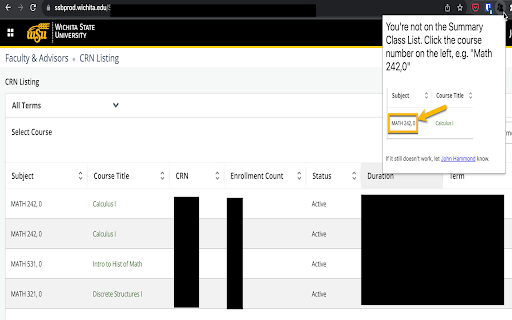
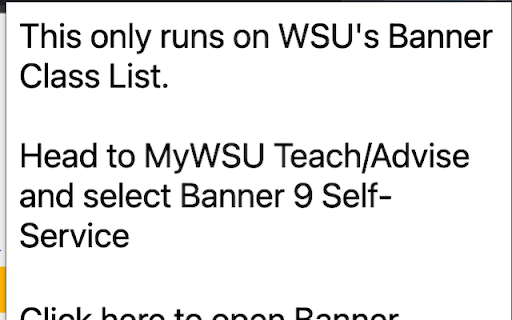
For Wichita State University Faculty -- this extension allows Shocker Faculty to print a visual student roster. Open the Banner course list, select a course, then click the extension. Wait a few seconds and your roster should print. Either print it or save it as PDF. ** If you have more than 100 students, you'll need to print them 100 at a time by clicking the ">" button at the bottom of the class list, as Banner only supports 100 entries per page. *** If you use a content blocker, please be sure to whitelist wichita.edu in order for this to work! **** Finally, if you have problems, please let me (John Hammond) know. It's a fragile hack that relies on Banner working the way it does right now (including some entries that are misspelled!). Please be patient :-) The source code is available at https://github.com/jmhammond/visual-student-roster

DarkGalaxy Plus
Set of improvements for DarkGalaxy A suite of modules that enhance your DarkGalaxy browsing experience. DarkGalaxy Plus is a community-driven unofficial browser extension for DarkGalaxy. NOTE: DarkGalaxy Plus is developed independently, and is not officially endorsed by or affiliated with DarkGalaxy. DarkGalaxy plus includes various fixes for DarkGalaxy beta released in May 2020. It fixes/augments the interface by achieving the following modifications: * Colorizes friendly alliances player names and alliance tags (NAP, CAP and WAR coloring) * Player name tags are now having onclick event which will open the /mail/ system with predefined recipient * Ingame mail system now supports TO variable which if set would set the recipient * Cancelling the top building/ship/soldier which is being built at the moment now requires confirmation * Implements planet, fleet and system navigation with ARROW KEYS (left and right) in building overview * Capability to send a screenshot to a Discord channel via user defined webhook (or copies it in the clipboard if such is not configured) * Sorting of planets by name or by population (both planet listing and fleet navigation drop down) * Sorting of fleets by name in fleet listing * Sorting comms in the radar section based on turns * Smart inputs on coordinates in fleet orders and scanning (using dot and backspace now navigates between the coordinates) * Added confirmation on kicking members * Added confirmation on invasion planets * Selecting scan type in comms can be done by clicking anywhere on the row * Minor bug fixes in DarkGalaxy front-end * Labels for Repeat and All resources are now activating the checkbox * Capability to select planet for fleet queuing from the Navigation * General planet income statistics * Logistics calculator per planet * Improved resources transfer with fleet orders * Capability to select planet for scanning from the Navigation * Indication of speed modifiers on planet list (ST/HB/JG) * Indication for currently landed ships * Ease of transfer resources and ships by clicking the specific resource/ship * Capability to export the planet list with various details to a CSV file for download

Airport Info Extension
Get airport information based on IATA and ICAO codes. Free search of an airport information using IATA or ICAO code. Find out airport coordinates, longitude, latitude, name, city of location, and website link.

Hapstack
Get more out of your SaaS tools. Hapstack helps your company keep track of which SaaS tools (e.g. Notion, Slack, HubSpot) you and your colleagues are using. It ensures that you're all using the best applications and that no money is being wasted on duplicate tools. Please note that Hapstack only tracks browsing data for common SaaS providers. All other browsing data will remain on your device. We only track whether an application was used or not, up to once per day - no other data or content is collected.

PPC SideClick
A second screen for the Amazon Advertising which helps you to rapidly supercharge your campaign management. NOTE: This extension is an add-on to the service "PPCProphet", if you do not have an account with PPCProphet it WILL NOT WORK. It is NOT a stand-alone extension. PPC SideCLick is a "second screen" tool to help you supercharge your Amazon Advertising campaign management. You can perform hours of Amazon Advertising optimisation and analysis in just a few minutes. The way it works is simple: When you're in the Amazon Advertising Console, the extension keeps an eye out for two pieces of information: the account you're working with, and the campaign name you're viewing. Then on a second screen, either on your same computer or even a totally different machine, PPC SideClick (powered by PPCProphet) gives you a wealth of options and analysis about that account (or campaign). You can at the account or campaign level - view all of the keyword performance - view all the search term performance - see your top performing keywords, targets, - see your conversion rate, budget performance and more. If you've added your Weekly Checklists / or Standard Operating Procedures, this would allow you to perform bulk operations in just one -click. (This is the part where you save hours of time every single week) For example: Say every week you want to Negative Exact every Search Term with 20 clicks and no conversions. Rather than using bulk files or having to click into every campaign on Amazon to analyse and find those search terms, you can use PPC SideClick. 1. Visit the Account 2. Choose your SOP "Neg Exact 20 clicks, 0 conversions" 3. Click "Negative Exact" Done. This would negative exact any search term across the entire account.
