
fcejihdhcioldopgcnbhjbmpmaigdpep
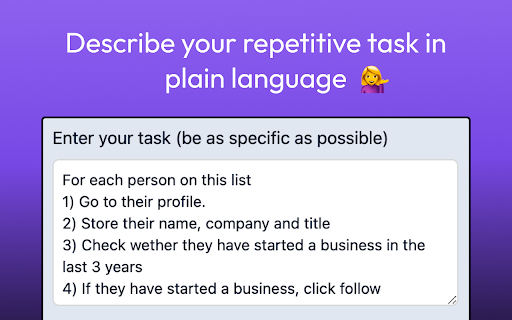
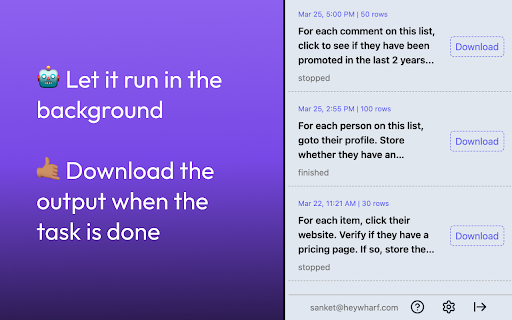
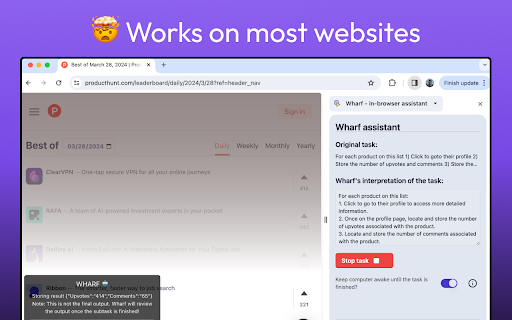
Wharf is an AI browser assistant that automates long-running tasks on the web! Check us out at https://heywharf.com/ Wharf is an in-browser assistant designed to automate repetitive recruiting and GTM tasks. Imagine a scenario where you need to navigate through a list of links and perform a specific action, such as reviewing a candidate profile to find specific attributes. Wharf is the tool that can streamline this process for you! For more information, visit: https://dotshq.notion.site/Wharf-8749e8106c6a4aa9b3557497a694214d

Ahrefs SEO Toolbar
Save hours with a complete toolkit in one SEO extension. Insights for on-page, keyword research, and link analysis on any webpage. Ahrefs toolbar is free and gives you detailed SEO insights without leaving your browser. 🌍 Global SEO research (No VPN needed) Switch regions, Google domains, languages, and get new keyword ideas directly in search results. 📃 On-page SEO data in 1 click Check titles, meta descriptions, headers, and technical SEO factors like canonical tags and indexation directives in one click. 🔗 Link analysis made easy Highlight links on the page, trace redirects, filter outgoing links, spot broken links, and export all the data to CSV. 🛠 Detailed SEO research tools Save URLs from open tabs or a SERP, switch user agents to see pages like Googlebot, read HTTP headers, and get performance data for page speed insights. ✨ Paid Ahrefs users unlock Ahrefs metrics: See domain and page-level metrics like keyword counts, traffic estimates, referring domains, and more - directly on every site or result. 📌 Note: Ahrefs subscription is required for access to Ahrefs metrics. The core tools of this SEO extension remain completely free.

Surgeflow: Automate at Surge Speed
Automate web tasks with AI! Surgeflow is a Chrome extension that lets you automate your workflows in your own browser. Stop Drowning in Browser Tabs. Start Automating with One Command. SurgeFlow transforms repetitive browser work into intelligent automation — powered by AI and executed directly inside your browser. 🚀 What is SurgeFlow? SurgeFlow is an AI-powered Chrome extension that turns natural language instructions into real browser actions. Instead of switching between tools, copying data, or repeating workflows manually, simply tell SurgeFlow what you want — and it completes tasks across your tabs automatically. Your work happens in the browser. SurgeFlow brings AI directly into that workflow. ⚡ Why SurgeFlow? Modern work means juggling dashboards, documents, emails, and research across dozens of tabs. Repetitive actions consume valuable time and attention. SurgeFlow eliminates manual busywork by allowing AI to interact with your browser workflows safely and efficiently — so you can focus on decisions instead of clicks. ✨ What’s New 🎁 Invite & Earn Rewards: Share your personal invitation link from the Settings page. When friends sign up using your link, both of you receive reward points. 🧠 Smarter Task Routing: An upgraded task dispatcher intelligently distinguishes between automation tasks and everyday questions, enabling more flexible assistance beyond execution workflows. 👆 Improved User Guidance: When user interaction is required, SurgeFlow now provides clearer prompts and seamlessly continues automation once the action is completed. 📊 Structured Output & Export: Results such as summaries, reports, and structured data are now generated in organized formats — including downloadable files and tables ready for immediate use. 📸 Screenshot Automation: Capture your workflow effortlessly: Single-screen screenshots&Full-page scrolling captures Screenshots can be generated and saved directly during task execution. 📊 Real Example — Customer Onboarding Example 1 — Multi-Platform Creator Data Organization “Collect this week’s performance data from a creator’s Xiaohongshu, Douyin, and TikTok accounts and organize it into a table.” → SurgeFlow gathers data across platforms and outputs a structured table ready for download. Example 2 — Job Search & Application Automation “Find job positions that match these requirements and fill out the applications.” → Searches listings, extracts relevant information, and completes repetitive application steps automatically. Example 3 — Email to Calendar Automation “Add interview dates from my emails into Google Calendar.” → Detects scheduling information from emails and creates calendar events automatically. Example 4 — Batch Collaboration Invitations “Invite editors in bulk and send email invitations.” → Processes contact lists and sends structured invitation emails efficiently. 🎯 Perfect For Researchers organizing large volumes of information Shoppers comparing products across sites Job seekers managing applications Marketers collecting competitive insights Content creators publishing across platforms Anyone overwhelmed by browser tabs 💡 Key Features ✓ Natural language commands ✓ Multi-tab workflow automation ✓ Intelligent task understanding ✓ Guided human-in-the-loop automation ✓ Structured data output & export ✓ Screenshot & scrolling capture ✓ Quick actions and reusable commands ✓ 10–50× faster than manual workflows

Page Agent Ext
AI-powered browser automation assistant. Control web pages with natural language. Page Agent Ext — AI-Powered Browser Automation 🌟 What is Page Agent Ext? Page Agent Ext brings AI-powered automation to your browser. Built on the open-source Page Agent framework, it lets you control web pages across multiple tabs using natural language — no scripting required. - Natural Language Control — Command your browser in plain language, no code needed - Cross-Tab Automation — Seamlessly operate across multiple tabs and pages - Smart HTML Cleaning — Intelligently extracts and simplifies page structure for accurate AI understanding - Bring Your Own LLM — Use OpenAI, Anthropic, or any compatible API with full data control - Privacy-First — Zero data collection; all data flows directly to your chosen LLM provider - Open Source — MIT licensed, built on the Page Agent framework with full transparency - 🧪 Connect from your own in-page agents - 🧪 Connect from local MCP Page Agent Ext performs DOM analysis locally in your browser. When you initiate a task, sanitized page structure is sent to the LLM API you configure. Your data is never collected or stored by us. - Your API Key — Configure your own LLM API (OpenAI, Anthropic, etc.). Data goes directly to your provider - Test API — A free test endpoint is available for evaluation; we recommend your own key for regular use Terms of Use & Privacy: https://github.com/alibaba/page-agent/blob/main/docs/terms-and-privacy.md This project is MIT licensed. Review the code, verify privacy claims, or extend it for your needs: https://github.com/alibaba/page-agent

AI Voice Assistant – Smart Browser Copilot
AI assistant that works inside your browser tab. Ask by voice and get instant, context-aware AI responses. AI Voice Assistant is a context-aware browser extension that brings AI directly into the page you're viewing. You can ask questions by voice, analyze on-screen content, or select text and instantly run AI-powered actions — all without switching tabs or copying content. It's built to reduce friction, eliminate repetitive steps, and help you stay focused while browsing, reading, researching, or working. 🎙️ Ask AI by Voice (Hands-Free) Use voice commands to ask questions and get instant AI responses based on the current webpage. No typing, no prompt writing, and no context loss — AI understands what's on your screen. Great for hands-free use, multitasking, and uninterrupted workflows. 🗣️ Wake Word Detection Say "Hey Assistant" to start recording — completely hands-free. No keyboard shortcuts needed. Just speak the wake word and ask your question. Uses on-device speech recognition for privacy — no audio is stored while listening. Customize your wake word in settings. 🔇 Auto-Stop on Silence Recording automatically stops when you finish speaking. No need to press a button to end — just pause, and AI processes your request. Adjustable silence duration (1-5 seconds) to match your speaking style. Combine with Wake Word for a fully hands-free experience. ⚡ Quick Actions (Instant AI Tasks on Selected Text) Quick Actions let you perform common AI tasks in one step. Simply select text on any webpage and trigger an action like: Summarize content in short or detailed form Explain complex text in simple terms Rewrite or rephrase content Translate text Extract key points or insights You can also create custom Quick Actions for tasks you repeat often. This turns multi-step AI workflows (copy → paste → prompt → adjust) into a single click. No prompt engineering. No switching tabs. Just select and run. 📸 Screen Read & Visual Understanding Ask AI questions about what's visible on your screen: Code snippets and error messages Articles, documents, and webpages Charts, diagrams, and visuals AI analyzes screenshots and on-screen content to provide relevant, contextual responses. 🔍 Real-Time Web Search Mode For questions that need live or up-to-date information, Web Search mode lets AI fetch and summarize current data directly from your browser. ⚡ SMART MODES Voice Mode – AI answers based on the current tab Screen Read Mode – AI help using screenshots and visuals Web Search Mode – AI answers powered by real-time web data Switch instantly using keyboard shortcuts. ✔ No tab switching or copy-paste ✔ Voice + text-based workflows ✔ Wake word activation — say "Hey Assistant" to start ✔ Auto-stop on silence — no button press to end ✔ Instant AI actions on selected content ✔ Custom actions for repetitive tasks ✔ Context-aware responses ✔ Works on any website ✔ Faster, cleaner, more focused browsing 👥 WHO IT'S FOR Professionals working with content and research Developers reading documentation or debugging issues Writers, marketers, and analysts handling text Anyone who frequently uses AI while browsing ⚙️ HOW IT WORKS Open any webpage Ask a question by voice (or just say "Hey Assistant") Trigger an instant AI action or response Get results without leaving the page 🔒 PRIVACY & SECURITY Your privacy matters. Audio is recorded only when you activate it. Wake word detection uses on-device processing — no audio is stored while listening. There is no background listening and no unnecessary data storage. 🚀 GET STARTED Install AI Voice Assistant and turn your browser into a smart, AI-powered workspace. Talk to AI. Select text. Run instant actions. Stay focused.
