
fcbnhmalionocfajdkpnlhmekghnmbii


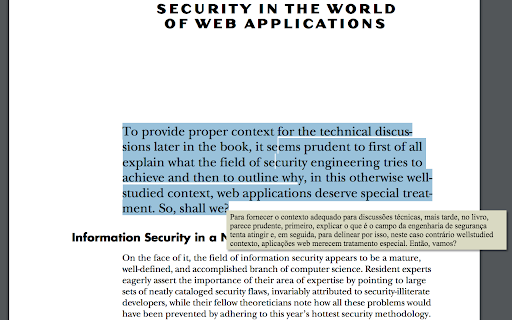

Translate text on PDF/HTML/TXT in two clicks, even for local docs. Now with ChatGPT support. 📖 Usage: Select text within any document and press Alt+Shift+A for an immediate translation (except for local PDF documents), or right-click on the text and choose 'Translate '. You can also enable the Selection Icon in Options — a floating icon appears when you select text, allowing instant translation with a single click. The translation will appear directly under your selection. With the integration of ChatGPT, Microsoft Translator, and Google API, the extension provides more accurate and context-aware translations, catering to an even broader range of language preferences. 🔍 Interactive Features: Clicking the extension button opens a popup window, allowing you to edit your selection. The extension features intelligent popup window management - when translating PDFs or when inline tooltips cannot be displayed, a smart popup window automatically appears with your translation. This popup remembers your preferred position across sessions and can be reused for multiple translations. Customize your experience by setting shortcuts, enabling the Selection Icon, choosing languages (supported by Google API, Microsoft Translator, and ChatGPT), configuring the popup window, and adding a 'Search the web' link for detailed information. The triple translation providers ensure a robust and versatile translation experience. 🌐 Compatibility: This extension works seamlessly with native PDF formats but is not compatible with protected or scanned documents. To translate local documents (PDF, TXT, HTML, etc.), enable the "Allow access to file URLs" option on the chrome://extensions page. ⚙️ Recent Updates and Improvements: - v4.8.0: Added Selection Icon for instant translation — a floating icon appears when selecting text (enable in Options), increased popup font size for better readability, improved messaging reliability. - v4.7.136: Enhanced popup window with keyboard shortcuts support (Alt+Shift+A works inside popup), automatic size and position memory, and context-aware styling. - v4.6.135: Added Chrome Web Store support hub link in Options, enhanced PDF translation reliability with improved accessibility detection. - v4.5.132: Enhanced PDF translation with intelligent popup window system — automatic fallback for PDF viewers, position memory, and multi-monitor support. - v4.4.129: Added Google API as a new translation provider. - v4.3.115: Integrated ChatGPT for context-aware translations. - Ongoing improvements in response time, API support, and overall functionality.

Instant Multilingual PDF/HTML/TXT Dictionary
Define word(s) on PDF/HTML/TXT pages in just two clicks, even on local docs. Now with ChatGPT support. 🔍 Enhance your reading experience with our extension. Easily obtain definitions by selecting a word or phrase. Click the floating icon, use the Alt+Shift+Z shortcut, or right-click to choose 'Define [your selected word(s)]'. 🆕 Now with robust PDF support: If tooltips cannot be shown in PDFs, the extension automatically opens a popup window for definitions, ensuring a seamless experience even in Chrome's built-in PDF viewer. 🔑 Key Options: - 🎛️ Customize Shortcuts: Tailor a shortcut that complements your workflow. - 📚 Definition Providers: Choose your primary definition provider. We now feature the versatile ChatGPT, supporting languages including Arabic, Brazilian Portuguese, Bulgarian, Chinese (Simplified), Chinese (Traditional), Czech, Danish, Dutch, English (UK/US), Finnish, French, German, Greek, Hebrew, Hindi, Hungarian, Indonesian, Italian, Japanese, Korean, Norwegian, Polish, Portuguese, Romanian, Russian, Slovak, Spanish, Swedish, Thai, Turkish, Ukrainian, and Vietnamese. - 🖼️ Popup Window Configuration: Personalize the popup window's appearance and functionality. - 🔗 Web Search Link: Easily access extended information with a 'Search the web' link. - 💡 ChatGPT Backup: Utilize ChatGPT as an additional source for definitions (register at chatgpt.com if required). 🌟 Special Feature: Enable word pronunciation on Content Security Policy (CSP) protected pages like github.com with our 'CSP Page Pronunciation' option. This feature is initially disabled 🔒 and can be activated based on site policies. ⚠️ Note: Our extension is compatible with native PDF formats (including Chrome's built-in PDF viewer) and now automatically falls back to a popup window if tooltips cannot be displayed. Protected or scanned documents are not supported. For local document access, enable the 'Allow access to file URLs' option on the chrome://extensions page. 📃 Changelog Highlights: -- 🎯 Version 2.3.0: Added Selection Icon for instant translation, increased popup font size for better readability, and improved overall reliability. -- 🪟 Version 2.2.146: Enhanced popup window system with keyboard shortcut support for recursive lookups within definitions, resizable fallback windows with position memory across sessions, and improved reliability with context menu duplicate error fix. -- 🔧 Version 2.1.142: Enhanced code quality and user support experience. Fixed tooltip reuse logic to prevent stale "thinking..." text, improved tooltip visibility on complex pages, added direct support hub link in Options for faster issue resolution, and modernized keyboard event handling. -- 🚀 Version 2.0.140: Major update! PDF support is now robust—when tooltips cannot be rendered (e.g., in Chrome's PDF viewer), the extension automatically opens a popup window for definitions. Popup window creation and positioning have been overhauled for reliability and user experience. -- 🌍 Version 1.3.120: ChatGPT added as a definition provider, expanding our language support and enhancing definition accuracy.

Synchrolator
Translate text into multiple languages simultaneously with the Synchronous Translator. Synchrolator makes multilingual translation effortless. With just one click, you can translate your text into up to 10 languages simultaneously. Supports 91 languages: Choose from a wide range of languages powered by Google Translate. Auto-detect feature: Let the extension automatically recognize your text’s language and translate it accordingly. Easy copy & paste: Quickly copy translations or paste text using built-in buttons for seamless use. Fast & accurate translations: Powered by the Google Translate API for reliable results in real time. Perfect for learning new words, communicating across languages, or working with multilingual content—all in an instant. --------- Changelog: v5.0.4: - bug fixes v5.0.0: - migration to new extensions platform (manifest v3) v4.1.2: - bug fixes v4.1.0: - Options are synchronized and restored on re-installation v4.0.0: - 27 new languages - Supports RTL languages - Shows phonetic if available v3.9.0: - Please use "Shift+Enter" for new line and "Enter" for translation - library upgrade and some debugging

DeftPDF
Free PDF Software to Edit, Convert, Sign & More. Integrated with Gmail DeftPDF - A Reliable, intuitive and productive PDF software. Edit, Convert, Fill, Compress, Merge, Split, Translate your PDF files. ★ Power-up your productivity by adding DeftPDF to Chrome! Works in the browser, without installing extra software. ★ Compress your PDF right inside your Gmail. ★ PDF Tools and PDF Converters: - PDF Editor - Reduce the size of your PDF - Merge, Split and Extract PDF Pages - Rotate and Delete PDF Pages - Fill and Sign and Send PDFs for Signature (PDF Filler) - Protect and Unlock PDF - Bates Numbering PDF - Crop - Grayscale - Add Header & Footer to PDF - N-up - Watermark - PDF / Word File Translation - Invoice Generator ★ How to use the DeftPDF Chrome Extension: 1. Search the tool you want to use and open the tool page 2. Upload PDF file (uploaded locally or Google Drive) 3. Make the change 4. Wait for your file to be processed 5. Download your new file ★ With DeftPDF you can process numerous file types: - PDF - Microsoft Office: Docx, Doc, Excel, PPT - Images: JPG, PNG, TIFF - Scans: OCR is available to extract data from PDFs into editable documents Please contact us at support@deftpdf.com if you have any issue

Ddict: AI Translation & Writing Assistant
Translate text and enhance writing with AI for seamless language learning and communication in your browser. Discover Ddict, your friendly AI-powered tool for seamless translation and writing enhancement on any website. Enjoy smooth and uninterrupted reading with real-time text translations and smart writing suggestions. - Instantly translate text to effortlessly understand web content. - Enhance your writing with AI-driven tips for clearer, more engaging communication. - Improve language learning with automatic text-to-speech functionality. - Expand your vocabulary using our comprehensive dictionary with definitions, synonyms, and examples. - Dark mode with other theme options. Perfect for language learners, professionals, and anyone who loves exploring the web, Ddict is your go-to tool for translation and writing assistance. Experience how Ddict can make your online communication more effective and enjoyable today!
