
fbjmpdahncaglogfllpdongbkfaomdjc

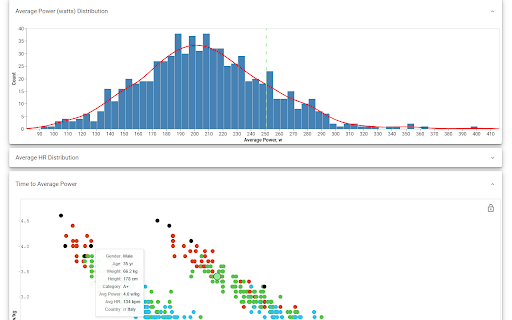

Demographic and performance charts for Zwift events ZwiftCharts enriches Zwift-related sites with data visualizations for data-curious cyclists. ZwiftCharts provides post-event analysis of demographic and performance. Find or participate in a Zwift event and head over to ZwiftPower.com to explore: • A global map highlighting the number of participants by country • Gender distribution statistics per country • Breakdowns of athletes by age and categories • Comprehensive charts for weight, height, power, and heart rate distributions • Time vs. average power plots • Average power vs. average heart rate graphs • Weight vs. heart rate and power comparisons With these charts, not only will you appreciate the dynamics of large Zwift events, but you'll also discover how you measure up against the Zwift community. How to Use: • Visit a completed event page on ZwiftPower.com • Click the far-right menu item labeled "ZC Charts" Dive deeper into workouts with visualization tool that: • Replaces the default workout chart with an interactive one • Overlays a W'bal chart • Reveals the minimum W'bal value specific to each workout Understanding W'bal data is crucial for estimating the feasibility of a workout (assuming your FTP is correctly set). While W'bal is a mathematical model and may not reflect your unique capabilities, familiarity with this metric can help you identify demanding workouts upfront, not when you hit the wall :) How to Use: • Open a specific workout page (Note: The feature is disabled on workout lists for performance reasons) • Input your FTP if it's not set • Check the checkbox at the right bottom corner of the workout chart Whether you're a competitive cyclist or a recreational rider, ZwiftCharts offers a data-driven perspective on your virtual cycling endeavors.

Squadrats Route Planning
Add thrill to your cycling route planning by hunting squadrats. Use Strava, Garmin, RideWithGPS, and other planners. No more meaningless rides. Turn your cycling trips into thrilling missions! This extension combines the power of Squadrats with your favourite route planning tool. Supported planners: * Strava * Garmin Connect * RideWithGPS (activities in Strava or Garmin) * Komoot (IMPORTANT: activities must be in Strava or Garmin) * Hammerhead Karoo (IMPORTANT: activities must be in Strava or Garmin) * and others Now you can use these tools to plan your activities so precisely, that you never miss a single squadrat! A squadrat is a mile by a mile squarish thing on the map. The idea is to go out, collect them, and connect them, forming larger chunks of land. By doing so, you'll visit strange places and amuse yourself with all the things you missed in your close neighbourhood. It will also make your cycling activities fun again. Don't have time for all-day rides? No problem. Switch to squadratinhos - tiny squadrats. Chase them on your way to work.

VeloViewer Strava Plugin
Additions to Strava website to provide helpful links and features for VeloViewer. Add direct links from within Strava to VeloViewer along with other, VeloViewer specific additions. - Top level VeloViewer menu providing direct links to your key pages on VeloViewer. - Direct links to VeloViewer segment details page throughout the Strava site. - Direct links to Activities. - Direct links to Routes. - Direct links to Club yearly leaderboards. - VeloViewer Explorer tiles highlighted in Strava Route Builder including completed tiles, max square(s) and max cluster. - Chronological ordering on your dashboard feeds. 1.49 - Map Switcher bug fixed. 1.48 - Update to handle new Strava Route Builder map. Explorer Tile overlay will no longer work in 3D map mode so logic introduced to switch to 2D when Tile shown. 1.47 - Bug fix to handle update to Strava. 1.46 - Bug fix to last version. 1.45 - Technical update to change the way JS file is loaded. 1.44 - Bug fix to show newly ticked tiles for planned route in updated Strava Route Builder. 1.43 - Update to handle new Strava Route Builder changes for showing Explorer Tiles. 1.42 - Some minor bug fixes to handle some rare exceptions. 1.41 - Change in default Chrome security settings has blocked the way to automatically get your ticked Explorer Tiles from VeloViewer. Functionality added to allow you to copy a user-specific code from VeloViewer Summary page which can be pasted into the Strava Route Builder page which allows a secure connection to get your ticked tile data. 1.40 - Explorer error message wasn't being displayed on Route Builder page if not logged in. Also tidied up code that generates Explorer tile option. 1.39 - Another fix to route builder page to handle slight change in Strava's HTML structure. 1.38 - Fix to route builder page to handle slight change in Strava's HTML structure. 1.37 - Previous fix failed when Strava site viewed in language other than English. Hopefully now fixed for other languages too. 1.36 - Fix on Route Builder to when incorrect text showing on Explorer tile toggle. Also tweak to the main menu layout. 1.34/1.35 - Fix to handle change in React code on Route Builder. 1.33 - Changes to support FireFox. 1.31 - Update to Route Builder Explorer Tiles to handle no structure of menus. Link to VeloViewer corrected on the Segment Details page. 1.30 - A small change to the Route Builder Explorer tiles overlay to work more smoothly with other map-switcher extensions. 1.29 - Hopefully the final bug fix around tiles being shown as newly ticked tiles when already ticked! 1.28 - Another bug fix around tiles being shown as newly ticked tiles when already ticked. 1.27 - Explorer tile lines added to map (only shown when map zoom > 10). Bug fixed around false newly ticked tiles being shown. 1.26 - Tweaks to Route Builder code to handle expected className changes when Strava rolls out updates. Ticking of previously missed new tiles between route points included. Slight difference in opacity of clustered tiles that aren't part of max cluster. 1.25 - Rework for Explorer Tiles to work with new Strava Route Builder. New tiles ticked by route now highlighted. Configure tile colours in map settings on Activities page in VeloViewer. I'll try and get Personal Heatmaps showing again next. 1.24 - Turns out it is nothing to do with "SameSite" mode. Explorer tiles not loading due to "Block third-party cookies" setting being enabled. Added code to catch the situation and redirect to blog post with instructions to add "veloviewer.com" to "Allowed" list on chrome://settings/content/cookies 1.23 - Hopefully fixing an issue for users with "SameSite" mode enabled on Chrome for showing completed Explorer tiles in Route Builder. 1.22 - Moved the text (informing the user to log into VeloViewer in order to see their Explorer tiles in the Route Builder) to the top of the menu to hopefully make it more obvious. 1.21 - Completed explorer tile info now retrieved in a more secure way. Also a slight UI change to stop menus wrapping on a smaller screen. 1.20 - A strange issue with Chrome caching the Explorer Tiles file with the origin set to VeloViewer or Strava resulting in it not being able to be loaded in the other site. Worked around the issue in the extension to get the data in a different way. 1.19 - Update to unexplored tile KML download to fix bug caused by new version of Chrome. 1.18 - VeloViewer link from Activity Details updated to work with new Strava page structure. 1.17 - Personal Heatmaps option added to Route Builder. Works with Ride and Run All-Time heatmaps (Summit users only). 1.16 - Athlete Id added to Activities links to enable the deep link to Activity Details to work post GDPR. 1.15 - Club yearly leaderboard links added. 1.14 - Changed the "Chronological" button to now offer two options, either by sort by activity start date/time or by activity upload date/time. Activity end time isn't easily doable I'm afraid. 1.13 - "Chronological" button added to Dashboard to allow the sorting of activities by start date/time. 1.12 - Correction to KML export: colour changed to aabbggrr (eh?!) 1.11 - KML download for unvisited tiles for current area in the Route editor. 1.10 - Explorer Clump added to Route Builder. Custom colours for Explorer tiles brought in from configuration on user's Activities List page in VeloViewer. 1.9 - Minor tweak to test something out. No new functionality though. 1.8 - Fixed (hopefully) a browser zoom issue that wasn't quite fixed in 1.7. 1.7 - Update to handle browser zoom with explorer tiles. Also remembers whether explorer option was on or off between sessions. 1.6 - Explorer tile logic updated to handle Leaflet map (which looks to be replacing the Google Map on the Route Builder); Explorer tile borders/background set to white when using satellite view for better contrast. 1.5 - Large performance improvement on initial load of route builder if you have a lot of explorer tiles ticked off. 1.4 - Max explorer square(s) now shown. All links to VeloViewer are now https. 1.3 - Route builder now shows explorer tiles at all most zoom levels and on all map types. Completed tiles are now shaded 1.2 - Explorer tile outlines now work on retina displays 1.1 - Tweaked to work alongside Stravaistix 1.0 - Initial version

Strava Kudo All
Kudo All Strava automating the process of giving kudos to your fellow athletes. Strava Kudo All is a browser extension for Chrome and Firefox that lets you give kudos to all Strava activities visible on your feed with a single click. Instead of manually clicking the kudos button for each activity, this extension adds a convenient button that automatically kudos every activity on the current page — saving you time and making sure none of your friends' efforts go unrecognized. Features: - One-click kudos for all activities on the page - Automatically skips your own activities - Lightweight and fast - Compatible with Chrome and Firefox - Keeps up to date with Strava's UI changes How to use: Simply navigate to your Strava feed and click the "Kudo All" button added by the extension. That's it! Open source — contributions welcome on GitHub. If you like this, you can donate here: BTC: bc1qdlwpu0k72tnnnp0ggqjld7qtqhkmg483wgd2sh

ZwiftUp! Auto/Mass Ride on!
If your thumbs are sore from giving all the thumbs up on Zwift and your throat is sore from shouting "Ride On!", this extension is here to help you out! Give thumbs up/ride on to everyone on the page with just one click! Patch Notes: 1.2 (19/07/2021) - Some minor changes on Zwift website broke the extension, updated to work again. - Internationalized the extension, it should now work on all the international versions of the Zwift page. - Updated to Manifest v3.
