
fbgpbfndoojlffkhpfijokglcfekhnpf


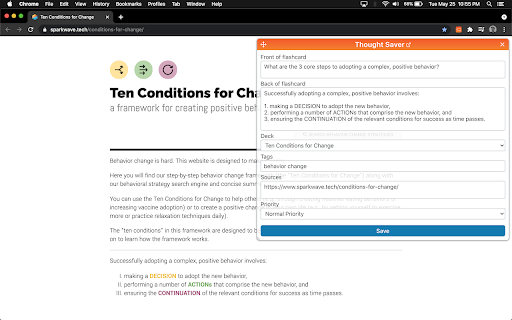


Tap into the superpower of remembering anything forever by using this incredibly efficient tool for learning. Capture your thoughts effortlessly while reading blog posts, articles, and PDFs. Turn them into flashcards so that you can easily remember them forever. Key Features: • Highlight the text you want to have and then click on the browser extension icon to create a new flashcard. • OR highlight the text and right click to "Save Thought" • You can create flashcard decks and share these with friends, or embed them in articles. • If you want to create flashcards from PDFs you will need to go to your Chrome Extension settings for Thought Saver and enable: "allow access to file URLs." About Thought Saver: We aim to help you effortlessly capture important ideas, then retain and apply them in your day-to-day life. It's easy to forget nearly everything you read or learn, but with a little help from our tools, you can remember what matters most to you!

Anki Highlight Helper
Easily create Anki cards from highlighted text in your browser. Elevate Your Learning with Anki Highlight Helper! (Setup instructions below) Anki Highlight Helper is designed for students, educators, and lifelong learners who want to maximize their study efficiency. This intuitive Chrome extension integrates smoothly with Anki, enabling you to generate flashcards quickly and easily from any webpage. With Anki Highlight Helper, your study sessions become more productive, allowing you to capture key information in just a few clicks. Whether you're browsing articles, research papers, or online textbooks, this tool ensures that you never miss an important detail. ----------Features---------- ✅ One-Click Card Creation – Select text, right-click, and choose “Make Anki Card” to instantly add flashcards. ✅ Deck & Note Type Selection – Choose from your existing Anki decks and note types. ✅ Persistent Preferences – Your last-used deck and note type are saved for a seamless experience. ✅ Cloze Deletion Support – Easily generate Cloze cards without manual formatting. ✅ Dynamic Fields – Automatically adapts to different note types, ensuring a flexible workflow. ----------Setup---------- ⚠️NECESSARY STEPS⚠️ 1) Open the Anki desktop application. 2) Navigate to Tools > Add-ons > Get Add-ons. 3) Enter the code 2055492159 to download and install the AnkiConnect add-on. 4) Go to Tools > Add-ons and find AnkiConnect in the list. 5) Select AnkiConnect and click Config. 6) Update the address field from "http://localhost" to "*". 7) Save your changes and restart Anki to apply the configuration. Privacy: We respect your privacy. No personal data is collected. Support Us: Your participation helps support the development and maintenance of this free extension. Version History: v1.1: Improved setup instructions and error handling. v1.2: Enhanced security and optimized extension permissions. v1.3: General optimizations and minor bug fixes. v1.4: Major UI update – improved design, persistent deck/note type selection, added Cloze card support, and dynamic field loading to accommodate different note types.

Anki Quick Adder
This extension provides the ability to create anki cards directly from Google Chrome on your Anki Desktop. Welcome to Anki Quick Adder. This extension provides Ability to create anki cards directly from Google Chrome on your Anki Desktop. It includes an inline WYSIWYG editor and keyboard shortcuts for editing your notes before adding them to anki. Requirements You will require the following sofware to use the extension. This extension is currently in beta. so, bear the bugs with me :-) Changelog: 2.0.6 January 25 2020 -------------------- Fixed ankiConnect Cors problem. -------------------- 2.0.4 February 12, 2019 -------------------------------- Added sticky field for tags Added ability to add links in editor(Settings->in-line editor-> add Link button) -------------------------------- 2.0.3 August 5, 2018 Fixed duplicate tags in autoCompleteTags Array Fixed sending multiple tags on mainCard and dialogCard Fixed indexOf error for numbers only in deckName Added auto-complete of tags for EditCards and sanitization for tags Fixed Error when extension doesnot load data on first start. 2.0.2 july 21,2018 Fixed refresh decks button -------------------------------- 2.0.1 july 20, 2018 Fixed chromeMenu creation on extension update Fixed incorrect saveNote fields. -------------------------------- 2.0.0 added settings to show fav decks and models in chrome context menu. -------------------------------- 1.0.9 Fixed minor bugs -------------------------------- 1.0.8 Fixed notes not saving from shortcuts -------------------------------- 1.0.7 Fixed typebug error -------------------------------- 1.0.6 Fixed minor bugs -------------------------------- 1.0.5 added localNotes mode to save note without checking for anki. Version 1.0.4 - Tuesday, June 19th, 2018 - Ability to export and import your saved notes in extension. - fixed typeError bug on saving notes. - Quick icon to turn off global sticky fields. -------------------------------- Version 1.0.3 - Tuesday, June 19th, 2018 - Moved to local storage to save currentFields instead of sync -------------------------------- Version 1.0.2 - Tuesday, June 19th, 2018 Fixed Type Error --------------------- Version 1.0.1 - Monday, June 18th, 2018 Fixed bug for user who updated extension. -------------------------------------- Version 1.0.0 - Monday, June 18th, 2018 - Ability to save notes in Local Storage and sync later. (settings-> saveNotes) - Added ability to customize in-line editor buttons (settings-> In-Line editor Buttons) - Added sticky Fields. Click [S] icon and field data will persist after adding a note until you clear. - Mode to change field background theme to dark mode temporarily. - Fixed field deletion on noteType change. --------------------------------------- Version 0.0.9 - Sunday, June 10th, 2018 - Fixed bugs Version 0.0.8 - Sunday, June 10th, 2018 - Toggle between favourite decks or models (select more than one deck or model) [Open demo](https://imgur.com/a/o54jyFw) - Fixed cloze caret position while adding from shortcut. - Customizable shortcuts for decks, models, cloze and quickSubmit. ---------------------------------- Version 0.0.7 - Wednesday, June 7th, 2018 - card submission directly on shortcut instead of submission through pop-up. --------------------------------------- Version 0.0.6 - Wednesday, June 7th, 2018 -fixed settings bug for users who updated instead of installing it. Version 0.0.5 - Wednesday, June 6th, 2018 --------------------------------------- - shortcuts for: deck, model and Cloze - shortcuts for: adding selection to fields - Cache for: decks, models and tags - settings for: cleaning text - Settings for: submit timeout from chrome menu Version 0.0.2 - Saturday, June 2nd, 2018 ------------------------------------------------ - Fixed note adding error on windows and mac ------------------------------------------------- Version 0.0.1 - Friday, June 1, 2018 ------------------------------------------------- - Released beta version -fixed deck selection for single decklist -fixed deck selection for modelList - parsed tags for autocomplete

Roam Highlighter
Web highlighter for Roam Research 📢 Update: I'm working on a new and improved version of this web highlighter called Markway. To learn more and get notified about the release, go to https://markway.io 🙂 DESCRIPTION: This extension offers an easy way to highlight text on a web page and import it to note-taking apps like Roam Research, Obsidian, Logseq or Notion in the format that best suits your workflow. This is especially helpful of you are doing research, want to build your own knowledge-base or just want to save your favorite blog articles. FEATURES: Easily highlight any text on a web page → Add tags to bring your highlights into context → Customise the format of your copied highlights with placeholders → Jump to the next open Roam Research tab, to quickly insert your highlight HOW TO GET THE MOST OUT THE EXTENSION? The quickest way to launch the extension is with a hotkey (e.g CMD + SHIFT + R). You can set a hotkey in the Chrome Settings for Extensions. Next you can create your own format for the highlights, by going into the widget settings. Play around with the placeholders and use spaces to indent content. QUESTIONS / FEEDBACK: Do you have questions or feedback? The best approach is to write me directly on x.com/wirtzdan PERMISSIONS: Roam Highlighter needs to modify the websites you visit to display the widget. That's why it needs the requested permissions to function properly. However, the exact phrase ("Read and change all your data on the website you visit") make it sound more invasive than it actually is. Currently, the extension runs completely on your local machine and the only thing that is saved, are the settings you make.

Insight - Track and Optimize Your Time Online
Know how you spend your time online. Insight by Freedom tracks the time you spend on websites, so you can improve your habits. We built Insight to be a lightweight, privacy-conscious time tracker that helps you understand how you spend your time online. Insight tracks the time you spend on websites in Chrome, and provides a simple report so you can see where you're spending your time. You can drill down into individual sites and see your daily time on each site. - See time spent by day, week, or set a custom time window for any calendar period - Drill down on each site to see time spent each day of time period - Exclude any site from being tracked We've built Insight to be privacy-conscious. None of your data is sent anywhere (the cloud, our servers, etc.) It remains secure on your own device. If you want to become more productive, you have to first understand how you're currently spending your time, and Insight helps you do just that. With this insight, you can be more mindful about how you spend your time. Thank you for giving Insight a try. Insight is a product of Freedom Labs, where we develop new tools to help you balance your relationship with technology. Like our other extensions, Insight is highly privacy-conscious. Learn more about Freedom here: https://freedom.to Please note: Insight 1.0.0 is our initial release with Manifest 3 compatibility. You may experience slight differences in behavior due to the significant changes required to comply with Manifest V3. Please send us your feedback at support@freedom.to and we'll continue to improve Insight. Thank you!
