
fbcdcliemdonkopdkpejdfmajlbaibac

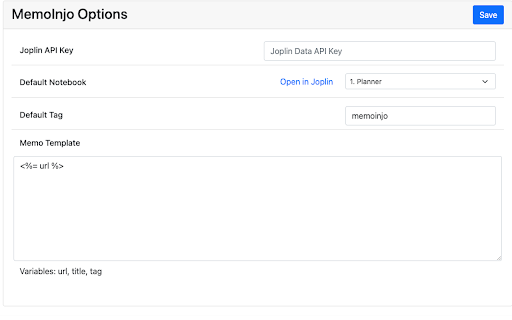
Stick memo on any website and sync via Joplin MemoInjo is a Chrome extension that sticks a memo on any website and stores/sync via Joplin. Simply press the icon of MemoInjo at the extension toolbar (top-right corner) in Chrome. It will show a memo editor for the browsing website. You may create a summary or a task list associated with a website easily. MemoInjo is not a web clipper that could capture only once. You could reopen the same memo for the same URL. And thank to the sync feature of Joplin, you may access the memo across different computer. 1. Install the extension 2. Open Joplin 3. Go to Web Clipper Options and follow the instruction. 4. In the toolbar of the browser, press the button of MemoInjo 5. It will ask you to grant permission in Joplin. 6. Switch back to Joplin and grant the permission.

Promnesia
Recall which pages you already visited, why and in which context Promnesia is a browser extension (Chrome/Firefox/Firefox mobile) which provides a sidebar which complements browser history with some enhanced features. TLDR: it lets you explore your browsing history in context: where you encountered it, in chat, on Twitter, on Reddit, or just in one of the text files on your computer. This is unlike most modern browsers, where you can only see when you visited the link. It allows you to answer different questions about the current web page: - have I been here before? When? - why have I bookmarked it? - how did I get on it? Which page has led to it? - who sent me this link? Can I just jump to the message? - which links on this page have I already explored? - which posts from this blog page have I already read? *NOTE*: to get the most benefits from the extension, you also need to set up a supplementary service. You can find the instructions here: https://github.com/karlicoss/promnesia#setup

obsidian-livesync-webclip
Webclipper for Obsidian LiveSync Clip web pages to markdown, and send them to Obsidian via Obsidian-livesync. You can keep online content as a local notebook, and reallege, collect, and add your comments as markdown. Images are also captured. Therefore, you can view the content while you are off the line. Self-hosted livesync and obsidian-live-sync-webcip are made in OpenSource. If you feel anything worries, check the repo. You can control all your data completely. Note: - Obsidian, and your own server or SaaS account are required. for more information, check the repo. - Your Cloudant or CouchDB instance should allow the CORS request from the URI you have clipped.

Notoy
Saves a link to the current active tab with its title, keywords and a long and short description as markdown, Org-Mode or plain text Notoy saves a note of the current website including it's URL, some keywords and a short or long description to disk. The note can be formatted as Markdown (for programs like Obsidian, Joplin or Zettlr), as Org-Mode to use with Emacs' Org-Mode or as plain text.

Kifier
The missing tool to turn your Web 2.0 services into Wiki Kifier is a tool to copy viewing webpage into a hyperlink with title. Then you should paste it on Web 2.0 services like Google Drive , Evernote , Gmail etc. It helps you to link up different service easily. Moreover, Kifier may convert the link into another format for site like Google Spreadsheet , which do not support standard hyperlink. Google Doc/Drive , Evernote , and many other Web 2.0 services provides online document editing function. Contents can be linked across documents , sites by using hyperlink. They works similar as wiki but with more advanced features and for your personal / organization data only. However , making a referral of your current reading site in browser to those services is not straightforward. Because you can not copy site’s URL and title by a single click. With Kifier, you just have to press the Kifier button at the right of address bar. The URL with page's title will be copied to clipboard directly. Then you may paste to the target site easily. If you have dual monitor or installed the Dualless extension , you may have both of the reading and target site shown on screen at the same time. In such case, you may drag the link in popup dialog to target site. It will be much simpler. The software is released under open source license, GPL 2.0.
