
fbbjmpeddaliljeidpmgchbgdfpjglok
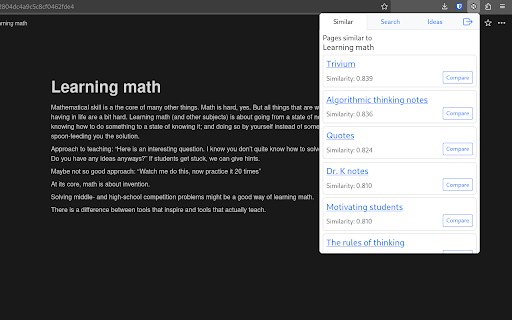


Notiondipity helps you discover new ideas and connections in your Notion workspace. With the help of ChatGPT it can: Notiondipity helps you discover new ideas and connections in your Notion workspace. With the help of ChatGPT it can: - Find pages similar to the page you are currently viewing - Show you similarities, differences and connections between the pages - Perform semantic search - find pages similar to the search query - Generate project ideas from the currently open page and up to 2 most similar pages You need a Notion account and give the extension read access to your pages. We use Open AI's `text-embedding-ada-002` embeddings and cosine similarity to find similar pages and `gpt-3.5-turbo` model to generate project ideas. After logging in, it might take several minutes before the plugin creates and caches the embeddings of your pages. Please be patient. The extension has a backend component that facilitates communication between the browser extension and the Notion API. The backend also stores the embeddings, their titles, URLs, encrypted content, and a hash of your unique user ID. We host the the backend on Fly.io. No other third party has access to your data. Your Notion API access token is stored only in the browser storage and sent to the backend with each request. Please note that this is a public Alpha version. There might be issues and bugs. We appreciate all the feedback we can get.

Notion Edit & Clip in Side Panel
Open and edit Notion pages in side panel to copy-paste from browser, manage notes. A powerful Notion Web Clipper alternative. You can EDIT, VIEW, DELETE notion pages from side panel. This avoids tab switching between current tab and notion page. With click of button, notion page is opened on current tabs side panel. Designed for researchers, students, content creators, and anyone looking to streamline their web interactions, making notion more efficient. - 💾 Save web articles, emails, tweets, Youtube videos, Linkedin posts, cooking recipes and more - ⚡ Instantly access your Notion workspace with a single click. Keep your notes at your fingertips. - 🧐 While reading blogs, surfing web, quickly take notes in notion using this extension - ✅ List tasks in notion page, and access them in side panel - 🛠️ Adjust the width of the notion page in side panel to suit your preferences, giving you control over your workspace layout. ≡ Usage Start using Turbo Notion today for free! It is helping notioners everyday to be more productive and enjoy Notion in their personal and professional lives. ≡ Contact You have an issue or want to give a feedback / suggestion? Drop me an email :) ≡ Privacy The extension doesn't collect any data unless you make an account. If you do, it may collect anonymous usage data to help us understand how you use the extension and what features we should work on first.

Notion Social Preview
Preview social media posts inside Notion. Powered by Notionsocial, A social media scheduling tool for Notion. Preview how your post will look like on social platforms, While creating it inside Notion. 🔌Plug & Play; Works for any database. 🤩 Preview posts on Instagram & X/Twitter. 🚀 Automatically schedule posts from your Notion database (Using Notionsocial). Read the guide: https://notionsocial.app/blog/chrome-extension This extension is powered by Notionsocial, a tool that allows you to schedule posts from Notion to multiple social platforms, Visit https://notionsocial.app to learn more. NOTE:- This extension is primarily for preview purposes and is not mandatory to use with Notionsocial.

Notion Cover
A Notion Cover to generator a cover for Notion note cover or the others cover. - Unlimited generation and download. - Custom background image. - Multiple fonts to choose from, custom font colors, custom font styles and sizes. - Title and subtitle position customization. - Export the synthesized image in “png/jpeg/webp” format to the local. - Click on the Chrome extension app. - Click ‘Begin to Make Your Notion Cover’ Button, open the ‘Make Your Notion Cover’ page. - Select the background image, fill in the title and subheadings, and set relevant parameters. - Click ‘Generate and Download’ button to download image. Indeed, Notion Cover is available for free. You can access the basic features and choose to upgrade for more functionalities. All data processing occurs locally on your computer, and it never traverses our servers.

Notion Tools
Make your Notion experience a little bit better with some QOL including colored headings, folded sidebar buttons and more. This extension provides a group of options that aim to improve your experience with the Notion website. These include: + ⭐ Automatically highlighting every heading across all your Notions. + 🔥 Having more vertical space in the sidebar by folding the "Search", "Inbox", and "Settings" buttons into horizontally lined icons (the notification counter also works). + Additional headings indication by adding # symbol at the end of it. + More horizontal space for your database board view. + Slightly more vertical space on page by reduced margin above it icon/name. + Ability to hide "invite members" button from sidebar. Every option can be disabled, if you want. I will continue adding more features over time. Hope you like it! ♥ UPDATE 1.2.2 - Added support for dark theme.
