
fbahnedcjcnlddgcbbogjkljfmnkjoed
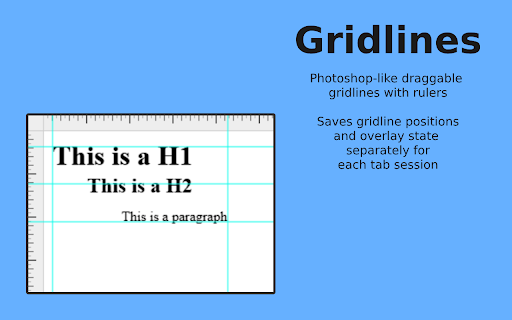


Photoshop-like draggable gridlines with rulers Gridlines is a sleek, intuitive, and powerful Chrome extension that brings Photoshop-inspired grid functionality right to your browser. Whether you're aligning elements, planning layouts, or just adding a bit of design precision, Gridlines makes it effortless. Key Features: - Draggable Gridlines: Enjoy Photoshop-like gridlines and rulers that let you drag and position with precision. - Instant Toggle: Quickly activate or hide rulers and gridlines using the convenient Alt+Shift+G shortcut. - Session-Specific Settings: Each tab session saves its own gridline positions and overlay state, keeping your work exactly where you left it. - Manual Gridline Addition: Precisely place a single gridline by inputting its position in the unit of your choice (px, cm, mm, in, or %). - Customizable Grid Overlay: Instantly overlay a grid on the screen with adjustable spacing and units for a tailored workspace. - One-Click Clear: Reset your canvas in a flash by clearing all gridlines with a single click. Ideal for web developers, designers, and anyone who values precision, Gridlines transforms your browsing experience into a customizable design tool. Try Gridlines today and bring professional-grade organization to your workflow!

FLOZABLE Tab Monitor
Boost focus with timers, block distractions, get study tips, and stay updated with group alerts using FLOZABLE. Supercharge your focus and productivity with the FLOZABLE Study Focus Chrome Extension. Seamlessly integrated with your browser, this extension is your go-to tool for cultivating efficient study habits and making the most out of your online learning experience. Time Management Mastery: Effortlessly track your study time with our intuitive timer. Set focused intervals, challenge yourself, and stay on top of your study goals. Distraction-Free Browsing: Activate the distraction-free mode to limit access to non-educational websites during your study sessions. Say goodbye to procrastination and hello to enhanced concentration. Personalized Study Plans: Receive AI-generated study suggestions based on your learning habits and preferences. Tailored recommendations to keep your study sessions engaging and effective. Group Study Alerts: Stay connected with study groups seamlessly. Receive instant notifications for group study invitations, challenges, and achievements directly through the Chrome Extension. Progress at a Glance: Get a quick overview of your study progress with a personalized dashboard. See your daily, weekly, and monthly study trends, empowering you to stay motivated and accountable.

TimeCrunch Tennis
AI-powered extension that removes non-playing time from tennis matches on Tennis TV and Tennis Channel Plus. The TimeCrunch browser extension is essential for anyone with an ATP Tennis TV or Tennis Channel Plus account. TimeCrunch uses AI to find and then skip over downtime during a tennis match. TimeCrunch is very light weight and will not increase your data usage. We also do not collect any of your browser data.

Page Grid
Add a simple grid to any page with adjustable size, and color. Page Grid is an extension that enables you to draw an adjustable grid layout on any page. To work with this addon, please navigate to a webpage and then press the toolbar button once. Once the addon is active, the toolbar icon is blue. For the inactive state, the toolbar button is gray. You can change the grid position (X/Y), line color, size, order (z-index), and line width (in pixel unit) via the extension options page. Reloading the active tab or pressing the toolbar button again will remove the grid from the page. To report bugs or request a new feature, please fill out the bug report form on the addon's homepage (https://mybrowseraddon.com/page-grid.html).

LayerGuide: Pixel-Perfect Overlay & Ruler web dev tool
Professional Pixel-Perfect overlay image, ruler, and magnifier tools. for web developers, designers, agencies, QA, and freelancers LayerGuide is a professional image overlay, pixel measurement, and magnifier tool that helps you build pixel-perfect sites and fast QA. Perfect for web developers, designers, agencies, and freelancers comparing mockups to live pages. - Save 2+ hours per project - Spot discrepancies fast and reduce errors - Reduce client feedback by 90% and deliver professional results - Catch tiny UI flaws agencies miss, ensuring client-ready perfection Image Overlay - Upload images locally (PNG, JPEG, GIF, WebP, SVG) with complete control - Adjust opacity, scale, rotate - Position with pixel precision using X/Y controls or drag - One-click centering and axis locking for constrained movement - Visibility toggle and color inversion for perfect contrast Ruler Tool - Create unlimited measurement rulers with drag-and-drop precision - Multi-color rulers - Custom opacity settings and corner resizing capabilities - Right-click removal and dynamic guidelines that follow cursor - Live pixel measurements with resize handles Magnifier - Real-time zoom up to 10x with adjustable magnifier size - Hardware-accelerated rendering for smooth performance - Smart positioning to avoid interface overlap - Instant zoom level indicators and scroll wheel controls Workflow Features - Automatic per-page memory saves all overlays and rulers for each page - Complete settings backup/export as JSON Control Panel - Minimize/Expand panel - Intuitive draggable interface with keyboard shortcuts (ESC to exit modes) - Grouped controls with visual dividers for better organization Perfect For: - Web Developers - QA testing and mockup implementation - UI/UX Designers - Design-to-code verification - Digital Agencies - Client project delivery and quality control - Freelancers - Professional tool that saves billable hours - QA Teams - Cross-browser testing and responsive validation Free vs Pro: FREE VERSION - Full Professional Features: - Complete image overlay with positioning, scaling, rotation, and color inversion - Multi-color rulers with resize and positioning (up to 2) - Real-time magnifier up to 1.5x zoom - Per-page memory and thumbnail history - Professional control panel with shortcuts PRO VERSION ($29.99/year or $89.99 lifetime): - Unlimited rulers with custom colors and opacity - 10x magnifier zoom with adjustable size (150px-750px) - Settings backup/restore for team collaboration - Default auto-lock axes for faster workflow - 3-device license with easy switching 14-day money-back guarantee Start free with full professional features - upgrade for unlimited power and team collaboration!
